• Skip to primary navigation
  • Skip to main content
  • Skip to primary sidebar
Multilingual Mastery

Multilingual Mastery

Online language learning coaching & education

  • About
  • Get 1:1 support
  • App search

$101-200

Kwiziq review: fun AND quality grammar lessons

March 21, 2022 by Jamie 1 Comment

Kwiziq is a gamified membership system meant to help French and Spanish language learners understand and conquer grammar concepts, in an intuitive, enjoyable way. In this Kwiziq review, we’ll take a deep dive into what that actually means for you and your language learning.

So, what do we need to know about Kwiziq? Let’s take a deep dive into this website. Is it the right resource for you?

Kwiziq review: how does the AI work?

To date, Kwiziq supports the following languages:

  • French
  • Spanish

Kwiziq’s claim to fame is its artificial intelligence. It uses its AI to determine your proficiency with different grammatical concepts, as well as when to test you on them. The way it tests you feels almost like Anki to me, which is a good thing.

It’s not that it reminds you of these things right before it thinks you’ll forget them, but it really throws one or two concepts at you until you make your way through them and prove that you’re ready to move on to something more advanced.

To master these levels, you take quizzes! The AI determines which concepts you should review, and then offers you quizzes, or “kwizzes”, based on this material. Your mastery of every concept starts at 0% and goes up or down depending on the questions you get right or wrong. As you get closer to 100%, the AI will suggest you move on to an upper level.

Besides the technical stuff, Kwiziq’s grammar is separated into CEFR levels, so both you and Kwiziq know what your actual skill level is: A1-C1, A1 being beginner, and C1 being advanced.

This is a great way to conceptualize your language level based on your knowledge of grammar. Clearly, Kwiziq is laser-focused on improving your grammar and keeping you in the know about what you’ve learned and what you still need help with.

Finally, these levels are presented to you in a progress map (as long as you’re a paid member). A green subject is one that’s been mastered, yellow is in progress, and red occurs when you have performed below 0%. Because the AI wants you to stay above 0%, it advises you not to answer questions if you’re not sure about their answer.

Kwiziq review: all the pros and cons to consider

So, now that you have the basic idea of Kwiziq, is it for you? The next section of this Kwiziq review will address several pros and cons based on my own detailed use of Kwiziq for both French and Spanish.

Pro: Kwiziq provides decent explanations of grammatical concepts

Kwiziq has experienced language teachers who create all of its content, and you can see who has provided this information quite easily. As I said, grammar is hard, and these concepts can sometimes take several different tries to finally get into our brains.

When I found Kwiziq, I was right in the middle of an “I kind of understand the difference, but I generally fumble and fall a lot when I try to use them” phase with the preterite and imperfect tenses in Spanish. Now, Kwiziq’s explanation didn’t really help me a lot. What did help me was their chart for the actual conjugations. Looking at what the ending should be over and over again did help me.

At the end of the day, one person can only do so much. The descriptions of when and how to use these grammar concepts are pretty well-executed, and I wouldn’t be surprised if they help certain ideas to really click for you.

Pro: Kwiziq rewards you for learning

One of the best parts about Kwiziq is that it rewards you for your efforts. It’s completely gamified, which means you get rewarded every time you answer 50%, 75%, 90%, and 100% of the questions pertaining to a certain grammatical concept correctly.

You get little stars after each of these accomplishments, so sometimes you’ll finish a Kwiz with a couple of dozen stars celebrating your success! These stars are also paired with “kudos”, which you get every time you accomplish literally anything.

Past the individual lessons, you’re rewarded for your success in certain levels, as well! Accomplishing certain percentages of success in your level means you’ll get trophies: a bronze shield for achieving 50%, a silver shield for 75%, a gold shield for 90%, and a diamond for 100%.

These also build up on top of each other: the more high-level trophies you win, the more foundational awards you get. For example, the A1 diamond trophy is yours once you achieve a diamond in A0 and gold in A1.

Finally, Kwiziq also rewards you for landmarks. You get your first one after your first kwiz and are continuously rewarded for the number of kwizzes you take in a day. The more kwizzes you take, the more landmarks you achieve, and the more kudos you receive.

Con: Kwiziq punishes you for your wrong answers

The way that Kwiziq’s AI works is that it takes all your answers at face value. Correct questions help you, incorrect questions hurt you, and questions that you don’t answer remain neutral. Therefore, Kwiziq tells you not to guess answers if you don’t know them in every kwiz.

While there’s nothing wrong with telling you that you’re wrong, the thing I don’t like about that is that the whole reward system is based on percentages: once you get a certain percentage right, you get a happy little green color, more stars, more trophies, etc.

However, this means that the more times you answer a question incorrectly, the more you have to get it correctly to get all these rewards. Which makes it almost impossible to reach milestones for concepts that may be more difficult for you.

This conflicts with one of my own philosophies for motivation: trying and failing are better than not trying at all. If you don’t try, how do you know if you’ll succeed? Kwiziq punishes learners for this.

Personally, it introduces more anxiety into my brain than is necessary because it means I’m constantly second-guessing whether I actually know the thing that I think I know. It means that I’m never confident in myself because the risk is so extreme.

The whole premise of Kwiziq feeds off a reward system, but if you’re having a hard time understanding something, forget about getting rewarded for practicing that concept, because you’re just never going to get that star. Which means I’ve honestly given up on certain parts of Kwiziq. I didn’t like how much negative reinforcement I was getting – I was being punished for trying!

Pro: Kwizzes are short, 10-question, multiple-choice exercises

The thing about Kwiziq is that it’s addictive. You get rewarded for almost every kwiz you take, and kwizzes are only a minute or so long. You don’t have to commit any time whatsoever to this fun little game. It’s easy to, once you go down the rabbit hole of figuring out your grammar, but you can just take 30 seconds to practice.

Plus, the fact that they’re multiple-choice (at first) makes them significantly easier to swallow. When you’re learning these things at first, you only have to choose from a few different options.

They’re not just 10 questions about 1 concept, either; they’re 10 questions on 2-3 concepts that the AI thinks you should be practicing.

Once Kwiziq’s AI thinks that you’ll be able to do it, it’ll throw you a few fill-in-the-blanks. These are the ones you have to be careful with, though, because it doesn’t take too kindly to typos. One mistyped letter, and you throw away the whole question, even if you were right.

As you can see, these questions get tough! These are things that you don’t necessarily need to know for conversational use of the language, so don’t get hung up on them if you’re not taking some sort of assessment.

Con: No mobile app for this Kwiziq review

We all love to do everything mobile. Especially with Kwiziq’s quick little quizzes, it should be fun to whip your phone out every once in a while, and kwiz your way through some Spanish practice! At least, that’s what I would love to do during a boring movie or something.

Unfortunately, as of this Kwiziq review, there is no mobile app. You can open the website on a mobile device, but it’s not the best – it’s too easy to accidentally hit the wrong multiple-choice answer, you have to keep scrolling to see the full sentence, etc.

Pro: Instant gratification

A great part about Kwiziq is the fact that you can instantly get an explanation as to why they marked your answer incorrectly. At the result of every quiz, they give you links to the lesson page, so you can figure out what you did wrong (or, in some cases, which grammatical concept they were even testing!).

This is an easy way to fill those little gaps in your grammar brain instantly, as opposed to creating a list of things that you should look up, and then you kind of forget what you did, and then you have to find the question again and figure out how to answer it, and it just goes on and on.

Even if I do think that Kwiziq punishes you too harshly for failing (as I believe failing should just mean that you put the effort forward, not “bad language learner, you were wrong”), I do appreciate the ability to get a question wrong and then instantly be directed to the lesson page for a quick reminder.

Con: if you take a break, don’t get anything wrong

Even though Kwiziq’s robot tells you not to answer questions if you’re not completely sure, there is a scenario in which this is different. I ran into this situation when some new topics had been recently added to the A1 level, which brought my 90+% down to somewhere in the 80s. All I wanted to do was get some questions right on this new subject so that my percentage would go back up to the 90s. It was all basic Spanish concepts, so I knew that I already understood them.

When I went to take a new quiz, I avoided all the other questions; I didn’t want to commit the brain space to the other subjects, just the one where I wanted to up my percentage. According to Kwiziq, I wouldn’t be punished for not trying to answer. Unfortunately, I was wrong.

I was on a beginner quiz, and I got all those questions wrong! Which, of course, brought my entire percentage farther down. Didn’t even matter that I got that one question right, the one that had been at 0%. All my little green areas quickly turned yellow, because Kwiziq had just assumed that I had forgotten all those beginner concepts.

Moral of the story: either stick with your kwizzing, make sure you answer all your old questions or don’t pay too much attention to that percentage. If the AI assumes that you forgot something, it will bring your score down to encourage you to relearn those lessons. I get what they’re trying to do, but they should’ve given me a big red flag saying “hey, our rule about not trying to answer questions that you don’t know doesn’t apply anymore, I will judge you on everything!”.

Pro: Kwiziq’s free trial

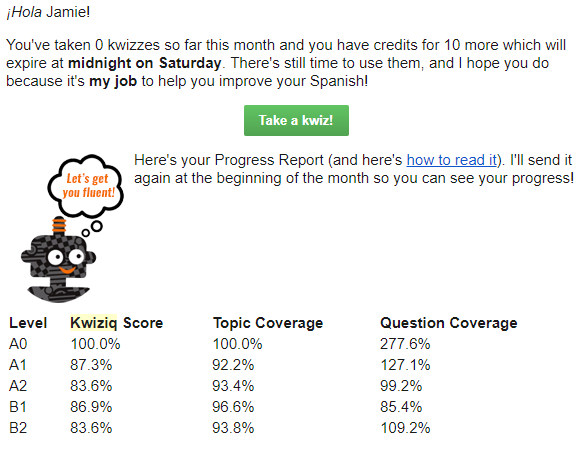
Kwiziq offers 10 free Kwizzes per month to everyone. I love this because the free content never expires! You can take free kwizzes as long as you want, they’re just limited. At the start of the new month, these 10 kwizzes are recharged.

This also means that you get your free kwizzes even if you were a member in the past but have since canceled, which is a thing that a lot of companies punish you for. If you cancel, you’ll still get an email once a month reminding you of free kwizzes that you have left, and when they’ll expire. Even if I’m not paying anymore, I still really like to be informed of free content that’s waiting for me.
Kwiziq review

Con: You can get a lot more for free elsewhere

Kwiziq isn’t the only guy out there with free quizzes to test your grammar fluency, but they’re the only one I know about that limits their quizzes. They are in competition with a couple of other resources that offer very similar products, with very similar information, all for free.

For example, Spanishdict is a great website with a free online Spanish-English dictionary, forum, and similar quizzes. These quizzes aren’t led by artificial intelligence, but they do a great job of providing you with the practice for some of these more difficult concepts.

Another popular free resource for grammar quizzes is StudySpanish. This website also has significant amounts of information available to help you understand your grammar, with some more hidden behind a paywall.

Note that both of these options are Spanish only. I’m not aware of similar resources for French as of this Kwiziq review.

Con: Kwiziq might be out of your budget

While Kwiziq is far from the only monthly membership platform to learn a language, it is on the pricey side. I do think the value is absolutely worth the price if you can swing it, and you specifically need to improve your grammar.

You can click here for Spanish pricing, and here for French pricing.

But don’t leave this Kwiziq review yet, there are still important features to talk about!

Pro: Kwiziq is more than just grammar

Primarily, Kwiziq is perfect for improving your Spanish and French grammar, but the other exercises in the “library” are excellent as well.

Just like Kwiziq’s grammar content, the exercises are also organized by A1-C2, so you get a really solid, in-depth understanding of your skill levels across the board, considering all 4 are rarely in the same place at any given time. And, honestly, I highly recommend Kwiziq for all language learners, if even just for these exercises.

In those practices (especially the last one), I love that it has you grade yourself. This is more flexible than the normal kwizzes, so you don’t have to mark yourself wrong for not seeing a word if you don’t find that necessary.

Then, of course, Kwiziq then links you to the individual lessons used in the statement, so you can figure out what you did wrong. If you’re not up to doing that research just yet, the icons to the right of the lesson links let you save them for later.

Still not quite getting it? All users are able to comment on the lessons and ask their questions, and Kwiziq’s Spanish teachers are actually incredibly responsive; if you’ve found something ambiguous and your question helps them see that something is confusing, they also have the power to make changes.

Plus, you can’t forget about the Weekend Workout! Every weekend, members get brand-new writing and listening challenges appropriate for every level sent directly to their email. It’s honestly a really nice reminder to keep up your practice, even if it’s only a little bit.

Kwiziq review: how to know if it’s the language app for you

At the end of the day, this Kwiziq review shows us a really great resource for French and Spanish learners. It has every grammar concept under the sun, and more are being added regularly.

Its gamification and easy-to-swallow kwizzes are addictive, which means that you’ll learn more grammar than you ever would anyways (let’s be real, most of us hate learning grammar). The exercises that are updated regularly are also a major win, I think.

If you’re not looking for grammar help, Kwiziq’s price point may not be worth it for you, depending on how much you use the other exercises. If you’re looking for something similar at a lower price point, I would recommend Yabla instead – not as pretty or user-friendly, but has similar types of exercises.

After reading this Kwiziq review, I would recommend all Spanish and French language learners, no matter the level, at least go through a few free kwizzes (click here for Spanish, or click here for French) and have the AI assess your level.

Filed Under: $101-200, $16-20, Advanced, Annual subscription, Audiobooks & video, Beginner, Communication, Daily streaks, Device, Explicit, Free, French, Gamification, Grammar, Implicit, Intermediate, Language app reviews, Language Skill, Level, Listening, Monthly subscription, Other Features, Pricing type, Reading, Spanish, Spelling, Stories, Target Language, Website, Words/phrases, Writing

Babbel vs Rosetta Stone: how to choose

March 20, 2022 by Jamie 48 Comments

The conversation of Babbel vs Rosetta Stone depends completely on what kind of language learner you are, and how far you want to go with your language.

Rosetta Stone, for example, is great for ultimate beginner learners who just want to get to tourist-level understanding, while Babbel is for much more intensive learners.

But, if that doesn’t answer the question of Babbel vs Rosetta Stone for you, let’s go into detail. Both resources are genuinely high quality and very useful, but neither is for every single type of language learner.

Babbel vs Rosetta Stone: languages

First things first, which language(s) are you interested in learning? Both Babbel and Rosetta Stone teach:

  • Dutch
  • English
  • French
  • German
  • Italian
  • Polish
  • Portuguese (Brazilian)
  • Russian
  • Spanish
  • Swedish
  • Turkish

Rosetta Stone also covers:

  • Arabic
  • Chinese
  • Tagalog
  • Greek
  • Hebrew
  • Hindi
  • Irish
  • Japanese
  • Korean
  • Latin
  • Farsi
  • Vietnamese

And Babbel has:

  • Danish
  • Indonesian
  • Norwegian

Babbel vs Rosetta Stone: lesson format

Both languages apps are structured very similarly…but there are key differences.

For example, Rosetta Stone is much more simple. It’s designed for the simplest goals: tourist level of the language. The lessons are static, and you know exactly what you’re going to get. You’ll also be consistently drilled several times over.

This is excellent for beginner language learners without any experience who need to get used to repetition, but boring for those with experience.

Babbel, on the other hand, is more responsive to your answers. If you keep getting something wrong, it’ll bring it up again and again until you get it. Plus, the content is going to go much more advanced, considering it’s built to be more textbook-like.

Babbel leads you through significantly less repetition than Rosetta Stone. Babbel does it SRS (Spaced Repetition) style, where you see more difficult terms more often; Rosetta Stone has a set number of repetitions for you to get through in every lesson.

If you try Rosetta Stone, you’ll learn very quickly if the repetition is too much for you, or if it’s exactly what you need.

From here, it’s pretty evident that Rosetta Stone and Babbel come from very different beginnings: Rosetta Stone being 3-figure-investment CD sets, Babbel being one of the first language learning apps.

Babbel vs Rosetta Stone: levels

As mentioned, Rosetta Stone is only going to get you so far. Babbel will get you…well, farther than that.

The first sign: Babbel asks you to assess your current level. And interestingly enough, the whole thing is in English!

On the other hand, Rosetta Stone doesn’t attempt to assess your level at all. Instead, it presents you with the lessons available and lets you choose the one that you think matches up with your current skill level. This approach is ideal for complete beginners.

Rosetta Stone’s static lessons follow the subject-verb-noun sentence structure all the way through its advanced content. It is engaging and well-rounded and helps you learn to use the language in more than one way, but it still maintains the same, identical patterns regardless of content.

This isn’t a problem if you just want to use the language to communicate simply, maybe for an upcoming trip or something. More experienced learners, however, will get bored quickly.

Rosetta Stone will get you speaking and understanding fast because of its real-life content; Babbel builds your skills over the long term because they’re being built to be more flexible, and useful in a variety of contexts (reading books, watching TV, etc.).

This isn’t to say Babbel doesn’t provide a real-life education, though, but we’ll talk about that later.

Language learning journeys: Rosetta Stone vs Babbel

One of the most important things to keep in mind is where your language learning app is going. It is worth noting here that the exact content from language to language isn’t going to necessarily match.

Like with any other language app, more popular foreign languages are going to be more developed. It’s a simple supply/demand thing. Regardless, here’s how the Spanish courses compare.

Babbel does offer support for more niche interests than Rosetta Stone, at least with languages as popular as Spanish.

However, Rosetta Stone, again, drills its lessons thoroughly. This leaves less room for the fun stuff or other needs you may have.

Speaking practice

If being able to speak your target language is important to you, it’s just as important to choose a language app that will support that goal. So when it comes to learning to speak, how do Babbel and Rosetta Stone compare?

While Rosetta Stone was offering live coaching for a minute, I’m guessing it never really took. At the time of this review, Rosetta Stone is limited to the tech in their app.

On the other hand, Babbel’s coaching system, Babbel Live, seems to be going strong! Basically, every month you can join a certain number of small group classes (limited to 6 participants) with a Babbel teacher where you can get real-life conversational practice.

*Note that a Babbel Live subscription is separate from the Babbel app, but if you pay for Babbel Live, you get the app thrown in free. The Babbel app is priced similarly to the Rosetta Stone app.

Which is your next language app?

While both Rosetta Stone and Babbel are pretty huge language learning apps and are insanely well-known within the language learning industry, they’re actually quite different from each other and serve wildly different needs.

Rosetta Stone is simple. It’ll get you to basic conversations pretty quickly, and will drill you again and again until the lessons truly sink into your long-term memory. And even if you want to eventually go into more intermediate content, Rosetta Stone is still a high quality start.

Babbel is more flexible. It follows your lead and gives you only the information that you need when you need it. Plus, the skills you learn from Babbel can be easily applied to any language learning goals you may have.

Made your choice?

If Rosetta Stone sounds more like your speed, you can learn more about it in my Rosetta Stone review or click here to get started.

Alternatively, if Babbel makes more sense, you can find my Babbel review right here, or click here to try the app.

Filed Under: $101-200, Android app, Annual subscription, Beginner, Device, Dutch, English, French, German, iOS app, Italian, Language app reviews, Language Skill, Level, Lifetime access available, Listening, Polish, Portuguese, Pricing type, Reading, Russian, Spanish, Swedish, Target Language, Turkish, Website, Words/phrases, Words/phrases

Pimsleur review: barely keeping with the times

March 15, 2022 by Jamie Leave a Comment

Back in the days of pre-internet language learning, you had 2 ways to learn a language: attend a class, or buy one of those CD sets that had you go over words and phrases in the language over and over again until you got a hang of it. The CD method is basically this Pimsleur review – yeah, it’s old-school.

This Pimsleur review will talk about what exactly the Pimsleur method is, Pimsleur’s promises, and what to expect if you do choose to buy the course. Is Pimsleur right for you?

Pimsleur review: languages

Right off the bat, Pimsleur boasts a significant number of languages:

  • Albanian
  • Arabic (Eastern)
  • Arabic (Egyptian)
  • Arabic (Modern Standard)
  • Armenian (Western)
  • Armenian (Eastern)
  • Chinese (Cantonese)
  • Chinese (Mandarin)
  • Creole (Haitian)
  • Croatian
  • Czech
  • Danish
  • Dutch
  • English
  • Filipino (Tagalog)
  • Finnish
  • French
  • German
  • Greek
  • Hebrew
  • Hindi
  • Hungarian
  • Icelandic
  • Indonesian
  • Irish
  • Italian
  • Japanese
  • Korean
  • Lithuanian
  • Norwegian
  • Ojibwe
  • Pashto
  • Persian (Dari)
  • Persian (Farsi)
  • Polish
  • Portuguese (Brazilian)
  • Portuguese (European)
  • Punjabi
  • Romanian
  • Russian
  • Spanish (Latin American)
  • Spanish (Castilian)
  • Swahili
  • Swedish
  • Swiss German
  • Thai
  • Turkish
  • Twi
  • Ukrainian
  • Urdu
  • Vietnamese

Pimsleur is an audio-based resource, which means the specific accent of any given language can be very important. So, if a certain “version” of a language is important to you, then Pimsleur may be an excellent match for your needs.

The Pimsleur Method

The Pimsleur Method is based on the research of the late Dr. Paul Pimsleur, whose interest and research were based on memory.

The Pimsleur Method itself is a very strict one: 30 minutes of practice every single day (no more, no less), of pure listening and speaking work. Do not attempt to read or write while you listen.

With this approach, Pimsleur promises you’ll be able to converse at an intermediate level in just 30 days. 30 days of 30 minutes of practice today means Pimsleur promises intermediate-level fluency after just 900 minutes (15 hours) of listening and speaking.

Pimsleur review: lessons

The first 30-minute lesson of every language on Pimsleur is absolutely free. You can work through any language you like, as many times as you like, but it’s only that first lesson. This can give you an idea if the approach is something that you’d like to use, without any financial risk.

For some, this first minute-long snippet is all you need to know about Pimsleur. You’re listening to an audio clip of a man slowly explaining (in English) a basic exchange of basic phrases.

If you find that boring, go to my language app search instead to find something better for you. If the slow pace and the excessive English narration don’t bother you, continue reading this Pimsleur review.

As mentioned early, Pimsleur was designed to be listened to and repeated (a common language learning strategy called “shadowing”) while you’re doing something else, like driving or doing the dishes.

When going through these lessons, you’ll start out with pretty basic, usable phrases: “Excuse me, do you speak English?” and “No, I don’t”, for example. Great for tourist-level learning, and getting a pretty solid background of the language.

Pimsleur will take these phrases apart and really drill you in on each individual aspect of the words and phrases, which is good for absolute beginners. It’s definitely all about training your ear to figure out what you’re listening to and saying. Excellent for listening practice as well as pronunciation – understanding the exact sounds that the language uses, not just the word itself.

Pimsleur’s reading approach

While Pimsleur is primarily focused on practicing speaking conversational phrases, it’s also recommended that you continue on their reading practice (but only after the initial lesson is done).

Here you’ll break down the pronunciation of important words and patterns bit by bit, by preparing you for common pronunciation mistakes as well as comparing the sounds of your target language with the sounds of English.

This is truly a slow, methodical approach to pronunciation via shadowing.

It’s not really reading as much as it is pronunciation, which is confusing. In fact, nothing about Pimsleur’s method could be considered effective reading practice.

Pimsleur review: other activities

The two samples above are really the meat of the Pimsleur app. There are other features (discussed below), however, it should be noted that that is THE Pimsleur Method. The rest of the features mentioned in this Pimsleur review are more of Pimsleur’s attempts to keep up with the times than anything else.

As in, not completely necessary.

For example, here are the practice games Pimsleur uses to help you truly drill the lesson’s vocabulary into your brain.

I do like that they’re trying to make the content just a little more engaging for the 21st century, but remember that Pimsleur is very clear that all these fun and games are after you listen to the initial lesson, not instead of.

While it feels like Pimsleur missed the mark a bit with those games, I do enjoy Pimsleur’s voice coach (it’s a chatbot….anytime you hear a language app talking about chatbots, it’s this).

In the future, I’d really like to see Pimsleur expand this section. Personally, I find this much more engaging than listening to a 30-minute recording that’s mostly in English anyway.

Pimsleur review: price

In the past, Pimsleur was very financially inaccessible – you would plan to spend a few hundred dollars for just a basic language education. Fortunately, time and tech have changed, and Pimsleur has negotiated their prices accordingly.

As aforementioned, you can access the first lesson of any language for free at any time.

If you decide to continue with the Pimsleur Method, you can opt to pay monthly, either for just the language you’re learning or for all languages Pimsleur offers. You can see updated pricing here.

Fortunately, gone are the days of spending $1,000 and waiting for your new CD set to come in the mail (and hoping for the best that you’ll actually use it) – now you can get started instantly!

Pimsleur review: who it’s for

We’ve reached the end of this Pimsleur review, so should you try it?

As I said, if the slow pace, the relaxing cadence, or the heavy English narration are distractions for you, then Pimsleur may not be the best way for you to learn a language. In that case, I would suggest Language Transfer or the LanguagePod101 series.

Or, even simpler, find videos for beginners on YouTube! That free content combined with the Language Reactor Chrome extension…the sky’s the limit.

However, if you enjoyed listening to the videos in this Pimsleur review and are happy to repeat words and phrases until you can have simple conversations, Pimsleur may just be the language app for you. Get your 1-week free trial here!

Filed Under: $101-200, $21-30, Albanian, Android app, Annual subscription, Arabic, Armenian, Audio lessons, Beginner, Cantonese, Chatbot, Chinese (Mandarin), Creole, Croatian, Czech, Danish, Device, Dutch, English, Finnish, French, German, Greek, Hebrew, Hindi, Hungarian, Icelandic, Indonesian, iOS app, Irish, Italian, Japanese, Korean, Language app reviews, Language Skill, Level, Listening, Lithuanian, Monthly subscription, Norwegian, Offline use, Ojibwe, Other Features, Pashto, Persian, Polish, Portuguese, Pricing type, Punjabi, Romanian, Russian, Shadowing, Spanish, Speaking, Speech recognition, Swahili, Swedish, Swiss German, Tagalog, Target Language, Thai, Turkish, Twi, Ukrainian, Urdu, Vietnamese, Website

Glossika review: for all your repetition needs

February 6, 2022 by Jamie Leave a Comment

Glossika is a highly engaging way to learn 60+ different languages. It does this with AI-supplemented sentences, high-quality audio, and a variety of different types of exercises. In this Glossika review, let’s take a walkthrough of the platform and discuss who can benefit most and who won’t.

And if Glossika doesn’t look like your kind of language app, keep scrolling to see some Glossika alternatives.

Glossika review: available languages

As mentioned, Glossika offers courses in 60+ languages:

  • Arabic (Egypt)
  • Arabic (Morocco)
  • Arabic (Standard)
  • Armenian (Eastern)
  • Azerbaijani
  • Belarusian
  • Bengali (India)
  • Bulgarian
  • Cantonese (HK)
  • Catalan
  • Chinese (Mandarin)(Beijing)
  • Chinese (Mandarin)(Taiwan)
  • Croatian (Ĺ tokavian)
  • Czech
  • Danish
  • Dutch
  • English (British)
  • Estonian
  • Filipino (Tagalog)
  • Finnish (SW dialect)
  • French
  • Gaelic
  • Georgian
  • German
  • Greek
  • Hakka (Hailu)
  • Hakka (Sixian)
  • Hebrew
  • Hindi
  • Hokkien
  • Hungarian
  • Icelandic
  • Indonesian
  • Irish
  • Italian
  • Japanese
  • Kazakh
  • Korean
  • Kurdish (Sorani)
  • Latvian
  • Lithuanian
  • Manx
  • Mongolian
  • Norwegian (Nynorsk)
  • Persian
  • Polish
  • Portuguese (Brazilian)
  • Portuguese (European)
  • Russian
  • Serbian (Ekavian)
  • Slovak
  • Slovenian
  • Spanish (Mexican)
  • Spanish (Castilian)
  • Swahili
  • Swedish
  • Thai
  • Turkish
  • Ukrainian
  • Uzbek
  • Vietnamese (Northern)
  • Vietnamese (Southern)
  • Welsh
  • Wenzhounese

And because Glossika cares about language preservation, a few of them are available for free; you don’t get all the benefits of a paid membership, but you do get unlimited spaced repetition practice to do your part to keep these languages alive.

We’ll talk about that more at the end.

Glossika review: the placement test

To start with Glossika, you can first opt to take a placement test. It’s a very simple test: listen to a few audio recordings of sentences, and select the sentence that you hear. If it ever gets too hard, you can always let Glossika know that you need to start from that level.

Unfortunately, like most placement tests, it’s pretty useless.

While the audio recordings themselves are very clear and high quality (the same goes for the usability of Glossika as a whole), I’d rather they just toss the whole thing.

The sentences are so different that all you need to do is recognize one single word at the beginning to answer correctly. This is regardless of whether you understood the statement itself or could even create it – you can see towards the end of the above video that I could answer correctly based on literally the first word.

And that’s beside the fact that it’s only testing listening (despite claiming to exercise all the language skills) and didn’t even attempt to test me beyond B2. Where the placement test is concerned, I’d rather they just ask me directly.

Glossika review: learning new phrases

Glossika teaches users a new language by introducing new sentences that are useful in day-to-day life. You’ll learn to understand the language implicitly, as opposed to learning new vocabulary words and grammatical terms piece by piece.

You’ll learn 5 phrases like this at a time, through reading, writing, listening, and speaking, as well as using spaced repetition.

Glossika lessons follow this format:

  1. The new phrase is presented written in both your source and target language
  2. You hear a recording of the phrase in both languages, so you can follow along
  3. You type out the phrase in the foreign language
  4. You reread the phrase just in the foreign language
  5. You record yourself saying the phrase in the foreign language

As you can see, you got these phrases drilled into your brain really well. It doesn’t seem to be wildly sensitive to mistakes (I didn’t use any capital letters or accents, for example) which can be a significant drawback if you don’t get used to spelling appropriately, especially with Spanish.

Glossika is very customizable, which is a plus; for example, you can opt out of speaking practice if it’s not convenient for you at the moment, or you can turn the English translation on or off. The only problem is that these customizations aren’t obvious.

Another example: this next video was actually my first attempt at a lesson with Glossika.

I didn’t realize that it had automatically been set to “listening mode” until I started clicking around. There’s no tutorial showing you these options, nor any attempt to even let you know they’re there, so you’ll have to do some experimenting for yourself.

Maybe there’s an option to require correct accents somewhere? If there is, it’s not obvious.

Another helpful setting that Glossika didn’t tell me: if any of the phrases are too easy for you, just click the smiley face, and they’ll be taken out of the cycle.

Nonetheless, if used appropriately, this approach can provide language learners with a very well-rounded language education.

As a whole, I do love Glossika’s approach! In general, it’s engaging, modern, and really attractive.

Glossika’s “reps”

If you hang around Glossika’s Facebook group enough, you’ll see tons of talk about “reps”. The basic idea is that Glossika teaches through repetition, and your mastery of any given phrase or sentence can be defined by how many reps you’ve completed.

With Glossika’s approach, if you repeat their sentences enough times, you’ll master the language! How many times? According to this page here:

  25,000 Reps → Speak sentences comfortably
  50,000 Reps → Start engaging in casual conversations at natural speeds
  75,000 Reps → Start honing skills with more specialized topics
100,000 Reps → Mastery level where you can say just about anything

This is Glossika’s version of spaced repetition (also known as SRS). This concept is not unique to Glossika; it’s when a computer program predicts how easy or difficult any given term or phrase is for you. If it’s easy, and you get it correct, it puts that term to the side until it thinks you’re just about to forget it. Then it shows you that phrase again, therefore getting that phrase from your short-term to long-term memory.

Does this make sense? Sure. Using this strategy, could you theoretically boil down a language to a specific number [of repetitions]? Makes sense.

The problem is (and this is my personal opinion), repeating the same phrases tens of thousands of times is insanely boring.

You’ll practice each phrase 5 times at a minimum, more often if you’re struggling with it. This strategy is great for the more logical and scientific of minds, less so for those needing more entertainment.

Don’t get me wrong, repetition is very important for every language learner. But for my own personal needs, this level of repetition drives me crazy.

Using your stats

Glossika is very scientifically-lead, so their stats are a bit more interesting than most. For one, I love this feature of the “Memory” tab.

Note: I don’t know if the audio problems are because of my device, or a Glossika error.

As I was doing my spoken reps, I honestly didn’t realize that my audio was actually being recorded, so I was disappointed at first. However, going back into this section I can listen to myself repeating the phrase, and compare it to Glossika’s native audio.

This is a helpful strategy called “shadowing”, where you learn to mirror your pronunciation of a foreign language based on an audio clip. Honestly, it’s pretty tough to come by, which is strange considering it’s a simple way for any given language learning app to help you practice speaking a foreign language.

Another interesting feature: you can choose the topics of Glossika’s sentences.

I appreciate being able to tell Glossika that I have absolutely no interest in talking about the military or science. It’s not quite enough to make the approach less boring (again, as a personal opinion and not at all an objective one), but every little option that users can mess with is a bonus.

Glossika’s pricing

Glossika offers free trials to all new users, and then offers 2 pricing tiers: $30/month for unlimited reps in unlimited languages, and about half that per month to only change your language once every 30 days.

This new lower tier is brand new as of this Glossika review, and I’m very happy to see the compromise to make language learning more accessible!

And finally, in an effort to promote minority languages, the following languages are 100% free to all users:

  • Catalan
  • Gaelic
  • Hakka (Sixian)
  • Hakka (Hailu)
  • Kurdish (Sorani)
  • Manx
  • Welsh
  • Taiwanese
  • Wenzhounese

If going through this Glossika review convinces you to give it a try (more on that below), I highly recommend you at least spring for your free trial. No credit card is required!

Glossika review: who it’s for

Glossika is beautiful, smooth, and high quality, but it’s not for everyone. For one, Glossika does not start from 0, with basic vocabulary and grammar. Instead, you’ll start with beginner phrases. It’s more of the “figure it out as you go” approach, as opposed to the “1+1=2” one.

If you’re a big fan of repetition, Glossika is great for a wide variety of language learners, especially how well they tackle all the language skills. The advanced customization is a huge plus, too, as long as you’re tech-savvy enough to figure it out for yourself.

But if you want usability with a less…sterile approach, you’re not alone. If that’s the case, I might recommend Busuu, which connects the language more by way of living, breathing community, as well as more explicit language lessons.

Hooked on Glossika and want to give it a try? Click here to start your free trial!

Filed Under: $101-200, $16-20, $201-300, $21-30, Advanced, Android app, Annual subscription, Arabic, Armenian, Azerbaijani, Belarusian, Bengali, Bulgarian, Cantonese, Catalan, Chinese (Mandarin), Chinese (Mandarin), Croatian, Czech, Danish, Device, Dutch, English, Estonian, Finnish, French, French, Gaelic, Georgian, German, Greek, Hakka, Hebrew, Hindi, Hokkien, Hungarian, Icelandic, Indonesian, Intermediate, iOS app, Irish, Italian, Japanese, Kazakh, Korean, Kurdish, Language app reviews, Language Skill, Latvian, Level, Listening, Lithuanian, Manx, Mongolian, Monthly subscription, Non-English base language, Norwegian, Offline use, Other Features, Persian, Polish, Portuguese, Pricing type, Russian, Russian, Serbian, Shadowing, Slovak, Slovenian, Spanish, Speaking, Spelling, Swahili, Swedish, Tagalog, Target Language, Thai, Turkish, Ukrainian, Uzbek, Vietnamese, Website, Welsh, Wenzhounese, Words/phrases, Writing

Mango Languages review: 70+ beginner languages

February 5, 2022 by Jamie 2 Comments

Mango Languages is a crowd favorite for language learners because it’s engaging, offers real-world education, and can be accessed for free through institutions everywhere. In this Mango Languages review, learn everything you need to know about this resource for your own language goals: what it does well, what it doesn’t, and who should use it.

And if you fall under the category of language learners who won’t really benefit, this Mango Languages review ends with a couple of other recommendations, based on Mango Languages’ biggest flaws.

Mango Languages available

To start, Mango Languages offers plenty of languages, plus quite a few different dialects/accents within those languages, including:

  • Arabic (Egyptian)
  • Arabic (Iraqi)
  • Arabic (Levantine)
  • Arabic (MS)*
  • Aramaic (Chaldean)
  • Armenian
  • Azerbaijani
  • Bengali
  • Cantonese
  • Cherokee
  • Chinese (Mandarin)*
  • Creole (Haitian)
  • Croatian
  • Czech
  • Danish
  • Dutch
  • Dzongkha
  • English
  • English (Shakespeare)
  • Filipino (Tagalog)
  • Finnish
  • French*
  • French (Canadian)
  • German*
  • Greek
  • Greek (Ancient)
  • Greek (Koine)
  • Hawaiian
  • Hebrew
  • Hebrew (Biblical)
  • Hindi
  • Hungarian
  • Icelandic
  • Igbo
  • Indonesian
  • Irish*
  • Italian*
  • Japanese*
  • Javanese
  • Kazakh
  • Korean*
  • Latin
  • Malay
  • Malayalam
  • Norwegian
  • Pashto
  • Pirate
  • Polish
  • Portuguese (Brazil)*
  • Persian (Dari)
  • Persian (Farsi)
  • Potawatomi
  • Punjabi (Pakistani)
  • Romanian
  • Russian*
  • Scottish Gaelic
  • Serbian
  • Shangainese
  • Slovak
  • Spanish (Castilian)*
  • Spanish (LAm)*
  • Swahili
  • Swedish
  • Tamil
  • Telugu
  • Thai
  • Turkish
  • Tuvan
  • Ukrainian
  • Urdu
  • Uzbek
  • Vietnamese
  • Yiddish

The languages marked with an asterisk(*) also include a variety of different cultural courses, from etiquette to business to superstitions and beyond.

These courses mean that you can also use Mango Languages to learn professional phrases, or even just fun ones (Like St Patrick’s Day Irish, for example). If you’re looking for a clear-cut, specific path in your target language, this is a great, unique approach.

Fun vocabulary options are a great way to make sure you’re enjoying the language learning process! Even if you don’t *need* St Patrick’s Day vocabulary, it still qualifies as legitimate exposure to the language. These fun sections are not reliable across languages, though, so check what’s available before assuming you can use it to learn professional Uzbek, for example.

Mango Languages: an overview

Mango Language’s courses are laid out in a very simple, modern way – no advertising, no outside podcasts or blog posts, nothing – so you can focus on the language and nothing else. It’s been completely redone within the past couple of years, and these updates have made massive improvements to the platform’s usability.

These courses are broken up into units and chapters. Once you start whichever chapter you like (there are no requirements for going through any prior lessons or units, just pick and choose whichever lessons suit your fancy), you’ll see that each chapter is one conversation that you’ll be dissecting. You’ll get a collection of phrases/sentences for a real-life conversation, and break them down bit by bit.

Specifically, you’ll learn to have these conversations by learning the individual words, phrases, and then sentences, with some nice little cultural facts thrown in. You’ll then learn to piece together all of this information yourself, with the option for plenty of help along the way.

As you continue on through these lessons, you’ll learn and understand each individual word and phrase in a variety of different ways. And each of these ways will be repeated many times.

When I say Mango Languages takes sentences bit by bit, I mean bit by bit. The first thing you learn isn’t the entire phrase included in the first piece of dialogue, but just the first word. Mango Languages crawls. Excellent for beginners, but painful for everyone else.

Nope, can’t fast-forward the speed, either.

For each and every little bit, you’ll get:

  • the word you’re learning
  • its translation
  • an audio recording (you can repeat as many times as you like)
  • the option to record yourself saying it (to compare with their audio)
  • the pronunciation

Think you’ve got it? The next step is a chance for you to translate it independently.

These sections are giving you the tools that you need to use the language, it’s up to you to piece the tools together correctly using critical thinking. Using the examples, grammar notes, and cultural notes, you’re led to rise to the challenge of forming foreign language sentences.

Did you notice the color coding? As a visual learner, I do love this part. It makes it easier for me to create the link in my brain between the two phrases and helps me to pick apart what each individual word means, and how the words come together in a way that makes sense.

As you learn new languages, you learn that sometimes the most difficult part is that sentences aren’t built the same across different languages. Words are all out of order, some words don’t even exist in other languages, and some languages need 10 words to say something that another language says in one.

Then, each phrase is repeated consistently while you continue to learn more, which is very helpful in turning that short-term memory into long-term memory if you need to take it slow. Later on in this post, we’ll take a look at Daily Review, which helps even more with building long-term memory.

Note: I completely forgot to turn off the narrator’s voice up until now in this Mango Languages review! From here on out, you’ll hear limited English and mostly Spanish. This is easily configured in the settings, in the upper right-hand corner.

Once you have the meaning down, Mango Languages has you actually practice the words and sounds.

So, if you’re an ultimate beginner in the language and have never studied any language before, Mango Languages definitely has a few decent options to offer!

And a lot of simple repetitions. This is, again, excellent for beginners. A lot of the time, there’s no easy way to learn something except seeing or hearing it as many times as it takes for your brain to catch on. Consistency is key, especially when it seems like a word is never going to stick!

Daily Review

Recently, Mango Languages has also included more tools to help baby language learners form a habit. With the mobile app, you can add and customize study reminders by day of the week and the time of day you want to receive your reminder. Very handy for even the busiest or most distractible language learners.

And even if you’re not using the mobile app, desktop users can access the review section at any time. Instead of going through the initial lessons over and over again, you can basically review the flashcards automatically created based on your past lessons.

Click the button, and you get those same options for self-study:

  • switch between “literal” and “understood” translation
  • listen to the audio
  • record yourself saying it

PLUS, unique to this section is the self-reporting buttons on the bottom and the option to take a card out of the deck in cases where you know that card like the back of your hand, so you don’t waste your time.

Self-reporting flashcards are my absolute favorite! They make it easier to get an accurate understanding of what you’re learning, instead of a resource assuming that you know any given term better or worse than you actually do.

I also love the power language learners have over what they need to review. Some language learning resources are much stricter about this, so it’s good to see this level of customization. There’s nothing more irritating than being forced to review terms that you already know.

Plus, it’s such an attractive interface! The only other resource that does this as well is Rocket Languages.

Mango Languages review: pricing and access

While Mango Languages is a paid resource, there’s a good chance you can find your way to free access through local institutions. They partner with public libraries, corporations, schools, and other public entities all over to provide free, unlimited access to all 70+ of their language learning courses at any time.

If you can’t find access through an institution, however, you can always opt for a paid subscription yourself. Fortunately, paid subscriptions are still very reasonably priced at less than $10/ month. Click here for updated pricing.

Who Mango Languages is for

For one, this Mango Languages review makes it clear that beginner language learners would benefit the most. As you grow in your language learning, the speed and repetition become unbearable, but it’s a very generous start for those who process slowly or are simply brand new to the language. This is also true concerning the content itself – it’s just for beginners.

It’s also pretty surface-level, meaning you’re not going to be able to find clear, tangible grammatical explanations to study. I mean, there are some tossed into individual chapters, of course, but it doesn’t suit grammar- and rule-focused learners. You’ll get a general feel of the grammar that you need to understand one particular phrase, and that’s it.

At the end of the day, if you want a simple, modern design with hand-holding through a collection of pretty simple phrases, as well as some cultural education (depending on the language) in a frankly huge variety of languages, I recommend you give Mango Languages a shot.

But for many language learners, Mango Languages will be much too slow. If this is the case, I might suggest uTalk for support in the less commonly learned languages or Glossika for a more advanced approach.

Filed Under: $10-15, $101-200, Android app, Annual subscription, Arabic, Aramaic, Armenian, Azerbaijani, Beginner, Bengali, Cantonese, Cherokee, Chinese (Mandarin), Creole, Croatian, Czech, Danish, Device, Dutch, Dzongkha, English, Finnish, Free, French, Gamification, German, Grammar, Greek, Hawaiian, Hebrew, Hindi, Hungarian, Icelandic, Igbo, Implicit, Indonesian, iOS app, Irish, Italian, Japanese, Javanese, Kazakh, Korean, Language app reviews, Language Skill, Latin, Level, Listening, Malay, Malayalam, Monthly subscription, Norwegian, Notifications, Other Features, Pashto, Persian, Portuguese, Potawatomi, Pricing type, Punjabi, Romanian, Russian, Scottish Gaelic, Serbian, Shadowing, Shangainese, Slovak, Spanish, Speaking, Swahili, Swedish, Tagalog, Tamil, Target Language, Telugu, Thai, Turkish, Tuvan, Ukrainian, Urdu, Uzbek, Vietnamese, Website, Words/phrases, Yiddish

LingQ review: probably not worth your time

February 3, 2022 by Jamie 2 Comments

LingQ (pronounced like ‘link’) is excellent for language learners who want to pick up vocabulary through reading and listening to audiobooks, stories, podcasts, etc. Given that it’s such a huge, popular resource, there’s a lot to say about it – some of it good, some bad. In this LingQ review, you’ll get a taste of it all.

In this LingQ review, learn if LingQ is the language app for you, or if it’s just not worth it.

LingQ review: languages

One thing that’s excellent about LingQ is that you can create your own content (more on that later) in the following languages:

  • Arabic
  • Chinese (Mandarin)
  • Czech
  • Dutch
  • English
  • Esperanto
  • Finnish
  • French
  • German
  • Greek
  • Hebrew
  • Italian
  • Japanese
  • Korean
  • Latin
  • Norwegian
  • Polish
  • Portuguese
  • Romanian
  • Russian
  • Spanish
  • Swedish
  • Turkish
  • Ukrainian

LingQ review: your dashboard

LingQ’s dashboard has been modernized in recent years, in an effort to be a more “bingeable” way to learn languages.

There’s a lot of information to take in, and I wish there were some sort of tutorial or something first because if I hadn’t been using this platform for years, I would have no idea where to start!

LingQ has a history of being…not very user-friendly, and that hasn’t changed. There’s a lot to take in here.

  • every video shows you how many words you know and how many you don’t*
  • you can see the percentage of words you don’t know*
  • while each cover photo is in your target language, it’ll automatically translate as soon as you roll over it
  • you can scroll through different categories of audio lessons, including Steve Kaufmann (co-creator of LingQ)’s podcast
  • you can search for specific content based on level or keywords

*neither of these stats is accurate if you don’t use LingQ religiously

Of course, like any other Netflix-esque platform, the more you use it, the better it can recommend you content that you’ll actually use.

So let’s move onto what it’s like to actually learn a language with LingQ.

LingQ review: basic lesson

Click to any video that you can see on your dashboard to get started with a LingQ lesson.

Once you press play, you’ll hear an audio recording in your target language, and it’s your responsibility to follow along with the written words.

Don’t get distracted or lost, though, because there’s literally no way to find your way back if you do. There’s on highlight to follow along with…the audio doesn’t even automatically turn the page, so you can be at the end of the audio but still on the first page, and you wouldn’t even know.

Plus, collecting new vocab words (i.e. LingQs)? What a pain. Not only does the audio not automatically stop to give you a second to learn the new word, but it gives you a robot voice for that word instead of just rewinding the audio a little bit.

I hate it. Maybe I’m spoiled by Language Reactor which makes it genuinely easy to learn new vocabulary by watching foreign language movies and TV. But just in that clip alone, I was stumbling so hard to pause the audio and catch up wit the word I just collected, I completely lost track of everything.

The idea is to make language learning easier, not more difficult.

LingQ review: words and lesson history

To find the LingQs (vocab words) you’ve collected within these lessons, click over to Vocabulary.

Again, LingQ’s usability is…wanting. While you do get to see how (theoretically) well you know any particular term, it’s hard to see what you’re supposed to do here. Again: mild inconvenience for some, completely handicapping for others.

The actual system of learning these LingQs definitely has potential, but it could also use some real help.

Fortunately, if you like finding your vocab using this method but have your own flashcard deck elsewhere, you can export all of your vocabulary to a CSV file, and upload that to any resource that’ll accept it.

The last tab, Playlist, holds your place if you’re in the middle of a book or series. This is definitely handy for when you click something in your Library feed, and it’s in the middle of a playlist or book.

Importing content to LingQ

LingQ has a plethora of practice options – tutors, forums, challenges, etc. – but I don’t want to spend time on those because they’re not really worth your time. There are plenty of other language learning resources that already do these things much better than LingQ could.

The important feature to know about LingQ is the ability to import content to use with LingQ’s technology

Anybody with an account can upload whatever content they like to the platform, and LingQ will stick it right into your feed. Either click the import button right from your dashboard or download the Chrome extension to import from anywhere on the internet.

You have three options: lesson, ebook, and vocab.

And, honestly, it’s pretty cool if you’re looking for a place to host your content all in one place, plus keep track of the vocabulary you’re learning in a centralized platform.

LingQ review: price

You can access any content at any time for free!

However, if you want to use LingQ as your primary language learning platform, you’ll definitely need to pay for premium due to the unlimited LingQs and unlimited imports.

You’ll also get access to all the other perks that I haven’t really mentioned in this LingQ review since other resources do those things much better, but if you decide to pay for premium, it might be worth taking advantage of them.

You can find updated prices for LingQ Premium here.

LingQ review: the bottom line

At the end of this LingQ review, it can be a great resource for you if the lack of usability doesn’t get in the way for you. If it’s as handicapping for you as it is for me, though, there are plenty of alternatives.

Readlang is my favorite for finding words and articles on the internet.

Lingvist is excellent for creating themed vocab lists, or lists from books you’re reading.

Language Reactor is best for new vocab in YouTube and Netflix media.

But if the cons mentioned in this LingQ review don’t dissuade you, LingQ is a solid option for finding new foreign language vocab through a variety of content available online!

Filed Under: $10-15, $101-200, $31-40, $400-500, Advanced, Android app, Annual subscription, Arabic, Audiobooks & video, Beginner, Chinese (Mandarin), Chrome Extension, Czech, Device, DIY flashcards, Dutch, English, Esperanto, Finnish, Free, French, German, Hebrew, Intermediate, iOS app, Italian, Japanese, Korean, Language app reviews, Language Skill, Latin, Level, Listening, Monthly subscription, Norwegian, Polish, Portuguese, Pricing type, Reading, Romanian, Russian, Spanish, Stories, Swedish, Target Language, Turkish, Ukrainian, Vocabulary, Website

Primary Sidebar

Meet your language coach

Hi! I'm Jamie (she/her), and I help you learn exactly what you need to do to learn a foreign language. Click my face above to learn more about me and how I can help.


We strive to offer equitable access to language learning for all, regardless of ethnicity, gender identity, ability, or sexual orientation.
Copyright © 2025 · Multilingual Mastery · Privacy Policy

  • About
  • Get 1:1 support
  • App search