• Skip to primary navigation
  • Skip to main content
  • Skip to primary sidebar
Multilingual Mastery

Multilingual Mastery

Online language learning coaching & education

  • About
  • Get 1:1 support
  • App search

Daily streaks

Ling Review: make language learning light and flexible

January 12, 2024 by Jamie Leave a Comment

Ling is a fun, cute language learning app that believes in making language learning (something inherently difficult) easy. It was originally created to satisfy a lack of resources available for learners of Southeast Asian languages, and today it’s been expanded to include over 60 languages of various popularities.

So how do you decide if Ling is right for you? In this Ling review, we’ll talk about what Ling does well, what it doesn’t, how to know if you should use Ling to learn a language, and Ling alternatives.

Languages you can learn with Ling

The Ling app boasts a frankly huge number and variety of languages offered! You can use Ling to learn:

  • Afrikaans
  • Albanian
  • Amharic
  • Arabic
  • Armenian
  • Bengali
  • Bosnian
  • Bulgarian
  • Burmese
  • Cantonese
  • Catalan
  • Chinese
  • Croatian
  • Czech
  • Danish
  • Dutch
  • English
  • Estonian
  • Finnish
  • French
  • Georgian
  • German
  • Greek
  • Gujurati
  • Hebrew
  • Hindi
  • Hungarian
  • Indonesian
  • Irish
  • Italian
  • Japanese
  • Kannada
  • Khmer
  • Korean
  • Lao
  • Latvian
  • Lithuanian
  • Malayalam
  • Malaysian
  • Marathi
  • Mongolian
  • Nepali
  • Norwegian
  • Pashto
  • Persian
  • Polish
  • Portuguese
  • Punjabi
  • Romanian
  • Russian
  • Serbian
  • Slovak
  • Slovenian
  • Spanish
  • Swahili
  • Swedish
  • Tagalog
  • Tamil
  • Telugu
  • Thai
  • Turkish
  • Ukrainian
  • Urdu
  • Vietnamese
  • Yoruba

As you can see, this collection of languages puts Ling on par with apps that support literally dozens of languages (apps like Mondly and Glossika come to mind). And just like those other apps, supporting 60+ languages means keeping their content pretty surface-level.

But we’ll talk about that more as we continue with this Ling review.

Ling review: getting started

Your Ling subscription grants you access to all 60+ languages, and you can access any of them at any level at any time. Here’s what that looks like.

Whenever you want to switch languages, just tap the flag in the upper left-hand corner and either scroll the list or type into the search box.

And no need to bother with any “checkpoints” or anything – attempt whichever lessons you want at any time. I love this freedom and flexibility; language learning does benefit from a certain level of structure, but I find myself easily unmotivated when an app forces me to study things I don’t want to learn.

So far, Ling is super easy to play around with and use!

Let’s take a look at the very first lesson of the very first section, built for total and complete beginners (I assume – there’s actually no mention of the intended skill level anywhere on the website or the app itself).

This is a curious approach, and there are a couple of reasons why.

Gamification

If the likes of Duolingo have taught us anything in the past several years, it’s that keeping language apps fun keeps language learners coming back. Bright colors, round and easy-to-read designs, and fun sound effects make people feel good.

It’s not nearly as annoying as Duolingo can be, but if you’ve been burned hard enough by Duolingo before, this might turn you off.

You can even see at the end of the above video where the app forces me to set a goal streak. Your opinion of this level of gamification already says a lot about how much you will or will not enjoy using Ling to learn a language.

That said, if gamification is something you need to keep you hooked (no judgment here) Ling might be a great option.

Implicit grammar lessons

Also just like Duolingo, Ling is teaching grammar implicitly, which means you’re led to figure it out as you go without being intentionally taught anything about rules or how the language works as a whole.

This can be seen as a more “natural” way to learn a language, but it can also be frustrating to try to piece the language together without being told how to. It’s a spectrum – how much you need to learn the rulebook, and how much you just need to try it – and every language learner is different.

If you want to use Ling to learn a new language that you have no experience with and is not related to any other language you know, it’s important to understand you will likely need to do some Googling to try to understand some things.

In this way, Ling can be used as more of a general path to be informed about what to learn next. There’s a direction here, but the vehicle you used to take it is completely up to you,

Translating vs “knowing”

One more thing that can make or break a language app for any particular learner is how you’re learning to connect to the meaning of new vocab words.

The best example of learning to understand meaning is Rosetta Stone – there’s no translation happening there, you’re just connecting new words to images that can be described with the new vocab word.

On the other hand, there are various levels of connecting new foreign language vocab to words in your native language, which leaves you translating back and forth between languages all the time.

Ling places you somewhere in the middle: you’re connecting new vocab to its translation, but the text is small, you’re always hearing the word, and you get a picture too. That’s not a bad compromise, in my opinion.

Even more important, though, is that Ling gets you to use the new vocabulary immediately.

Ling review: speaking practice

Ling’s approach to learning languages includes their dedication to the four language skills. An all too common problem is these fun, gamified language apps doing absolutely nothing to get language learners to speak the language. Tapping buttons is easy, but it only gets you so far.

Let’s see how Ling approaches this problem.

Voice recognition, the most common method for language apps to accomplish this, is mostly to motivate you to try. Even in the above video, you can see the voice recognition not being too sure.

It gets the job done, it’s fine.

Honestly, the point is that language learners are led to start. It’s often so hard for people to practice speaking their target language just because after months or years of learning, they’ve never actually tried to speak.

Ling also has chatbot conversations, which are basic pre-made conversations where you just repeat your side of the chat (and try to keep up). Again, it’s meant mostly to get you started speaking, not mastering it.

I wanted to like Ling’s chatbot more…but I couldn’t. I just got annoyed.

If it didn’t recognize my pronunciation, fine. But the message telling you that the chatbot doesn’t understand you over and over and over again is rage-inducing!

That, and listening to the app repeat what I just said after I said it, made me never want to use Ling’s chatbot again.

Hopefully, you have a different experience than I did (voice recognition and chatbots often vary significantly across devices), but I have to be honest.

On the bright side, I am a big fan of the ability to turn off the translations in this section, as well as the push to practice speaking in a safe, controlled environment (this feature cannot be overstated here).

Ling review: difficulty level

In the languages I’ve seen, Ling offers lessons labeled from total beginner to expert. Given how many languages the app supports, I was skeptical, so I took a look at the most advanced Spanish lesson.

Definitely not expert-level vocab.

The grammar is at a more intermediate level, but keep in mind that there are no explicit grammar lessons, so you either need to be very very good at picking up patterns, or you need to find your grammar information elsewhere.

That said, do not expect Ling to get you to advanced (and definitely not expert) levels within your target language. That’s not what it’s been created to do, even if they named their levels a bit too optimistically.

Ling review: pricing

Ling is a paid-only app, with payment structures varying from monthly to annually to lifetime. Only the annual plan includes a 7-day free trial.

I do believe that the quality of the Ling app reflects its price point, especially with how many languages you can learn at any time.

The biggest thing to keep in mind here: no ads (and no changes to try to pressure you into paying more money – what you see is what you get).

Click here for updated pricing.

Should you use Ling to learn a language?

Ling is a great way to learn a new language, but not for everyone.

I’m a fan of the focus on all 4 language skills; even if it doesn’t get you past beginner levels, it’s a good habit to start with such a well-rounded approach. The app is also easy on the eyes and easy to maneuver.

But my favorite part about Ling is that it’s a light path to learning a new language, without having to pass checkpoints or worry about losing so many hearts you can’t learn anymore.

If you want something similar to Ling, read about LingoDeer.

However, Ling will not teach you things beyond the surface level. You will not learn any grammar, or intermediate/advanced vocabulary. If you’re looking for that pathway with a bit more detail, some Ling alternatives include LanguagePod101 or Rocket Languages.

Want to give it a shot? Click here to try Ling.
Filed Under: $10-15, $50-100, Afrikaans, Albanian, Amharic, Android app, Annual subscription, Arabic, Armenian, Beginner, Bengali, Bosnian, Bulgarian, Burmese, Cantonese, Catalan, Chatbot, Communication, Croatian, Curated flashcards, Czech, Daily streaks, Danish, Device, Dutch, English, Estonian, Finnish, French, Gamification, Georgian, German, Grammar, Greek, Gujarati, Hebrew, Hindi, Hungarian, Implicit, Indonesian, iOS app, Irish, Italian, Japanese, Kannada, Khmer, Korean, Language app reviews, Language Skill, Lao, Latvian, Level, Lifetime access available, Listening, Lithuanian, Malayalam, Malaysian, Marathi, Mongolian, Monthly subscription, Nepali, Norwegian, Notifications, Other Features, Pashto, Persian, Polish, Portuguese, Pricing type, Punjabi, Reading, Romanian, Russian, Serbian, Slovak, Slovenian, Spanish, Speaking, Speech recognition, Swahili, Swedish, Tagalog, Tamil, Target Language, Telugu, Thai, Turkish, Ukrainian, Urdu, Vietnamese, Vocabulary, Words/phrases, Words/phrases, Writing, Yoruba

Ella Verbs review: your best bet for Spanish conjugation practice

May 31, 2023 by Jamie Leave a Comment

Ella (not pronounced like “she” in Spanish, but like “elephant”) Verbs is a language app that specializes in helping users to understand and conquer their Spanish verb conjugations – if you have any experience learning Spanish, you know that this is a sorely needed resource. In this Ella Verbs review, let’s take an honest look at the app, including what it does well, where it can be improved, and if it’s the Spanish language app for you.

Ella Verbs review: their “Learn, Quiz, Repeat” ethos

Before we look at what it’s like to use Ella Verbs, it’s important to understand the bare-bones strategy of Jane and Brian (the Irish couple behind the app)’s approach: learn, quiz, repeat. This is how these words are executed in your learning of Spanish verb conjugations:

  • Journey: Ella Verbs guides you through the major Spanish tenses, in the order that they are most used in conversation, allowing you to put them into practice as soon as possible and get speaking faster – AKA, worry about the fancy “correct” tenses later, after you can have a basic conversation
  • Levels: each level is made up of bite-sized lessons introducing a concept, followed by interactive quizzes to test your knowledge*
  • Vocabulary: Ella Verbs gradually introduces new popular verbs at every level, so by the time you are finished, you will know the top 300 verbs used in most conversations
  • Progress: a detailed progress map, showing you each corresponding CEFR level (A1 – C2), and highlighting the areas you need to focus on to get to the next level
  • Personalized: quizzes tailored to you, help you focus on your weak points – be it a certain tense, pronoun, or verb. These quizzes change daily based on your practice
  • Custom: learn the way you want and completely customize your quizzes, whether that be typing, multiple choice, or in sentences. You can also add boosts to increase the difficulty

*Consistently quizzing your conjugations is proven to facilitate long-term retention better than reading, so this is one of Ella Verbs’ most important and core ideas.

Let’s take this ethos and see how each point is executed!

Journey

First, let’s look at the Ella Verbs journey. Here you can see that users are guided through verb conjugations in the order that they’re actually useful (and as compared to the CEFR levels):

Ella Verbs does this really well! It’s simple, easy, and gets the job done. Plus, I love that it waits for you to spell the words correctly – when you get it right, it automatically continues to the next question (this can be changed in settings if you prefer); if it’s wrong, it’ll wait til you figure it out for yourself (and it won’t ding you for wrong answers!).

This is excellent for Spanish language learners who can be sensitive to negative reinforcement (I will get so anxious about consistently getting these wrong that it’ll ruin my day).

As you prove your understanding of more beginner levels, you’ll slowly be pushed to the more advanced ones. And if you’re already more intermediate/advanced? Just click over at any time, you don’t even have to “prove” your understanding of the conjugations.

Speaking of levels…

Levels

Each level is made up of short, easy-to-consume lessons to explain the concepts. When you’re ready, it’s time to quiz!

In the video below, watch as I complete Level 6: Learn, Test, and Vocabulary.

As you can see, while the lessons themselves are insanely bite-sized, they also quickly build up to enough of a lesson that I had to quit early because my brain got tired!

It really only takes a few minutes of truly targeted, active use of these Spanish verb conjugations to get your brain working pretty hard and get this information truly internalized. This is how you know you’re using your time effectively, as opposed to passively pushing buttons because you’re supposed to, not because you’re learning anything (*cough cough* Duolingo).

And that’s how you know this Ella Verbs review is legit! Next up: vocab.

Friendly reminder that Ella Verbs is exclusively a verb app!

Vocabulary

As aforementioned, new vocabulary is introduced in the order that is most useful for Spanish language learners. Not only that, though – the verbs you see in your quizzes are insanely customizable!

Like many language apps, Ella Verbs gets better and better at knowing what you need when you need it the longer you use it. One of the (many) features that I love in this vocabulary section is the use of My Verbs.

But I’m getting ahead of myself here. Tap over to the “Verbs” section of the app to easily personalize which verbs you’re using and learning.

You can easily search for, and practice, verbs based on:

  • alphabetical order
  • top 100 most commonly-used verbs
  • the verbs you’ve saved for later
  • top 300 most commonly-used verbs
  • regular verbs
  • irregular verbs
  • most popular irregular verbs
  • AR verbs
  • ER verbs
  • IR verbs
  • reflexives
  • highly irregular verbs
  • stem-changers
  • irregular gerunds
  • irregular past participles

…and if all those options STILL don’t work for you at the moment, you can always search for the verb you’re looking for using the search bar at the top of the screen.

Of course, you’ll still have to find your nouns elsewhere, but that’s just something to be aware of when using a language app that focuses exclusively on Spanish verb conjugations.

Progress

Next on the list of Ella Verbs’ list of priorities is Progress. Despite the fact that the straightforward nature of their Journey makes it easy enough to see your progress, I honestly think this section of the app is pretty excellent!

I say this because there’s less (not zero, but less) focus on daily streaks and other fun-but-useless statistics, and more on how you’ve performed and, most importantly, what you can learn from your performance.

I love how this section is focused mostly on how you’ve done on your quizzes and how long it’s been since you’ve practiced – you can see exactly what you’ve done well and what you can work on.

I find it interesting that they mention “Tense Fluency” – the idea being that the tenses you’ve practiced relate to a specific CEFR level, but at the same time, it’s only one piece of the puzzle. You’re not expected to take an official exam and succeed just based on the conjugations you know, but it is a familiar marker.

My favorite part is the Smart Quizzes. It’s one thing to tell you which conjugations and tenses you should be reviewing, a whole other thing to easily practice those exact concepts with one little button tap.

These are great examples of Progress and Personalized, so our last bullet point is Custom.

Custom

One of the biggest problems with most language apps is the one-size-fits-all approach. Every app comes with a different approach, and that approach will work just fine for some people. Unless you know how, though, there’s no way to know if that approach will work for you until you try.

This is the beauty of Ella Verbs’ simplicity – because it’s so simple, it’s just as simple to customize your study sessions in a variety of different ways.

Really want to focus on conjugating one verb tense? Okay.

Want to double down on one word and master all of its conjugations? No problemo.

Only in the mood for 5 questions? Or have the space for 80 questions? Cool.

You can quiz any concept at any time as many times as you like, however you like. Excellent!

Ella Verbs review: who it’s for

Point-blank, I think Ella Verbs is an excellent resource for Spanish language learners of any level who want to improve their ability to conjugate any Spanish verb in any tense. There are little mini-lessons that explain the conjugations, but the vast majority of your time will be spent quizzing, which teaches your brain to use the information and figure it out naturally.

And Ella Verbs is reasonably priced, too. You can use the app for free and get limited access:

  • 99 out of 1,800 verbs
  • 9 out of 39 levels
  • 1 out of 16 tenses
  • no access to Smart Quizzes
  • no access to custom quizzes
  • no access to My Verbs

But if you do give Ella Verbs a shot, and you enjoy it, it only costs around $5/month, which directly supports a small family in their side hobby.

Ella Verbs review: alternatives

And if you don’t enjoy Ella Verbs? I’d suggest these alternatives for your Spanish verb conjugation practice:

Kwiziq: the best option for die-hard grammar fans, also teaches Spanish grammar with quizzes (or “Kwizzes”)

Conjuguemos: definitely offers much more variety of things to practice (and ways to practice them), but not nearly as attractive

Clozemaster: for intermediate & advanced learners only; you practice grammar with fill-in-the-blank sentences

Each of these alternatives is primarily desktop-based, which may be better Ella Verbs alternatives if you prefer a different device. They all also touch upon a little bit more Spanish language content than Ella Verbs does, as Ella Verbs does only one thing (really well).

Regardless, I highly recommend giving Ella Verbs a try if verb tenses are something you’re really struggling with. It’s easy to use and incredibly affordable, so you’ve got nothing to lose!

Click here to try Ella Verbs for yourself.

Filed Under: $1-49, $1-9, $100-299, Advanced, Android app, Beginner, Daily streaks, Device, Explicit, Free, Gamification, Grammar, Implicit, Intermediate, iOS app, Language app reviews, Language Skill, Level, Listening, Monthly subscription, One-time purchase, Other Features, Pricing type, Spanish, Target Language, Words/phrases

Lingbe Review: language exchanges without the texting phase

March 7, 2023 by Jamie Leave a Comment

Many language learners struggle with finding native speakers to practice their target language with; sure, there’s Tandem and HelloTalk, but it can be a struggle to get past the texting stage and into the actual conversation stage. That’s where this Lingbe review comes in.

Lingbe has a slightly different approach to language exchanges: pick up the phone and see who answers! In this Lingbe review, we’ll experience this for ourselves, so you can see if Lingbe is the best way for you to practice your foreign language conversation skills.

How to use Lingbe to learn a language

Lingbe is a free app (with a paid option, but we’ll get into that later) and relies on its community to keep the app alive. Basically, the more you help others learn your native language (and earn “lingos”), the more opportunity you have to practice your target language (by paying in lingos)!

This is the normal premise of a one-on-one language exchange expanded to the community level; while a one-on-one language exchange has some of both languages, with you and your partner consistently switching languages to make sure you both benefit, you and your partner enter a conversation on Lingbe already agreeing on one language.

Language exchanges can be difficult if you struggle to agree with your conversation partner on when or how often you switch languages – Lingbe fixes this problem!

After creating your account and going through the above tutorial (if you can call it that), you’re spat out into the Lingbe community to figure out your options for yourself.

Besides making calls, Lingbe offers two other ways to exercise your language skills:

  • Rooms – live group chats, like Clubhouse for language learners
  • Tasks – asking & answering questions about your native & target languages

Unfortunately, it’s not easy to find these options if you’re looking for them. Lingbe’s home screen will show you which rooms and tasks are available, but in order to actually see what’s available, you’ll need to tap the button on the bottom to start a call.

Lingbe review: finding a phone call!

While Lingbe is not the only language exchange app to offer phone calls and video calls, it is unique in how easy it is to find language learners open to chat within a moment’s notice.

Instead of searching through dozens and dozens of language learners, hoping to find one that will not only respond to your texts but will also get on the phone with you, Lingbe removes those first steps and throws users straight into a live conversation.

If you’re on Lingbe, you’re looking for a language exchange without the hassle.

Unfortunately, while it’s super easy to hop on a call, it’s just as easy to drop a call. In the above video, you can see the first of 3 attempts I made to have a Spanish language exchange. The app even told me there were a lot of users online, but not one of them answered my call!

This was super frustrating because whenever you’re in the Lingbe app, you’re constantly told about other Lingbe users looking for a call; but even after tapping the button they wanted me to app to answer the call, the other person had already hung up.

In theory, this would be an excellent system for me: everything is strictly timed, and you know exactly what you’re getting into. But, like any other language exchange experience, it’s heavily hit or miss.

Nonetheless, here’s a clip of a successful language exchange from 2020. The app doesn’t appear to have changed much since then.

In this clip, I had wanted a timed practice session but answered a call from a native speaker instead (even though it cost more “lingos”) because nobody would pick up for a practice session.

Paying for LingbePro

Free users of Lingbe get free access to as many language exchanges as they want – as long as they spend just as much time helping out others who are learning their native language. Otherwise, be prepared to have the call spontaneously drop, like in the above video.

To be honest, this does provide an interesting exit strategy: only commit to so many minutes of a conversation based on how much energy you have. Fortunately, even when the call does drop, Lingbe recommends you “add” your conversation partner for future language exchanges if you two hit it off.

Taking turns sharing your native language and learning someone else’s native language is the concept behind any language exchange, but if you want to skip the whole “earning energy” thing, you can opt for LingbePro for unlimited language exchanges as well as other exclusive options.

For a few bucks a week, month, or year (depending on your plan) Pro users get to do the following:

  • Unlimited practice sessions
  • Extend practice sessions
  • Calls to practice pals
  • Video calls
  • Gender filters
  • Skip users
  • Greetings
  • See your visitors
  • Create practice rooms
  • Join practice rooms
  • Make rooms private
  • Post Lingbe tasks
  • Prioritized Lingbe tasks

And if you’re not sure if you’ll actually use Lingbe, you can always try a free 3-day trial to start.

Lingbe review: is it for you?

If you want to learn to speak a foreign language, language exchanges are a popular option: they’re free, and you get the chance to build real, lifelong relationships with native speakers.

With online language exchanges, one of the most common problems is that it’s easy to send someone a direct message, but it’s not necessarily easy to start a real conversation. This Lingbe review doesn’t totally fix the problem, but it does offer an excellent alternative to cut right to the chase and have a conversation.

That said, if you’ve been trying to find a language exchange on Tandem or HelloTalk but consistently run into this issue, I would recommend giving Lingbe a shot!

However, if this isn’t a problem for you, and you’re not interested in having to either “earn” your practice or pay for unlimited practice, then Lingbe may not be a productive addition to your language learning strategy.

Click here to check out Lingbe for yourself!

Filed Under: $1-9, $50-100, Advanced, Afrikaans, Ainu, Albanian, American Sign Language, Amharic, Android app, Annual subscription, Arabic, Aramaic, Armenian, Assamese, Azerbaijani, Basque, Beginner, Belarusian, Bengali, Bosnian, Breton, Bulgarian, Burmese, Cantonese, Catalan, Cebuano, Cherokee, Chibemba, Chichewa, Chinese (Hakka), Chinese (Mandarin), Community, Conversation, Conversation, Creole, Croatian, Czech, Daily streaks, Danish, Dependent on Users, Device, Dutch, Dzongkha, English, Esperanto, Estonian, Farsi, Feedback, Fijian, Finnish, Flemish, Free, French, Gaelic, Galician, Gamification, Georgian, German, Greek, Greenlandic, Group, GuaranĂ­, Gujarati, Hakka, Hausa, Hawaiian, Hebrew, Hindi, Hokkien, Hungarian, Icelandic, Igbo, Ilocano, Indonesian, Intermediate, iOS app, Irish, Italian, Japanese, Javanese, Kachchi, Kannada, Kazakh, Khmer, Kinyarwanda, Korean, Kurdish, Kyrgyz, Language app reviews, Language Skill, Latin, Latvian, Level, Listening, Lithuanian, Macedonian, Malagasy, Malay, Malayalam, Maltese, Manx, Maori, Marathi, Mongolian, Monthly subscription, Navajo, Neapolitan, Nepali, Norwegian, Notifications, Occitan, Ojibwe, Oriya, Oromo, Other Features, Papiamentu, Pashto, Persian, Pidgin (Nigerian), Piedmontese, Polish, Portuguese, Potawatomi, Pricing type, Punjabi, Romanian, Russian, Saami, Samoan, Sanskrit, Sardinian, Scots, Scottish Gaelic, Serbian, Shangainese, Shona, Sicilian, Sindhi, Sinhala, Slovak, Slovenian, Somali, Spanish, Speaking, Swahili, Swedish, Swiss German, Tagalog, Tamil, Target Language, Telugu, Thai, Tibetan, Tigrinya, Tok Pisin, Turkish, Tuvan, Twi, Ukrainian, Urdu, Uzbek, Vietnamese, Welsh, Wenzhounese, Yiddish, Yoruba

Speakly Review: limited, but can get you speaking fast!

January 14, 2023 by Jamie Leave a Comment

Speakly is a popular language app, loved by those who appreciate its beautiful design and smooth interface. Speakly itself claims to be the fastest way to learn a foreign language based on its approach of teaching you the most relevant words first. In this Speakly review, let’s take an objective look at this approach and see if it’s an appropriate addition to your own language learning strategy.

To start, Speakly supports the following languages:

  • English
  • Estonian
  • Finnish
  • French
  • German
  • Italian
  • Russian
  • Spanish

Each of these languages is also offered in a handful of other languages (German for Finnish speakers, for example), but these source languages are not consistent, so they’re not mentioned here.

Speakly review: My Classroom

All the actual learning you’ll do within Speakly happens in the My Classroom section; this is basically your home for everything you’ll be learning with Speakly.

Here, you have a plethora of options – let’s look at what they mean for your language learning.

Speakly’s level assessment

When getting started (or at any time, by scrolling to the bottom of the page), you can have Speakly assess your level in the language based on your responses to a collection of sentences.

In general, I recommend language learners avoid putting too much emphasis on language learning app assessments because they’re not objective, and every assessment is different. For example, just based on the above recording:

  • Speakly totally ignores my missing accent (accents are important!)
  • There are many ways to translate some of the provided sentences, and you’re marked wrong if you don’t choose “their” translation
  • Some translations/tenses change based on context; in different contexts, my answers would have been correct. Instead, Speakly tells me I’m straight-up wrong

That said, take Speakly’s assessment with a big ol’ grain of salt. After this assessment, Speakly went on to teach me very beginner-level lessons that are not appropriate for me.

Basically, this assessment will get you where you are generally if you’re not a beginner, but otherwise, it’s not precise.

Speaking of beginner levels…

Beginner language learners look elsewhere

If you’ve found this Speakly review via my language app search, it’s because you’re looking for intermediate or advanced-level education. This is not because Speakly doesn’t offer content for beginners, but because I don’t recommend it. Here’s why.

For a beginner German language learner (as an example), there are many grammar rules that you need to understand before any of these make sense. Things like:

  • Gender (i.e. the different endings that signify 1 of 3 genders, and how to know which endings to apply to which words)
  • Declensions (which endings to put on non-noun words depending on subject/object/context)

Fortunately, thanks to German Foundations I’m familiar with these concepts; however, I started learning German with Speakly, and it did not provide me the education I needed as a beginner language learner.

This left me frustrated, confused, and stuck.

While Speakly does offer some grammatical explanations, they’re not the most useful (more on that later).

Now, let’s move on to where Speakly does well (intermediate+ only).

Speakly Live Situations

As you build your vocabulary more and more, Speakly offers you access to “Live situations”, which are simple, real-life conversations that you may be having in your target language.

It’s a very simple chatbot situation that does connect your skills to real-life use of the language. For language learners who need a small step up between memorizing vocabulary and having foreign language conversations, this is great.

I just wish that (a) I could use the voice recorder feature on the desktop and (b) I could speed up or slow down the audio. These are basic accessibility options that would make a world of difference in the quality of the Speakly app, and are available in many other language learning apps.

For reference, here’s what this same Live situation looks like on the mobile app. It’s honestly not a huge difference.

For example, if they’re recording my speech to use speech recognition, then having me review the conversation at the end, I would love to compare my audio recording with Speakly’s native recording.

This technique, called shadowing, can be helpful to judge your pronunciation and see how your words sound outside your own brain (it can make a difference!).

It’s certainly not the end of the world, and may not make any difference at all to your language learning, but I’d like to see the option.

For example, uTalk does this well, though uTalk teaches individual words instead of sentences; when working through their chatbot exercises, you can listen to either your own voice recording or uTalk’s native speaker recording.

Listening exercises

Next, we have Speakly’s listening exercises. These are short dialogues native to the platform that you can use to practice your listening side-by-side with the exercise’s transcription (and translation).

Similar to the Live situations, these exercises are perfectly beautiful and high quality, but lack options compared to other language apps. For example, I would love to see the ability to save words for later, and replay different words or sentences (you can only replay whole paragraphs at the time of this writing, which can be frustrating if you want to review a single word or sentence a few times), and more.

Honestly, you can’t even copy/paste words if you want to put them into Quizlet for digital flashcards or Forvo for more context. If you want to plug these words or sentences into your own independent review, you have the extra step of typing everything out yourself.

Even better, if there were comprehension questions a la Babbel! Speakly could do so many different things with this content, I’m disappointed by the lack of options.

Even these small changes would make Speakly so much more useful and valuable for language learners! But of course, if you wouldn’t use these kinds of features, you can ignore these complaints completely.

Grammar

One of Speakly’s major ethos is focusing on the bare minimum you need to have a conversation (i.e. your base vocabulary). While this can be true, you do need a touch of grammar; not too advanced, but you need a solid base.

Fortunately, Speakly offers grammar sections for you to reference.

Unfortunately, they’re completely useless.

In the above video, you see the grammar sections of Spanish first, then German (as well as how to switch between languages). In my opinion, the Spanish section is fine, though nothing you can’t find elsewhere with more detailed explanations/targeted practice (I suggest Kwiziq for this in Spanish and French, by the way).

Then there’s German.

To start, here’s Speakly’s opinion about German pronunciation:

Really?! You want to read about pronunciation? No! No! You have to LIVE the language, remember? Listen to the sentences in the program and repeat them out loud to yourself, again and again. That’s really the best approach.

At this point, I’d rather they just not bring up pronunciation if they’re not going to help with it.

Then, as you continue to read about declensions (a notoriously difficult aspect of German grammar), there are no opportunities to practice for understanding. Instead, they briefly list declensions – theoretically for review purposes – and leave you to simply figure it out on your own.

Seriously – if you’re looking for German grammar, you’re better off with Laura’s German Foundations.

Speakly review: pricing

Speakly is a reasonably-priced subscription-based language learning app. The price changes depending on your commitment, from 1 to 12 months. Click here for updated pricing.

But, there are a couple of caveats to Speakly’s pricing.

First, if you commit to more than 1 month’s subscription at a time, you’ll pay for 3-12 months of Speakly upfront.

Second, if you only commit to 1 or 3 months at a time, you also only get 1 language. Subscribers who commit to 6 or 12 months at a time get access to all languages.

Fortunately, with my code, you get 40% off your Speakly subscription! Keep reading for more details on that.

Speakly review: should you try it?

I will be the first to admit that this Speakly review has been a critical one; however, most of my criticisms come from a place of potential opportunities as opposed to details that are just bad.

To summarize:

Speakly’s approach to learning a language is truly holistic (as they claim on the Speakly website), meaning you learn and practice your target language in a variety of ways using a variety of language skills. Speakly also focuses on growing your knowledge of the most important vocabulary that you need to communicate in the language.

This is a genuinely productive way to focus on speaking the language ASAP; no need to worry about fancy grammar rules or perfect pronunciation, just get speaking!

If you enjoy and are fulfilled by the practices that Speakly has to offer, I recommend you take advantage of their 7-day trial. And don’t forget my discount code for 40% off!

  • English: CC1
  • Spanish: CC2
  • French: CC3
  • German: CC4
  • Italian: CC5
  • Russian: CC6
  • Estonian: CC7
  • Finnish: CC8

However, if you enjoy the approach but feel limited by some of the criticisms mentioned in this Speakly review, there are Speakly alternatives!

For example, Lingvist offers a similar approach to learning languages, though with a lot more flexibility in the vocab you’re learning and the context in which you’re learning it.

Or, if you’re very interested in the Live/chatbot option, LingoDeer’s chatbot is much more thoroughly fleshed out.

Both of these alternatives have very beautiful apps to give you the same smooth feeling that you’ll get with the Speakly app.

Click here to start learning a language with Speakly!

Filed Under: $1-9, $50-100, Advanced, Android app, Annual subscription, Chatbot, Conversation, Conversation, Curated flashcards, Daily streaks, Device, English, Estonian, Exclusive discount, Finnish, French, Gamification, German, Intermediate, iOS app, Italian, Language app reviews, Language Skill, Level, Listening, Monthly subscription, Notifications, Other Features, Pricing type, Reading, Russian, Spanish, Speaking, Speech recognition, Spelling, Target Language, Vocabulary, Website, Words/phrases, Words/phrases, Writing

Kwiziq review: fun AND quality grammar lessons

March 21, 2022 by Jamie 1 Comment

Kwiziq is a gamified membership system meant to help French and Spanish language learners understand and conquer grammar concepts, in an intuitive, enjoyable way. In this Kwiziq review, we’ll take a deep dive into what that actually means for you and your language learning.

So, what do we need to know about Kwiziq? Let’s take a deep dive into this website. Is it the right resource for you?

Kwiziq review: how does the AI work?

To date, Kwiziq supports the following languages:

  • French
  • Spanish

Kwiziq’s claim to fame is its artificial intelligence. It uses its AI to determine your proficiency with different grammatical concepts, as well as when to test you on them. The way it tests you feels almost like Anki to me, which is a good thing.

It’s not that it reminds you of these things right before it thinks you’ll forget them, but it really throws one or two concepts at you until you make your way through them and prove that you’re ready to move on to something more advanced.

To master these levels, you take quizzes! The AI determines which concepts you should review, and then offers you quizzes, or “kwizzes”, based on this material. Your mastery of every concept starts at 0% and goes up or down depending on the questions you get right or wrong. As you get closer to 100%, the AI will suggest you move on to an upper level.

Besides the technical stuff, Kwiziq’s grammar is separated into CEFR levels, so both you and Kwiziq know what your actual skill level is: A1-C1, A1 being beginner, and C1 being advanced.

This is a great way to conceptualize your language level based on your knowledge of grammar. Clearly, Kwiziq is laser-focused on improving your grammar and keeping you in the know about what you’ve learned and what you still need help with.

Finally, these levels are presented to you in a progress map (as long as you’re a paid member). A green subject is one that’s been mastered, yellow is in progress, and red occurs when you have performed below 0%. Because the AI wants you to stay above 0%, it advises you not to answer questions if you’re not sure about their answer.

Kwiziq review: all the pros and cons to consider

So, now that you have the basic idea of Kwiziq, is it for you? The next section of this Kwiziq review will address several pros and cons based on my own detailed use of Kwiziq for both French and Spanish.

Pro: Kwiziq provides decent explanations of grammatical concepts

Kwiziq has experienced language teachers who create all of its content, and you can see who has provided this information quite easily. As I said, grammar is hard, and these concepts can sometimes take several different tries to finally get into our brains.

When I found Kwiziq, I was right in the middle of an “I kind of understand the difference, but I generally fumble and fall a lot when I try to use them” phase with the preterite and imperfect tenses in Spanish. Now, Kwiziq’s explanation didn’t really help me a lot. What did help me was their chart for the actual conjugations. Looking at what the ending should be over and over again did help me.

At the end of the day, one person can only do so much. The descriptions of when and how to use these grammar concepts are pretty well-executed, and I wouldn’t be surprised if they help certain ideas to really click for you.

Pro: Kwiziq rewards you for learning

One of the best parts about Kwiziq is that it rewards you for your efforts. It’s completely gamified, which means you get rewarded every time you answer 50%, 75%, 90%, and 100% of the questions pertaining to a certain grammatical concept correctly.

You get little stars after each of these accomplishments, so sometimes you’ll finish a Kwiz with a couple of dozen stars celebrating your success! These stars are also paired with “kudos”, which you get every time you accomplish literally anything.

Past the individual lessons, you’re rewarded for your success in certain levels, as well! Accomplishing certain percentages of success in your level means you’ll get trophies: a bronze shield for achieving 50%, a silver shield for 75%, a gold shield for 90%, and a diamond for 100%.

These also build up on top of each other: the more high-level trophies you win, the more foundational awards you get. For example, the A1 diamond trophy is yours once you achieve a diamond in A0 and gold in A1.

Finally, Kwiziq also rewards you for landmarks. You get your first one after your first kwiz and are continuously rewarded for the number of kwizzes you take in a day. The more kwizzes you take, the more landmarks you achieve, and the more kudos you receive.

Con: Kwiziq punishes you for your wrong answers

The way that Kwiziq’s AI works is that it takes all your answers at face value. Correct questions help you, incorrect questions hurt you, and questions that you don’t answer remain neutral. Therefore, Kwiziq tells you not to guess answers if you don’t know them in every kwiz.

While there’s nothing wrong with telling you that you’re wrong, the thing I don’t like about that is that the whole reward system is based on percentages: once you get a certain percentage right, you get a happy little green color, more stars, more trophies, etc.

However, this means that the more times you answer a question incorrectly, the more you have to get it correctly to get all these rewards. Which makes it almost impossible to reach milestones for concepts that may be more difficult for you.

This conflicts with one of my own philosophies for motivation: trying and failing are better than not trying at all. If you don’t try, how do you know if you’ll succeed? Kwiziq punishes learners for this.

Personally, it introduces more anxiety into my brain than is necessary because it means I’m constantly second-guessing whether I actually know the thing that I think I know. It means that I’m never confident in myself because the risk is so extreme.

The whole premise of Kwiziq feeds off a reward system, but if you’re having a hard time understanding something, forget about getting rewarded for practicing that concept, because you’re just never going to get that star. Which means I’ve honestly given up on certain parts of Kwiziq. I didn’t like how much negative reinforcement I was getting – I was being punished for trying!

Pro: Kwizzes are short, 10-question, multiple-choice exercises

The thing about Kwiziq is that it’s addictive. You get rewarded for almost every kwiz you take, and kwizzes are only a minute or so long. You don’t have to commit any time whatsoever to this fun little game. It’s easy to, once you go down the rabbit hole of figuring out your grammar, but you can just take 30 seconds to practice.

Plus, the fact that they’re multiple-choice (at first) makes them significantly easier to swallow. When you’re learning these things at first, you only have to choose from a few different options.

They’re not just 10 questions about 1 concept, either; they’re 10 questions on 2-3 concepts that the AI thinks you should be practicing.

Once Kwiziq’s AI thinks that you’ll be able to do it, it’ll throw you a few fill-in-the-blanks. These are the ones you have to be careful with, though, because it doesn’t take too kindly to typos. One mistyped letter, and you throw away the whole question, even if you were right.

As you can see, these questions get tough! These are things that you don’t necessarily need to know for conversational use of the language, so don’t get hung up on them if you’re not taking some sort of assessment.

Con: No mobile app for this Kwiziq review

We all love to do everything mobile. Especially with Kwiziq’s quick little quizzes, it should be fun to whip your phone out every once in a while, and kwiz your way through some Spanish practice! At least, that’s what I would love to do during a boring movie or something.

Unfortunately, as of this Kwiziq review, there is no mobile app. You can open the website on a mobile device, but it’s not the best – it’s too easy to accidentally hit the wrong multiple-choice answer, you have to keep scrolling to see the full sentence, etc.

Pro: Instant gratification

A great part about Kwiziq is the fact that you can instantly get an explanation as to why they marked your answer incorrectly. At the result of every quiz, they give you links to the lesson page, so you can figure out what you did wrong (or, in some cases, which grammatical concept they were even testing!).

This is an easy way to fill those little gaps in your grammar brain instantly, as opposed to creating a list of things that you should look up, and then you kind of forget what you did, and then you have to find the question again and figure out how to answer it, and it just goes on and on.

Even if I do think that Kwiziq punishes you too harshly for failing (as I believe failing should just mean that you put the effort forward, not “bad language learner, you were wrong”), I do appreciate the ability to get a question wrong and then instantly be directed to the lesson page for a quick reminder.

Con: if you take a break, don’t get anything wrong

Even though Kwiziq’s robot tells you not to answer questions if you’re not completely sure, there is a scenario in which this is different. I ran into this situation when some new topics had been recently added to the A1 level, which brought my 90+% down to somewhere in the 80s. All I wanted to do was get some questions right on this new subject so that my percentage would go back up to the 90s. It was all basic Spanish concepts, so I knew that I already understood them.

When I went to take a new quiz, I avoided all the other questions; I didn’t want to commit the brain space to the other subjects, just the one where I wanted to up my percentage. According to Kwiziq, I wouldn’t be punished for not trying to answer. Unfortunately, I was wrong.

I was on a beginner quiz, and I got all those questions wrong! Which, of course, brought my entire percentage farther down. Didn’t even matter that I got that one question right, the one that had been at 0%. All my little green areas quickly turned yellow, because Kwiziq had just assumed that I had forgotten all those beginner concepts.

Moral of the story: either stick with your kwizzing, make sure you answer all your old questions or don’t pay too much attention to that percentage. If the AI assumes that you forgot something, it will bring your score down to encourage you to relearn those lessons. I get what they’re trying to do, but they should’ve given me a big red flag saying “hey, our rule about not trying to answer questions that you don’t know doesn’t apply anymore, I will judge you on everything!”.

Pro: Kwiziq’s free trial

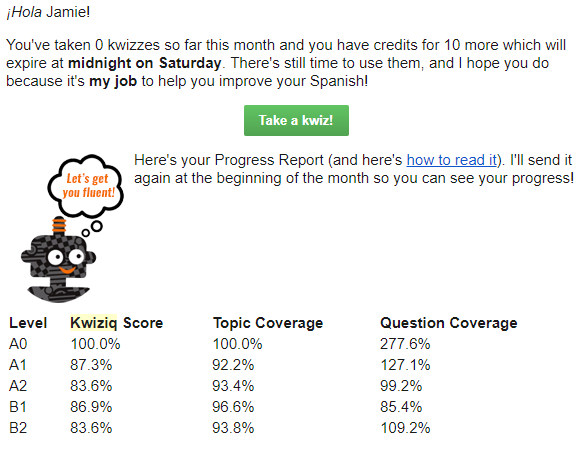
Kwiziq offers 10 free Kwizzes per month to everyone. I love this because the free content never expires! You can take free kwizzes as long as you want, they’re just limited. At the start of the new month, these 10 kwizzes are recharged.

This also means that you get your free kwizzes even if you were a member in the past but have since canceled, which is a thing that a lot of companies punish you for. If you cancel, you’ll still get an email once a month reminding you of free kwizzes that you have left, and when they’ll expire. Even if I’m not paying anymore, I still really like to be informed of free content that’s waiting for me.

Kwiziq review

Con: You can get a lot more for free elsewhere

Kwiziq isn’t the only guy out there with free quizzes to test your grammar fluency, but they’re the only one I know about that limits their quizzes. They are in competition with a couple of other resources that offer very similar products, with very similar information, all for free.

For example, Spanishdict is a great website with a free online Spanish-English dictionary, forum, and similar quizzes. These quizzes aren’t led by artificial intelligence, but they do a great job of providing you with the practice for some of these more difficult concepts.

Another popular free resource for grammar quizzes is StudySpanish. This website also has significant amounts of information available to help you understand your grammar, with some more hidden behind a paywall.

Note that both of these options are Spanish only. I’m not aware of similar resources for French as of this Kwiziq review.

Con: Kwiziq might be out of your budget

While Kwiziq is far from the only monthly membership platform to learn a language, it is on the pricey side. I do think the value is absolutely worth the price if you can swing it, and you specifically need to improve your grammar.

You can click here for Spanish pricing, and here for French pricing.

But don’t leave this Kwiziq review yet, there are still important features to talk about!

Pro: Kwiziq is more than just grammar

Primarily, Kwiziq is perfect for improving your Spanish and French grammar, but the other exercises in the “library” are excellent as well.

Just like Kwiziq’s grammar content, the exercises are also organized by A1-C2, so you get a really solid, in-depth understanding of your skill levels across the board, considering all 4 are rarely in the same place at any given time. And, honestly, I highly recommend Kwiziq for all language learners, if even just for these exercises.

In those practices (especially the last one), I love that it has you grade yourself. This is more flexible than the normal kwizzes, so you don’t have to mark yourself wrong for not seeing a word if you don’t find that necessary.

Then, of course, Kwiziq then links you to the individual lessons used in the statement, so you can figure out what you did wrong. If you’re not up to doing that research just yet, the icons to the right of the lesson links let you save them for later.

Still not quite getting it? All users are able to comment on the lessons and ask their questions, and Kwiziq’s Spanish teachers are actually incredibly responsive; if you’ve found something ambiguous and your question helps them see that something is confusing, they also have the power to make changes.

Plus, you can’t forget about the Weekend Workout! Every weekend, members get brand-new writing and listening challenges appropriate for every level sent directly to their email. It’s honestly a really nice reminder to keep up your practice, even if it’s only a little bit.

Kwiziq review: how to know if it’s the language app for you

At the end of the day, this Kwiziq review shows us a really great resource for French and Spanish learners. It has every grammar concept under the sun, and more are being added regularly.

Its gamification and easy-to-swallow kwizzes are addictive, which means that you’ll learn more grammar than you ever would anyways (let’s be real, most of us hate learning grammar). The exercises that are updated regularly are also a major win, I think.

If you’re not looking for grammar help, Kwiziq’s price point may not be worth it for you, depending on how much you use the other exercises. If you’re looking for something similar at a lower price point, I would recommend Yabla instead – not as pretty or user-friendly, but has similar types of exercises.

After reading this Kwiziq review, I would recommend all Spanish and French language learners, no matter the level, at least go through a few free kwizzes (click here for Spanish, or click here for French) and have the AI assess your level.

Filed Under: $101-200, $16-20, Advanced, Annual subscription, Audiobooks & video, Beginner, Communication, Daily streaks, Device, Explicit, Free, French, Gamification, Grammar, Implicit, Intermediate, Language app reviews, Language Skill, Level, Listening, Monthly subscription, Other Features, Pricing type, Reading, Spanish, Spelling, Stories, Target Language, Website, Words/phrases, Writing

Busuu review: the best combo of academic & social

March 21, 2022 by Jamie 1 Comment

Busuu is one of the most popular, recognized, and biggest language apps out there (so much so that they bought out Verbling, and are now owned by Chegg, a huge education company), and in this Busuu review, it will be made clear why it’s so well-liked. Get to know all of Busuu’s features and how to best use them for your own language learning so you can reach your language goals faster.

If after this Busuu review you find that it’s not the best solution for your language learning, I’ll also share some alternatives based on Busuu’s flaws so you can make the best choice for your languaeg learning.

Busuu review: languages offered

Busuu is available to learners of the most common foreign languages:

  • Arabic
  • Chinese
  • English
  • French
  • German
  • Italian
  • Japanese
  • Polish
  • Portuguese
  • Russian
  • Spanish
  • Turkish

Busuu is appropriate for all levels of these languages, making it accessible for language learners coming from all over. This is important because some of Busuu’s features are only successful because of its huge audience.

Without further ado, let’s take a look at Busuu and see if it’s the language app for you.

Busuu review: quality of lessons

Thanks to Busuu’s partnership with Chegg (a college education company), you can rely on Busuu for a high-quality education based on the CEFR levels (or Fluency Score, as they put it). Right from the start, this sets our expectations: Busuu is focused on academic use of the language, i.e. passing exams and textbook knowledge.

While many of us language learners have been taught that this is the only and/or best approach to learning languages, but it quite simply is not (always). If your goal is not an academic one, and you instead want to focus on being conversational as a priority…well, we’ll talk about this lower down in this Busuu review.

With this in mind, let’s take a look at Busuu’s first lesson to see how they execute their academic approach.

If you’re not a total beginner in the language, you have the option to take Busuu’s assessment. As a general rule, I take these online language level assessments with a grain of salt; no matter the platform, they’re almost always some variation of inaccurate. I recommend you do the same.

From the start, it’s clear that I was right about Busuu’s approach to learning a language! Very academic, very focused on using the language “correctly” and working towards the eventual goal of taking and passing an assessment.

Busuu’s assessment basically judges my ability in Spanish based on grammar, and much less so on things like communication or understanding. As such, I was really frustrated to be put at the A2 level in Spanish. I understand why – my A2 grammar is top-notch, and my intermediate is fairly functional but not quite textbook – but A2 is much too conservative, and I know that the content will be too easy.

It doesn’t seem like this would be too big of a deal, but in the past (and in the present for many language learners) I’ve followed these assessments, learned what they’ve told me to learn, and then quickly gotten bored and given up because of it.

After completing the assessment, you’re sent off to a comprehension lesson based on where Busuu thinks your level is. And keep watching, because I was genuinely shocked at the end to see some gamification.

As I assumed, the A2 level was boring and repetitive for me. The vocabulary was snooze-worthy, and I was not even the least bit challenged. This isn’t as much of a problem for me because I know how to solve the problem, but it can prove to be an insurmountable obstacle for language learners who are used to being bored and use this as further proof that they don’t like/are not good at learning languages.

Fortunately, Busuu allows you to switch lessons and attempt checkpoints at any time! You have to achieve at least 80% in this checkpoint, and the questions are pretty well-rounded. They prioritize grammar, of course, but also include other ways to use the language.

Regardless, I do really like the lessons themselves (once I get to my appropriate level!). Everything is very smooth and user-friendly, and the video comprehension questions make the language just a touch more 3-dimensional, too. I can tell that they’re trying to make a traditionally boring skill just a bit more engaging.

And like any intentional journey to learn a language, Busuu lessons end with a certificate! Unfortunately, official institutions will not accept a McGraw-Hill (another textbook company!) certificate from Busuu as proof of foreign language fluency.

You can use it as a resume builder for unrelated career paths, or you can frame it for your own personal pride, but it’s not the same as an official CEFR exam.

This certificate is also only available to paid users (which we’ll talk about more in a second).

Vocab review

Need to review? Busuu has a sleek way to have you review the vocabulary terms you come across in the lessons. The platform itself looks great, and I appreciate how you not only have to spell the words, but you also will be marked wrong if you don’t use appropriate accents, but there’s room for growth.

For one, I wish I could tell Busuu that I already know these terms. If I continued on with more at-level vocabulary, it would be easier to kick these easier terms out and focus on what would actually be helpful for me. I don’t see that option anywhere, though.

I do also wish you could add your own vocab! Assuming you’re using more than just Busuu to learn a language, or that you’re not a total beginner, it would be helpful to include other terms that you find off-platform. Spanishdict is an excellent example of this improvement.

Honestly, the fact that you can’t give Busuu any input whatsoever is a major bummer. These words are super easy for me (I told you I wasn’t A2!), and if I follow this lead, I’ll just be studying these terms that I already know until my eyes bleed.

Busuu community

Besides the frankly awesome lesson pathway, Busuu really excels with their community! You can only get so far in your language learning without actively using the language and making any kind of connections; fortunately, Busuu’s got you covered.

Click over to the “Community” tab to participate.

Here you have the opportunity to make connections with other language learners who can benefit from your native skills (hello, potential language exchanges!), as well as to practice your own use of the language in whichever way you see fit.

If your priority is communication, focus on the different ways to practice speaking. Likewise with written skills.

Whichever method of communication you want to improve, your response will be automatically submitted to the community, where native speakers can help correct you and encourage you along the way, just like you can encourage those practicing and learning your native language.

Wait a beat, check your notifications, and you’ll get a handful of corrections from the native-speaking community.

If you like, you can also go through and add respondents as friends and form a mutually-beneficial relationship where you correct each other’s submissions.

Finally, you can see all your corrections, submissions, and potential language friends by visiting your profile.

Busuu’s community may not be their primary talking point, but do yourself a favor and keep it in mind when you consider using Busuu to learn a new language! Even if this isn’t the only version of an online community for language learners, I think it blows communities like HelloTalk out of the water completely.

The difference between Busuu Premium and free

The bulk of Busuu is available for free to all, which is amazing! It’s awesome to see such a high-quality resource accessible to language learners of all different economic backgrounds. If you opt for Busuu Premium, you can also access:

  • No ads
  • Additional “fun” courses (travel, pronunciation, etc.)
  • AI-powered vocab review
  • Faster community feedback
  • The aforementioned Busuu certificates

These features are all not required for basic learning of the language. If you find them beneficial to your language learning and believe they would help keep you motivated, you’ll be happy to know that Busuu Premium is also very reasonably priced!

You can also start out with a 14-day free trial before you commit.

Click here to see updated pricing.

Busuu review: worth the hype for you?

Busuu’s success isn’t a mystery – it combines the academic approach to learning a language with a more motivating platform (meaning modern technology, not boring textbooks) and a strong community of other language learners to help keep you and your language learning on track.

If this sounds like your kind of language app, you can click here to get started with a free trial of Busuu Premium.

However, if grammar is not high on your list of priorities, you may find Busuu boring. If, for example, you want a stronger focus on conversational skills, you might consider finding a tutor on Verbling (which is owned by Busuu, fun fact!)

Or, if you like the structured, step-by-step approach to mastering a language but don’t want to rely so heavily on grammar, LingoDeer may be another option for you to consider.

Filed Under: $10-15, $50-100, Advanced, Android app, Annual subscription, Arabic, Beginner, Chinese (Mandarin), Communication, Community, Conversation, Curated flashcards, Daily streaks, Device, English, Explicit, Feedback, Free, French, Gamification, German, Grammar, Intermediate, iOS app, Italian, Japanese, Language app reviews, Language Skill, Level, Listening, Monthly subscription, Notifications, Other Features, Polish, Portuguese, Pricing type, Prompts, Reading, Russian, Spanish, Speaking, Spelling, Target Language, Turkish, Vocabulary, Website, Words/phrases, Words/phrases, Writing

  • Page 1
  • Page 2
  • Page 3
  • Go to Next Page »

Primary Sidebar

Meet your language coach

Hi! I'm Jamie (she/her), and I help you learn exactly what you need to do to learn a foreign language. Click my face above to learn more about me and how I can help.


We strive to offer equitable access to language learning for all, regardless of ethnicity, gender identity, ability, or sexual orientation.
Copyright © 2025 · Multilingual Mastery · Privacy Policy

  • About
  • Get 1:1 support
  • App search