• Skip to primary navigation
  • Skip to main content
  • Skip to primary sidebar
Multilingual Mastery

Multilingual Mastery

Online language learning coaching & education

  • About
  • Get 1:1 support
  • App search

Spelling

Trancy Review: Language Reactor alternative with tons of potential

October 11, 2023 by Jamie Leave a Comment

Trancy review

In recent years, the concept of learning a language on YouTube and Netflix has made way for lots of new opportunities to learn foreign languages for free. First, there was CaptionPop, then Language Reactor, and now we have this Trancy review.

So how does Trancy compare to the competition and how do you know if you should use it to learn a language? Let’s discuss what this Chrome extension does well, what it doesn’t, and what kind of language learner it’s for.

Trancy languages

While you can use Trancy to learn a language with any YouTube video or Netflix show/movie, it only supports the following languages:

  • Chinese
  • Egnlish
  • French
  • German
  • Italian
  • Japanese
  • Korean
  • Portuguese
  • Spanish

Now, when I say ‘only’, that isn’t to say that it’s a bad thing; on the contrary, if it’s designed to support just a handful of languages, the quality of the translation is probably better than much of the competition.

I’m not a translator so I can’t speak on this for sure, but it is a pattern that I see across language learning resources: the fewer the languages, the higher the quality of the education.

That said, let’s dive into what it’s like to use Trancy to learn a language!

How to use Trancy

Trancy is a Chrome extension, so once you enable it in your browser, booting it up is just a matter of clicking the little icon in the bottom right-hand corner of your video.

It is worth noting that Trancy is not compatible with AdBlock, so if you rely on it for your viewing experience that may prove to be an obstacle. There is a tutorial preventing AdBlock from stopping Trancy from working, but honestly, it’s a lot of work and if I’m using Trancy myself, I’ll just turn off AdBlock temporarily.

After you click the logo, you’ll get a theater-esque screen with bilingual subtitles and a few icons in the corner. These icons initiate the features of Trancy that I feel are really special. But we’ll talk about those in a second.

First, let’s talk about the functionality of the subtitles themselves (keeping in mind this isn’t where this Chrome extension truly shines).

They’re smooth, functional, and easy to read. You can easily turn the original and translated subtitles on and off, and save either entire sentences or single words for later.

While you don’t get the option to blur out the translated subtitles when you’re watching a video like Language Reactor does, this feature does show up in practice mode which we haven’t gotten to yet. Just in case you were missing that part in the video above like I was.

Trancy also gives you the option to switch modes between focusing on the video itself or the subtitles, which can be a nice customizable feature. You can get the benefit of the video while also being able to really focus on the words. A little bit of customization like that can really go a long way.

Suffice it to say that the subtitles themselves are beautiful. No real complaints here – if anything, I’m just being nit-picky. So let’s look at my favorite feature of Trancy: practice mode.

Trancy review: practice mode

Once you boot up Trancy, slide your mouse over and click “Practice mode”, the headphones icon. Or just tap P on your keyboard. Here you’ll get the video’s subtitles already created into 5 different activities:

  • Speaking
  • Listening
  • Selection
  • Filling
  • Dictation

This is how each activity functions.

Trancy is a new Chrome extension. These features aren’t amazing yet, but there’s a lot of potential.

For example, I would love it if you could go into settings and turn on/off different things, like if the audio clip repeats after you get it correct, access to letters and accents that you may not have on your keyboard, and that pesky timer in the upper right-hand corner.

Some might like the timer, but it gives me a lot of anxiety. I feel like I have to rush to find the answers. Let me disable that clock!

Regardless, the basic concept is unique and a real benefit to language learners. And if activities like this are what you’re already doing but with fewer steps, I do recommend you switch over to using Trancy.

Collections

As you’ve seen in the videos above, you can “heart” any word or sentence to save and study it for later. When you’re ready to do that, you can visit the Trancy website/platform and easily see what you’ve saved.

This is what that looks like.

Again, interesting concept, but this could use work.

I would love to see Trancy using the audio from the actual video as opposed to a robot voice. This would be more helpful for understanding the language as it’s used by native speakers and actual humans, which is an entirely different experience.

Learning to understand a new language means training your brain to connect different sounds to the same words, which is why watching videos is excellent for listening comprehension. Losing that quality of the words you’re saving is really more significant than you may think!

Secondly, I understand that subtitles don’t always break at natural sentence endings. But that sentence isn’t a sentence. It’s 2 and a half sentences. This means that either you just deal with funky practice, or you go in and manually shift your sentences around.

You do get the option to download your saved terms as a PDF or .csv, but it doesn’t include audio. If you want to add audio to your flashcards (assuming you already have a chosen study tool), you’ll have the extra step of finding or creating your own audio.

Trancy’s AI functions

When visiting your collections, you may have noticed a couple of AI functions. They honestly feel kind of random and out of left field when you’re just trying to study your material, but they could be beneficial if you give them a shot.

For example, Trancy offers AI chatbot conversations. This isn’t a new concept at all, but I’m genuinely impressed by the functionality! With other chatbots (say, Lingodeer or Mondly), the conversation is pre-planned. It’s practice, but it’s stale. Trancy, on the other hand, uses AI to bring this tech to life.

I’m surprised!

This was a whole conversation that would be incredibly helpful when it comes to thinking in and using a foreign language. Definitely a helpful step between learning words and real-life conversations.

P.S. You can also access all these functions on mobile via the Trancy app! On both Android and Apple, you can practice all of your saved collections and the AI features on any mobile device. It doesn’t include watching the functionality of the Chrome extension, so you can’t watch videos and collect new terms, but it’s something.

Trancy review: cost

The basic premise of this Chrome extension is free. If you find yourself using Trancy consistently, you can opt-in for upgrades including:

  • save unlimited words and sentences
  • unlimited practice
  • enhanced translation
  • AI-powered word/syntax explanations
  • speaking practice

Fortunately for us, Trancy keeps it cheap; here’s the explanation behind their pricing:

Trancy Premium is a paid option, as most Premium features require Trancy to pay addition fees to third parties such as data center providers and openAI. Contributions from premium users allow us to cover these costs and help keep trancy free for everyone.

I hope this approach is successful for Trancy, because it keeps language learning accessible to all. Honestly, it’s only a few bucks a month, which is a no-brainer if you find yourself using it a lot.

You can see Trancy’s updated pricing here.

Trancy review: should you try it?

Now that we’ve reached the end of this Trancy review, is it the Chrome extension for you? Here are some thoughts.

If you enjoy watching videos in your target language and would get even more practice with Trancy automatically creating activities from subtitles, I highly recommend Trancy. I love how it automatically creates engaging, functional activities out of the media you’re already watching, so you can activate all of your language skills, not just your listening skills.

Plus, the chatbot is surprisingly great! That feature in itself is a 10/10.

Click here to get started with Trancy!

However, there are a lot of small, nit-picky issues that are only really cons when compared to other options that have been around longer, and therefore have had more time to iron these things out. So if you’re perfectly happy using Language Reactor to create your own activities and avoid some small functionality issues, you may be just fine doing that.

Or, if you want a heavier focus on the activities and don’t really care about the videos themselves, I might recommend Yabla or FluentU to help with that.
Filed Under: $1-49, $1-9, Advanced, Android app, Annual subscription, Audiobooks & video, Captions and subtitles, Chatbot, Chinese (Mandarin), Chrome Extension, Device, English, Free, French, German, Intermediate, iOS app, Italian, Japanese, Korean, Language app reviews, Language Skill, Level, Listening, Monthly subscription, Portuguese, Pricing type, Reading, Shadowing, Spanish, Speaking, Spelling, Target Language, Website, Writing

Speakly Review: limited, but can get you speaking fast!

January 14, 2023 by Jamie Leave a Comment

Speakly is a popular language app, loved by those who appreciate its beautiful design and smooth interface. Speakly itself claims to be the fastest way to learn a foreign language based on its approach of teaching you the most relevant words first. In this Speakly review, let’s take an objective look at this approach and see if it’s an appropriate addition to your own language learning strategy.

To start, Speakly supports the following languages:

  • English
  • Estonian
  • Finnish
  • French
  • German
  • Italian
  • Russian
  • Spanish

Each of these languages is also offered in a handful of other languages (German for Finnish speakers, for example), but these source languages are not consistent, so they’re not mentioned here.

Speakly review: My Classroom

All the actual learning you’ll do within Speakly happens in the My Classroom section; this is basically your home for everything you’ll be learning with Speakly.

Here, you have a plethora of options – let’s look at what they mean for your language learning.

Speakly’s level assessment

When getting started (or at any time, by scrolling to the bottom of the page), you can have Speakly assess your level in the language based on your responses to a collection of sentences.

In general, I recommend language learners avoid putting too much emphasis on language learning app assessments because they’re not objective, and every assessment is different. For example, just based on the above recording:

  • Speakly totally ignores my missing accent (accents are important!)
  • There are many ways to translate some of the provided sentences, and you’re marked wrong if you don’t choose “their” translation
  • Some translations/tenses change based on context; in different contexts, my answers would have been correct. Instead, Speakly tells me I’m straight-up wrong

That said, take Speakly’s assessment with a big ol’ grain of salt. After this assessment, Speakly went on to teach me very beginner-level lessons that are not appropriate for me.

Basically, this assessment will get you where you are generally if you’re not a beginner, but otherwise, it’s not precise.

Speaking of beginner levels…

Beginner language learners look elsewhere

If you’ve found this Speakly review via my language app search, it’s because you’re looking for intermediate or advanced-level education. This is not because Speakly doesn’t offer content for beginners, but because I don’t recommend it. Here’s why.

For a beginner German language learner (as an example), there are many grammar rules that you need to understand before any of these make sense. Things like:

  • Gender (i.e. the different endings that signify 1 of 3 genders, and how to know which endings to apply to which words)
  • Declensions (which endings to put on non-noun words depending on subject/object/context)

Fortunately, thanks to German Foundations I’m familiar with these concepts; however, I started learning German with Speakly, and it did not provide me the education I needed as a beginner language learner.

This left me frustrated, confused, and stuck.

While Speakly does offer some grammatical explanations, they’re not the most useful (more on that later).

Now, let’s move on to where Speakly does well (intermediate+ only).

Speakly Live Situations

As you build your vocabulary more and more, Speakly offers you access to “Live situations”, which are simple, real-life conversations that you may be having in your target language.

It’s a very simple chatbot situation that does connect your skills to real-life use of the language. For language learners who need a small step up between memorizing vocabulary and having foreign language conversations, this is great.

I just wish that (a) I could use the voice recorder feature on the desktop and (b) I could speed up or slow down the audio. These are basic accessibility options that would make a world of difference in the quality of the Speakly app, and are available in many other language learning apps.

For reference, here’s what this same Live situation looks like on the mobile app. It’s honestly not a huge difference.

For example, if they’re recording my speech to use speech recognition, then having me review the conversation at the end, I would love to compare my audio recording with Speakly’s native recording.

This technique, called shadowing, can be helpful to judge your pronunciation and see how your words sound outside your own brain (it can make a difference!).

It’s certainly not the end of the world, and may not make any difference at all to your language learning, but I’d like to see the option.

For example, uTalk does this well, though uTalk teaches individual words instead of sentences; when working through their chatbot exercises, you can listen to either your own voice recording or uTalk’s native speaker recording.

Listening exercises

Next, we have Speakly’s listening exercises. These are short dialogues native to the platform that you can use to practice your listening side-by-side with the exercise’s transcription (and translation).

Similar to the Live situations, these exercises are perfectly beautiful and high quality, but lack options compared to other language apps. For example, I would love to see the ability to save words for later, and replay different words or sentences (you can only replay whole paragraphs at the time of this writing, which can be frustrating if you want to review a single word or sentence a few times), and more.

Honestly, you can’t even copy/paste words if you want to put them into Quizlet for digital flashcards or Forvo for more context. If you want to plug these words or sentences into your own independent review, you have the extra step of typing everything out yourself.

Even better, if there were comprehension questions a la Babbel! Speakly could do so many different things with this content, I’m disappointed by the lack of options.

Even these small changes would make Speakly so much more useful and valuable for language learners! But of course, if you wouldn’t use these kinds of features, you can ignore these complaints completely.

Grammar

One of Speakly’s major ethos is focusing on the bare minimum you need to have a conversation (i.e. your base vocabulary). While this can be true, you do need a touch of grammar; not too advanced, but you need a solid base.

Fortunately, Speakly offers grammar sections for you to reference.

Unfortunately, they’re completely useless.

In the above video, you see the grammar sections of Spanish first, then German (as well as how to switch between languages). In my opinion, the Spanish section is fine, though nothing you can’t find elsewhere with more detailed explanations/targeted practice (I suggest Kwiziq for this in Spanish and French, by the way).

Then there’s German.

To start, here’s Speakly’s opinion about German pronunciation:

Really?! You want to read about pronunciation? No! No! You have to LIVE the language, remember? Listen to the sentences in the program and repeat them out loud to yourself, again and again. That’s really the best approach.

At this point, I’d rather they just not bring up pronunciation if they’re not going to help with it.

Then, as you continue to read about declensions (a notoriously difficult aspect of German grammar), there are no opportunities to practice for understanding. Instead, they briefly list declensions – theoretically for review purposes – and leave you to simply figure it out on your own.

Seriously – if you’re looking for German grammar, you’re better off with Laura’s German Foundations.

Speakly review: pricing

Speakly is a reasonably-priced subscription-based language learning app. The price changes depending on your commitment, from 1 to 12 months. Click here for updated pricing.

But, there are a couple of caveats to Speakly’s pricing.

First, if you commit to more than 1 month’s subscription at a time, you’ll pay for 3-12 months of Speakly upfront.

Second, if you only commit to 1 or 3 months at a time, you also only get 1 language. Subscribers who commit to 6 or 12 months at a time get access to all languages.

Fortunately, with my code, you get 40% off your Speakly subscription! Keep reading for more details on that.

Speakly review: should you try it?

I will be the first to admit that this Speakly review has been a critical one; however, most of my criticisms come from a place of potential opportunities as opposed to details that are just bad.

To summarize:

Speakly’s approach to learning a language is truly holistic (as they claim on the Speakly website), meaning you learn and practice your target language in a variety of ways using a variety of language skills. Speakly also focuses on growing your knowledge of the most important vocabulary that you need to communicate in the language.

This is a genuinely productive way to focus on speaking the language ASAP; no need to worry about fancy grammar rules or perfect pronunciation, just get speaking!

If you enjoy and are fulfilled by the practices that Speakly has to offer, I recommend you take advantage of their 7-day trial. And don’t forget my discount code for 40% off!

  • English: CC1
  • Spanish: CC2
  • French: CC3
  • German: CC4
  • Italian: CC5
  • Russian: CC6
  • Estonian: CC7
  • Finnish: CC8

However, if you enjoy the approach but feel limited by some of the criticisms mentioned in this Speakly review, there are Speakly alternatives!

For example, Lingvist offers a similar approach to learning languages, though with a lot more flexibility in the vocab you’re learning and the context in which you’re learning it.

Or, if you’re very interested in the Live/chatbot option, LingoDeer’s chatbot is much more thoroughly fleshed out.

Both of these alternatives have very beautiful apps to give you the same smooth feeling that you’ll get with the Speakly app.

Click here to start learning a language with Speakly!

Filed Under: $1-9, $50-100, Advanced, Android app, Annual subscription, Chatbot, Conversation, Conversation, Curated flashcards, Daily streaks, Device, English, Estonian, Exclusive discount, Finnish, French, Gamification, German, Intermediate, iOS app, Italian, Language app reviews, Language Skill, Level, Listening, Monthly subscription, Notifications, Other Features, Pricing type, Reading, Russian, Spanish, Speaking, Speech recognition, Spelling, Target Language, Vocabulary, Website, Words/phrases, Words/phrases, Writing

Kwiziq review: fun AND quality grammar lessons

March 21, 2022 by Jamie 1 Comment

Kwiziq is a gamified membership system meant to help French and Spanish language learners understand and conquer grammar concepts, in an intuitive, enjoyable way. In this Kwiziq review, we’ll take a deep dive into what that actually means for you and your language learning.

So, what do we need to know about Kwiziq? Let’s take a deep dive into this website. Is it the right resource for you?

Kwiziq review: how does the AI work?

To date, Kwiziq supports the following languages:

  • French
  • Spanish

Kwiziq’s claim to fame is its artificial intelligence. It uses its AI to determine your proficiency with different grammatical concepts, as well as when to test you on them. The way it tests you feels almost like Anki to me, which is a good thing.

It’s not that it reminds you of these things right before it thinks you’ll forget them, but it really throws one or two concepts at you until you make your way through them and prove that you’re ready to move on to something more advanced.

To master these levels, you take quizzes! The AI determines which concepts you should review, and then offers you quizzes, or “kwizzes”, based on this material. Your mastery of every concept starts at 0% and goes up or down depending on the questions you get right or wrong. As you get closer to 100%, the AI will suggest you move on to an upper level.

Besides the technical stuff, Kwiziq’s grammar is separated into CEFR levels, so both you and Kwiziq know what your actual skill level is: A1-C1, A1 being beginner, and C1 being advanced.

This is a great way to conceptualize your language level based on your knowledge of grammar. Clearly, Kwiziq is laser-focused on improving your grammar and keeping you in the know about what you’ve learned and what you still need help with.

Finally, these levels are presented to you in a progress map (as long as you’re a paid member). A green subject is one that’s been mastered, yellow is in progress, and red occurs when you have performed below 0%. Because the AI wants you to stay above 0%, it advises you not to answer questions if you’re not sure about their answer.

Kwiziq review: all the pros and cons to consider

So, now that you have the basic idea of Kwiziq, is it for you? The next section of this Kwiziq review will address several pros and cons based on my own detailed use of Kwiziq for both French and Spanish.

Pro: Kwiziq provides decent explanations of grammatical concepts

Kwiziq has experienced language teachers who create all of its content, and you can see who has provided this information quite easily. As I said, grammar is hard, and these concepts can sometimes take several different tries to finally get into our brains.

When I found Kwiziq, I was right in the middle of an “I kind of understand the difference, but I generally fumble and fall a lot when I try to use them” phase with the preterite and imperfect tenses in Spanish. Now, Kwiziq’s explanation didn’t really help me a lot. What did help me was their chart for the actual conjugations. Looking at what the ending should be over and over again did help me.

At the end of the day, one person can only do so much. The descriptions of when and how to use these grammar concepts are pretty well-executed, and I wouldn’t be surprised if they help certain ideas to really click for you.

Pro: Kwiziq rewards you for learning

One of the best parts about Kwiziq is that it rewards you for your efforts. It’s completely gamified, which means you get rewarded every time you answer 50%, 75%, 90%, and 100% of the questions pertaining to a certain grammatical concept correctly.

You get little stars after each of these accomplishments, so sometimes you’ll finish a Kwiz with a couple of dozen stars celebrating your success! These stars are also paired with “kudos”, which you get every time you accomplish literally anything.

Past the individual lessons, you’re rewarded for your success in certain levels, as well! Accomplishing certain percentages of success in your level means you’ll get trophies: a bronze shield for achieving 50%, a silver shield for 75%, a gold shield for 90%, and a diamond for 100%.

These also build up on top of each other: the more high-level trophies you win, the more foundational awards you get. For example, the A1 diamond trophy is yours once you achieve a diamond in A0 and gold in A1.

Finally, Kwiziq also rewards you for landmarks. You get your first one after your first kwiz and are continuously rewarded for the number of kwizzes you take in a day. The more kwizzes you take, the more landmarks you achieve, and the more kudos you receive.

Con: Kwiziq punishes you for your wrong answers

The way that Kwiziq’s AI works is that it takes all your answers at face value. Correct questions help you, incorrect questions hurt you, and questions that you don’t answer remain neutral. Therefore, Kwiziq tells you not to guess answers if you don’t know them in every kwiz.

While there’s nothing wrong with telling you that you’re wrong, the thing I don’t like about that is that the whole reward system is based on percentages: once you get a certain percentage right, you get a happy little green color, more stars, more trophies, etc.

However, this means that the more times you answer a question incorrectly, the more you have to get it correctly to get all these rewards. Which makes it almost impossible to reach milestones for concepts that may be more difficult for you.

This conflicts with one of my own philosophies for motivation: trying and failing are better than not trying at all. If you don’t try, how do you know if you’ll succeed? Kwiziq punishes learners for this.

Personally, it introduces more anxiety into my brain than is necessary because it means I’m constantly second-guessing whether I actually know the thing that I think I know. It means that I’m never confident in myself because the risk is so extreme.

The whole premise of Kwiziq feeds off a reward system, but if you’re having a hard time understanding something, forget about getting rewarded for practicing that concept, because you’re just never going to get that star. Which means I’ve honestly given up on certain parts of Kwiziq. I didn’t like how much negative reinforcement I was getting – I was being punished for trying!

Pro: Kwizzes are short, 10-question, multiple-choice exercises

The thing about Kwiziq is that it’s addictive. You get rewarded for almost every kwiz you take, and kwizzes are only a minute or so long. You don’t have to commit any time whatsoever to this fun little game. It’s easy to, once you go down the rabbit hole of figuring out your grammar, but you can just take 30 seconds to practice.

Plus, the fact that they’re multiple-choice (at first) makes them significantly easier to swallow. When you’re learning these things at first, you only have to choose from a few different options.

They’re not just 10 questions about 1 concept, either; they’re 10 questions on 2-3 concepts that the AI thinks you should be practicing.

Once Kwiziq’s AI thinks that you’ll be able to do it, it’ll throw you a few fill-in-the-blanks. These are the ones you have to be careful with, though, because it doesn’t take too kindly to typos. One mistyped letter, and you throw away the whole question, even if you were right.

As you can see, these questions get tough! These are things that you don’t necessarily need to know for conversational use of the language, so don’t get hung up on them if you’re not taking some sort of assessment.

Con: No mobile app for this Kwiziq review

We all love to do everything mobile. Especially with Kwiziq’s quick little quizzes, it should be fun to whip your phone out every once in a while, and kwiz your way through some Spanish practice! At least, that’s what I would love to do during a boring movie or something.

Unfortunately, as of this Kwiziq review, there is no mobile app. You can open the website on a mobile device, but it’s not the best – it’s too easy to accidentally hit the wrong multiple-choice answer, you have to keep scrolling to see the full sentence, etc.

Pro: Instant gratification

A great part about Kwiziq is the fact that you can instantly get an explanation as to why they marked your answer incorrectly. At the result of every quiz, they give you links to the lesson page, so you can figure out what you did wrong (or, in some cases, which grammatical concept they were even testing!).

This is an easy way to fill those little gaps in your grammar brain instantly, as opposed to creating a list of things that you should look up, and then you kind of forget what you did, and then you have to find the question again and figure out how to answer it, and it just goes on and on.

Even if I do think that Kwiziq punishes you too harshly for failing (as I believe failing should just mean that you put the effort forward, not “bad language learner, you were wrong”), I do appreciate the ability to get a question wrong and then instantly be directed to the lesson page for a quick reminder.

Con: if you take a break, don’t get anything wrong

Even though Kwiziq’s robot tells you not to answer questions if you’re not completely sure, there is a scenario in which this is different. I ran into this situation when some new topics had been recently added to the A1 level, which brought my 90+% down to somewhere in the 80s. All I wanted to do was get some questions right on this new subject so that my percentage would go back up to the 90s. It was all basic Spanish concepts, so I knew that I already understood them.

When I went to take a new quiz, I avoided all the other questions; I didn’t want to commit the brain space to the other subjects, just the one where I wanted to up my percentage. According to Kwiziq, I wouldn’t be punished for not trying to answer. Unfortunately, I was wrong.

I was on a beginner quiz, and I got all those questions wrong! Which, of course, brought my entire percentage farther down. Didn’t even matter that I got that one question right, the one that had been at 0%. All my little green areas quickly turned yellow, because Kwiziq had just assumed that I had forgotten all those beginner concepts.

Moral of the story: either stick with your kwizzing, make sure you answer all your old questions or don’t pay too much attention to that percentage. If the AI assumes that you forgot something, it will bring your score down to encourage you to relearn those lessons. I get what they’re trying to do, but they should’ve given me a big red flag saying “hey, our rule about not trying to answer questions that you don’t know doesn’t apply anymore, I will judge you on everything!”.

Pro: Kwiziq’s free trial

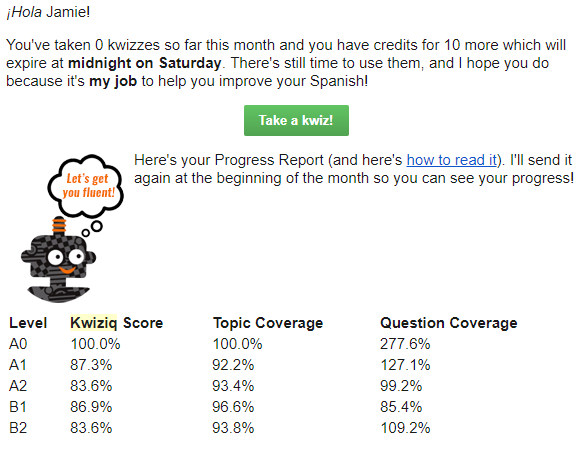
Kwiziq offers 10 free Kwizzes per month to everyone. I love this because the free content never expires! You can take free kwizzes as long as you want, they’re just limited. At the start of the new month, these 10 kwizzes are recharged.

This also means that you get your free kwizzes even if you were a member in the past but have since canceled, which is a thing that a lot of companies punish you for. If you cancel, you’ll still get an email once a month reminding you of free kwizzes that you have left, and when they’ll expire. Even if I’m not paying anymore, I still really like to be informed of free content that’s waiting for me.

Kwiziq review

Con: You can get a lot more for free elsewhere

Kwiziq isn’t the only guy out there with free quizzes to test your grammar fluency, but they’re the only one I know about that limits their quizzes. They are in competition with a couple of other resources that offer very similar products, with very similar information, all for free.

For example, Spanishdict is a great website with a free online Spanish-English dictionary, forum, and similar quizzes. These quizzes aren’t led by artificial intelligence, but they do a great job of providing you with the practice for some of these more difficult concepts.

Another popular free resource for grammar quizzes is StudySpanish. This website also has significant amounts of information available to help you understand your grammar, with some more hidden behind a paywall.

Note that both of these options are Spanish only. I’m not aware of similar resources for French as of this Kwiziq review.

Con: Kwiziq might be out of your budget

While Kwiziq is far from the only monthly membership platform to learn a language, it is on the pricey side. I do think the value is absolutely worth the price if you can swing it, and you specifically need to improve your grammar.

You can click here for Spanish pricing, and here for French pricing.

But don’t leave this Kwiziq review yet, there are still important features to talk about!

Pro: Kwiziq is more than just grammar

Primarily, Kwiziq is perfect for improving your Spanish and French grammar, but the other exercises in the “library” are excellent as well.

Just like Kwiziq’s grammar content, the exercises are also organized by A1-C2, so you get a really solid, in-depth understanding of your skill levels across the board, considering all 4 are rarely in the same place at any given time. And, honestly, I highly recommend Kwiziq for all language learners, if even just for these exercises.

In those practices (especially the last one), I love that it has you grade yourself. This is more flexible than the normal kwizzes, so you don’t have to mark yourself wrong for not seeing a word if you don’t find that necessary.

Then, of course, Kwiziq then links you to the individual lessons used in the statement, so you can figure out what you did wrong. If you’re not up to doing that research just yet, the icons to the right of the lesson links let you save them for later.

Still not quite getting it? All users are able to comment on the lessons and ask their questions, and Kwiziq’s Spanish teachers are actually incredibly responsive; if you’ve found something ambiguous and your question helps them see that something is confusing, they also have the power to make changes.

Plus, you can’t forget about the Weekend Workout! Every weekend, members get brand-new writing and listening challenges appropriate for every level sent directly to their email. It’s honestly a really nice reminder to keep up your practice, even if it’s only a little bit.

Kwiziq review: how to know if it’s the language app for you

At the end of the day, this Kwiziq review shows us a really great resource for French and Spanish learners. It has every grammar concept under the sun, and more are being added regularly.

Its gamification and easy-to-swallow kwizzes are addictive, which means that you’ll learn more grammar than you ever would anyways (let’s be real, most of us hate learning grammar). The exercises that are updated regularly are also a major win, I think.

If you’re not looking for grammar help, Kwiziq’s price point may not be worth it for you, depending on how much you use the other exercises. If you’re looking for something similar at a lower price point, I would recommend Yabla instead – not as pretty or user-friendly, but has similar types of exercises.

After reading this Kwiziq review, I would recommend all Spanish and French language learners, no matter the level, at least go through a few free kwizzes (click here for Spanish, or click here for French) and have the AI assess your level.

Filed Under: $101-200, $16-20, Advanced, Annual subscription, Audiobooks & video, Beginner, Communication, Daily streaks, Device, Explicit, Free, French, Gamification, Grammar, Implicit, Intermediate, Language app reviews, Language Skill, Level, Listening, Monthly subscription, Other Features, Pricing type, Reading, Spanish, Spelling, Stories, Target Language, Website, Words/phrases, Writing

Busuu review: the best combo of academic & social

March 21, 2022 by Jamie 1 Comment

Busuu is one of the most popular, recognized, and biggest language apps out there (so much so that they bought out Verbling, and are now owned by Chegg, a huge education company), and in this Busuu review, it will be made clear why it’s so well-liked. Get to know all of Busuu’s features and how to best use them for your own language learning so you can reach your language goals faster.

If after this Busuu review you find that it’s not the best solution for your language learning, I’ll also share some alternatives based on Busuu’s flaws so you can make the best choice for your languaeg learning.

Busuu review: languages offered

Busuu is available to learners of the most common foreign languages:

  • Arabic
  • Chinese
  • English
  • French
  • German
  • Italian
  • Japanese
  • Polish
  • Portuguese
  • Russian
  • Spanish
  • Turkish

Busuu is appropriate for all levels of these languages, making it accessible for language learners coming from all over. This is important because some of Busuu’s features are only successful because of its huge audience.

Without further ado, let’s take a look at Busuu and see if it’s the language app for you.

Busuu review: quality of lessons

Thanks to Busuu’s partnership with Chegg (a college education company), you can rely on Busuu for a high-quality education based on the CEFR levels (or Fluency Score, as they put it). Right from the start, this sets our expectations: Busuu is focused on academic use of the language, i.e. passing exams and textbook knowledge.

While many of us language learners have been taught that this is the only and/or best approach to learning languages, but it quite simply is not (always). If your goal is not an academic one, and you instead want to focus on being conversational as a priority…well, we’ll talk about this lower down in this Busuu review.

With this in mind, let’s take a look at Busuu’s first lesson to see how they execute their academic approach.

If you’re not a total beginner in the language, you have the option to take Busuu’s assessment. As a general rule, I take these online language level assessments with a grain of salt; no matter the platform, they’re almost always some variation of inaccurate. I recommend you do the same.

From the start, it’s clear that I was right about Busuu’s approach to learning a language! Very academic, very focused on using the language “correctly” and working towards the eventual goal of taking and passing an assessment.

Busuu’s assessment basically judges my ability in Spanish based on grammar, and much less so on things like communication or understanding. As such, I was really frustrated to be put at the A2 level in Spanish. I understand why – my A2 grammar is top-notch, and my intermediate is fairly functional but not quite textbook – but A2 is much too conservative, and I know that the content will be too easy.

It doesn’t seem like this would be too big of a deal, but in the past (and in the present for many language learners) I’ve followed these assessments, learned what they’ve told me to learn, and then quickly gotten bored and given up because of it.

After completing the assessment, you’re sent off to a comprehension lesson based on where Busuu thinks your level is. And keep watching, because I was genuinely shocked at the end to see some gamification.

As I assumed, the A2 level was boring and repetitive for me. The vocabulary was snooze-worthy, and I was not even the least bit challenged. This isn’t as much of a problem for me because I know how to solve the problem, but it can prove to be an insurmountable obstacle for language learners who are used to being bored and use this as further proof that they don’t like/are not good at learning languages.

Fortunately, Busuu allows you to switch lessons and attempt checkpoints at any time! You have to achieve at least 80% in this checkpoint, and the questions are pretty well-rounded. They prioritize grammar, of course, but also include other ways to use the language.

Regardless, I do really like the lessons themselves (once I get to my appropriate level!). Everything is very smooth and user-friendly, and the video comprehension questions make the language just a touch more 3-dimensional, too. I can tell that they’re trying to make a traditionally boring skill just a bit more engaging.

And like any intentional journey to learn a language, Busuu lessons end with a certificate! Unfortunately, official institutions will not accept a McGraw-Hill (another textbook company!) certificate from Busuu as proof of foreign language fluency.

You can use it as a resume builder for unrelated career paths, or you can frame it for your own personal pride, but it’s not the same as an official CEFR exam.

This certificate is also only available to paid users (which we’ll talk about more in a second).

Vocab review

Need to review? Busuu has a sleek way to have you review the vocabulary terms you come across in the lessons. The platform itself looks great, and I appreciate how you not only have to spell the words, but you also will be marked wrong if you don’t use appropriate accents, but there’s room for growth.

For one, I wish I could tell Busuu that I already know these terms. If I continued on with more at-level vocabulary, it would be easier to kick these easier terms out and focus on what would actually be helpful for me. I don’t see that option anywhere, though.

I do also wish you could add your own vocab! Assuming you’re using more than just Busuu to learn a language, or that you’re not a total beginner, it would be helpful to include other terms that you find off-platform. Spanishdict is an excellent example of this improvement.

Honestly, the fact that you can’t give Busuu any input whatsoever is a major bummer. These words are super easy for me (I told you I wasn’t A2!), and if I follow this lead, I’ll just be studying these terms that I already know until my eyes bleed.

Busuu community

Besides the frankly awesome lesson pathway, Busuu really excels with their community! You can only get so far in your language learning without actively using the language and making any kind of connections; fortunately, Busuu’s got you covered.

Click over to the “Community” tab to participate.

Here you have the opportunity to make connections with other language learners who can benefit from your native skills (hello, potential language exchanges!), as well as to practice your own use of the language in whichever way you see fit.

If your priority is communication, focus on the different ways to practice speaking. Likewise with written skills.

Whichever method of communication you want to improve, your response will be automatically submitted to the community, where native speakers can help correct you and encourage you along the way, just like you can encourage those practicing and learning your native language.

Wait a beat, check your notifications, and you’ll get a handful of corrections from the native-speaking community.

If you like, you can also go through and add respondents as friends and form a mutually-beneficial relationship where you correct each other’s submissions.

Finally, you can see all your corrections, submissions, and potential language friends by visiting your profile.

Busuu’s community may not be their primary talking point, but do yourself a favor and keep it in mind when you consider using Busuu to learn a new language! Even if this isn’t the only version of an online community for language learners, I think it blows communities like HelloTalk out of the water completely.

The difference between Busuu Premium and free

The bulk of Busuu is available for free to all, which is amazing! It’s awesome to see such a high-quality resource accessible to language learners of all different economic backgrounds. If you opt for Busuu Premium, you can also access:

  • No ads
  • Additional “fun” courses (travel, pronunciation, etc.)
  • AI-powered vocab review
  • Faster community feedback
  • The aforementioned Busuu certificates

These features are all not required for basic learning of the language. If you find them beneficial to your language learning and believe they would help keep you motivated, you’ll be happy to know that Busuu Premium is also very reasonably priced!

You can also start out with a 14-day free trial before you commit.

Click here to see updated pricing.

Busuu review: worth the hype for you?

Busuu’s success isn’t a mystery – it combines the academic approach to learning a language with a more motivating platform (meaning modern technology, not boring textbooks) and a strong community of other language learners to help keep you and your language learning on track.

If this sounds like your kind of language app, you can click here to get started with a free trial of Busuu Premium.

However, if grammar is not high on your list of priorities, you may find Busuu boring. If, for example, you want a stronger focus on conversational skills, you might consider finding a tutor on Verbling (which is owned by Busuu, fun fact!)

Or, if you like the structured, step-by-step approach to mastering a language but don’t want to rely so heavily on grammar, LingoDeer may be another option for you to consider.

Filed Under: $10-15, $50-100, Advanced, Android app, Annual subscription, Arabic, Beginner, Chinese (Mandarin), Communication, Community, Conversation, Curated flashcards, Daily streaks, Device, English, Explicit, Feedback, Free, French, Gamification, German, Grammar, Intermediate, iOS app, Italian, Japanese, Language app reviews, Language Skill, Level, Listening, Monthly subscription, Notifications, Other Features, Polish, Portuguese, Pricing type, Prompts, Reading, Russian, Spanish, Speaking, Spelling, Target Language, Turkish, Vocabulary, Website, Words/phrases, Words/phrases, Writing

Busuu vs Duolingo: do you want fun or functional?

March 20, 2022 by Jamie Leave a Comment

Busuu and Duolingo are two of the most popular language apps there are, so how do you make the choice when it comes to how to learn a language? In this post, let’s compare Busuu vs Duolingo, so you can make the best choice for your own language learning.

We’ll address each app’s flaws, where they shine, and which one is more likely to get your language learning where you want it to go.

Busuu vs Duolingo: languages

The following languages are available on both Busuu and Duolingo:

  • Arabic
  • Chinese
  • French
  • German
  • Italian
  • Japanese
  • Polish
  • Portuguese
  • Russian
  • Spanish
  • Turkish

Busuu also offers English, and Duolingo’s list of languages is massive, so I’ll leave it to my Duolingo review.

Busuu vs Duolingo: finding your level

Both Duolingo and Busuu are appropriate for total beginners, and both honestly have similar systems. It may be surprising to see how Busuu has evolved to be easier and more addictive, like Duolingo has trained language learners to become.

Here’s Duolingo’s checkpoint test to fast-forward in your Learning Path.

And here’s Busuu’s version.

As you can see, Busuu isn’t actually very different from Duolingo. It’s smooth, easy, and focuses almost entirely on passive skills (i.e. learning to understand the gist of the language, not necessarily reproducing it).

This makes it a fairly easy transition for language learners who enjoy Duolingo, but are tired of the heavy gamification. Busuu does have some gamification, but the way that it’s implemented makes the process of learning a language smoother and more engaging, not just an addiction.

That said, what makes Duolingo and Busuu different?

Using your target language

The base core of learning languages on each language app is pretty similar. However, learning new words, grammar, and other concepts isn’t so hard – it’s using them that gets language learners stuck.

It’s very easy to present you with new information, but not so much to lead you to actively use and produce that information. Let me show you what I mean.

This feature of Duolingo, Stories, is the main way that they attempt to get you to use the language. These Stories are intertwined within the Learning Path, so you have to complete them when presented in order to continue to higher levels.

And even though it’s technically closer (I guess?) to real use of the language, it’s still pretty passive. You’re still tapping buttons, an activity you can do in the background of watching a movie or doing the dishes.

Here’s Busuu’s strategy for comparison.

The Busuu community is full of language learners who speak your target language natively, and use this skill to help critique your submissions and motivate you.

While you are prompted to submit something (whether it be an audio recording or a writing prompt, your decision) consistently after lessons, you don’t have to. I mean, obviously it’s a good idea, but you’re not going to be chastised if you just want to move on.

Suffice it to say, Busuu is much better for helping you to produce the language using the information they teach you.

What you’ll pay to access each language app

This comparison couldn’t be more simple (in theory): Duolingo is free, and Busuu is not.

Being free is very important to the Duolingo brand. While you can invest in a Premium membership, Duolingo states that they will never hide access to their content behind a paywall. Their goal is to make education free for all.

It’s the ads/gamification that is different with a Premium subscription, and many users claim that the Duolingo app becomes less and less usable for free members as time goes on. I personally can’t speak on that particular theory, but you should keep it in mind.

Busuu, on the other hand, is largely a paid app, and offers subscriptions from monthly to annually. You can see updated prices here. You can generally expect to pay $10-15 a month.

Duolingo or Busuu?

This is honestly a short review, but only because there’s not much to say about the difference between Busuu and Duolingo. Duolingo is addictive and surface-level, while Busuu is engaging and well-rounded.

This is one of those cases where the price point accurately reflects the quality of the service – if you’re willing to invest in your language learning just a little bit, Busuu will teach you exponentially more.

On the other hand, if you’d rather keep things fun, low-commitment, and flexible (this part being a reference to the sheer number of languages available to learn on Duolingo) Duolingo is excellent at keeping education accessible and consistent (many Duolingo users complain of addiction to their daily streak, despite not learning as much as they’d like).

If you want to learn more about either of these ways to learn a language, you can read my Duolingo review here, and my Busuu review here.

Filed Under: Android app, Arabic, Beginner, Chinese (Mandarin), Community, Daily streaks, Device, Feedback, Free, French, Gamification, German, Grammar, Implicit, iOS app, Italian, Japanese, Language app reviews, Language Skill, Level, Listening, Notifications, Other Features, Polish, Portuguese, Pricing type, Reading, Russian, Spanish, Speaking, Speech recognition, Spelling, Target Language, Turkish, Website, Words/phrases, Words/phrases, Writing

Busuu vs Babbel: minor differences, major implications

March 15, 2022 by Jamie Leave a Comment

Busuu and Babbel are in tight competition with each other. It can be difficult to compare the two because they are so similar (not to mention both being named 2-syllable words that start with ‘b’). So for language learners, which is better, Busuu vs Babbel?

In this blog post, we’ll focus on what each language app does differently, for better or for worse, so you can make an educated decision for your own language learning strategy.

Busuu vs Babbel: languages

Both Busuu and Babbel offer their content in the following languages:

  • English
  • French
  • German
  • Italian
  • Polish
  • Portuguese
  • Russian
  • Spanish
  • Turkish

You can also use Busuu to learn:

  • Arabic
  • Chinese
  • Japanese

and Babbel to learn:

  • Danish
  • Dutch
  • Indonesian
  • Norwegian
  • Swedish

Busuu vs Babbel: getting started with each app

Like many other apps to learn a language, Busuu and Babbel both give you the opportunity to assess your current level in the language. However, the way they do this is wildly different.

When assessing your skills, most language learning resources will provide you with a series of activities and see how far you can go before answering consistently incorrectly. This is exactly what Busuu does.

It’s a very simple, black-and-white, “either you know it or you don’t” kind of thing. Very academic.

And while I would also consider Babbel to be a more academic approach to learning a language, their assessment style is…decidedly not.

Here, Babbel is more focused on how your skills can be used in real-life scenarios. Here, Babbel is less focused on helping you get an A on an exam and more focused on what you can do with the information you already have.

When it comes to assessments like these (as in, assessments given by a computer), I’ll tell you what I tell my clients: don’t rely on these results too much. If the app does its tech right, these assessments will get the right level of activity for you, but it’s not a very reliable indicator of your skill in the language as a whole.

And this is an excellent display of this. Do you care more about acing a test or using these skills? How do you want to have your foreign language abilities judged?

Busuu vs Babbel: which skills you’ll build

To the unseasoned language learner, Busuu and Babbel seem to both be excellent quality apps. While this is true, there are some small yet important differences to consider when comparing to two, especially when it comes to which skills you’ll be building.

Let’s look at a Busuu lesson.

In this lesson, you follow along with a simple dialogue and then are tested on your comprehension of the conversation. Exercises like these are really helpful if you want to be able to understand conversations in a foreign language or watch foreign language movies.

These are important skills, but they’re not the only important skills.

One of my biggest critiques of Duolingo is that it’s a lot of button-pushing, not a whole lot of learning to use the language. And in this way, Busuu has the same problem.

To show you what I mean, here’s a Babbel lesson.

In one Babbel lesson, you’re using the content in a variety of different ways, including speaking and writing. Most language apps struggle to fit such a holistic approach into one system, but Babbel does it well!

If speaking and contributing to the language (not just understanding it) is important to you, this is a major distinction.

How each app reviews vocabulary

An important part of learning is the review, and both Babbel and Busuu have slightly different systems to do this. Each platform allows you the option to review instead of learning at any point, and these reviews are similar to their lessons.

For example, here’s a Busuu review session.

Busuu takes the vocabulary terms it’s shown you and has you actively write them out. This is very helpful for recall, as it forces your brain to think about it more deeply than it would if you were just constantly pushing buttons.

Let’s compare it to Babbel’s review.

I love that Babbel starts out by asking you how you’d like to practice. If you’re intentional about your language learning and are clear about what skills you want to develop, this is an A+ way to review.

This is opposed to Babbel, which does not give you any options. Writing out all the answers is excellent, but it can also be frustrating if spelling isn’t your priority.

Busuu vs Babbel: how you’ll practice having conversations

Likely the biggest way that these two apps differ is how you’ll practice using the things you learn in conversation. Neither is better nor worse than the other, but this difference can truly define which app is the better fit for you to learn a language.

Central to the Busuu experience is the community. As you complete your lessons, you’ll be led to submit a recording or written prompt (your choice) to Busuu’s community. You also have the option to truly invest time into Busuu’s community and build up your conversation skills.

This is a hugely important part of the Busuu experience because there are so many options to use the language you’re learning in engaging ways. It’s always your decision when to practice and how in easy, 5-minute exercises that are not just pushing buttons.

Assuming you take the time to build up some relationships and connect with other community members, your functional language skills will skyrocket.

Babbel takes a different approach with their new group lesson service, Babbel Live.

While Babbel focuses on short, community-driven practice sessions that you can execute in whatever ways you need to in your own time, Babbel gets you in front of professional teachers that will lead you appropriately and correct your mistakes.

These are very different strategies, so here’s a basic pros/cons list to help you understand your best fit.

Babbel Live


  • Professional support
  • Scheduled lessons = accountability
  • Labor-intensive
  • Expensive over time

Busuu community


  • Convenient for any schedule
  • Flexible activities
  • Unreliable feedback
  • Less structured focus

How much do they cost?

Both Babbel and Busuu are premium apps. They’re not free, but they’re also not outrageously expensive. If you’re in a position to invest in your language learning, the prices are worth it.

That said, the apps themselves are similarly priced. Their subscription lengths may differ, but the price you pay monthly/yearly/whatever is essentially the same.

You can find updated Busuu prices here, and subscription prices for the Babbel app here.

Babbel Live is a different, more expensive subscription, but real access to language teachers is going to cost more (and be worth more) than an app. Check Babbel Live prices here.

Busuu vs Babbel: make your choice

Now that we’ve compared Busuu vs Babbel in different ways, it should be clear which language app is the better fit for you.

Babbel is considerably more flexible, as it’s always asking you how you want to complete your activities, so you’re always building the skills you want to build. And if you spring for Babbel Live, you’ll be held accountable by your teachers in your lessons to not only study, but also to study correctly.

On the other hand, Busuu’s lessons are a lighter touch, closer to Duolingo’s method of tapping away. It’s not quite so surface level, though, as you can use Busuu’s huge online community of language learners to help correct you and keep you accountable.

Still can’t decide?

You can learn more in my review of Busuu here, or my Babbel review here.

Filed Under: $10-15, $50-100, Android app, Annual subscription, Beginner, Device, English, French, German, Grammar, Implicit, Intermediate, iOS app, Italian, Language app reviews, Language Skill, Level, Listening, Monthly subscription, Polish, Portuguese, Pricing type, Reading, Russian, Spanish, Speaking, Spelling, Target Language, Turkish, Website, Words/phrases, Words/phrases, Writing

  • Page 1
  • Page 2
  • Page 3
  • Go to Next Page »

Primary Sidebar

Meet your language coach

Hi! I'm Jamie (she/her), and I help you learn exactly what you need to do to learn a foreign language. Click my face above to learn more about me and how I can help.


We strive to offer equitable access to language learning for all, regardless of ethnicity, gender identity, ability, or sexual orientation.
Copyright © 2025 · Multilingual Mastery · Privacy Policy

  • About
  • Get 1:1 support
  • App search