• Skip to primary navigation
  • Skip to main content
  • Skip to primary sidebar
Multilingual Mastery

Multilingual Mastery

Online language learning coaching & education

  • About
  • Get 1:1 support
  • App search

Language Skill

Language Reactor review: learn languages with Netflix with ease

February 6, 2023 by Jamie 12 Comments

Language Reactor (formerly known as Language Learning with Netflix [LLN] and Language Learning with YouTube [LLY]) is a fairly new Chrome extension that language learners are loving to help them enjoy foreign language movies and series. And in this Language Reactor review, we’re talking about why.

Let’s dive into how to use Language Reactor, why, and the absolute plethora of options (+ counting!) that are available for language learners who want to use foreign language media to learn a language.

Language Reactor: an overview

Language Reactor’s job is to take the subtitles already available in any given video and present them in a way that is engaging and significantly more useful for learning a language.

This is an important distinction: alone, subtitles are meant for audiences that are hard of hearing, process spoken words a little slowly, or any number of needs that can benefit from accommodations.

And while they are helpful for foreign language audiences, it can take a lot of creativity to get the most out of them…without Language Reactor. That said, let’s look at the opportunities offered to us when watching our favorite Netflix series.

From the get-go, with Language Reactor’s most basic settings, you get the following tools:

  • current subtitles in the target language, front and center
  • their translation into your native language
  • an overview of the previous/next subtitles, with their translations
  • automatic pausing when reviewing specific words or phrases

And all of these options are completely customizable; over time, they can be used to highlight new words, highlight difficult words, or you can hide them altogether. We’ll look at these options more in detail later.

These options are just the tip of the iceberg of this Language Reactor review – let’s see what else we can do!

Learning new words with Language Learning with Netflix

Language Reactor is most powerful when it comes to how many ways language learners can use subtitles to learn a language. This includes simple features, like getting the translations of words when you roll over them, to the most advanced use cases, like building up your vocab in order of frequency words (i.e. the most common words in the language first, the least common ones last).

While this tool is best for intermediate or advanced language learners – as beginners likely don’t have the comprehension level to understand anything – this does make Language Reactor more of an option for beginners! It’s easy to focus on the most useful beginner words first, before diving into more complex, niche vocabulary.

Watch the above video to see features in action like:

  • roll over words to pause and translate
  • click to see:
    • translations
    • synonyms
    • other occurrences of the word in the episode
    • links to the word in your favorite online dictionary
  • find other example sentences with the word in Tatoeba (a commonly-used source of sentences for language learners, like in platforms like Clozemaster)
  • read, listen to, translate, and save any sentence, be it in the episode itself or one of the sentences sourced from Tatoeba
  • sorting the words presented in the transcript from most common to least common

And, finally, the option to color-code your vocabulary words to easily differentiate between words that you know, words that you’re learning, and words that aren’t important to you, so you can ignore them.

Holy options, Batman!

Note: in the above video, the audio clips don’t match up at all when choosing other occurrences of a word in the episode, but the Tatoeba clips match up just fine. I can’t say whether that’s a platform glitch or a ‘me’ thing.

Speed options in Language Reactor

Depending on any particular show or movie (or your comprehension level in different languages), it can be helpful to have finely tuned controls when it comes to speed. Fortunately, Language Reactor’s tools here are both helpful and very easy to find and use.

Specifically, it can take a few tries to process the meaning of a sentence. This is why Language Reactor offers users the ability to:

  • automatically pause after every line
  • repeat sentences with just a keystroke
  • speed up and slow down audio in real time

It is worth noting that while it’s super accessible to be able to slow down audio, I don’t personally recommend doing so, or at least not long-term.

If you’re just starting out, that’s fine, but your intention should be building up your foreign language comprehension so that you can understand the audio at its native speed – this is because depending on slower audio will teach you to recognize different sounds.

Therefore, unless you’re only interested in listening to media where you can control the speed (so limited understanding of things like conversations and music), I’d make sure to build up your comprehension to not depend on that particular feature!

How to customize Language Reactor

Because Language Reactor depends on the content already on Netflix and YouTube, this Chrome extension truly succeeds in giving language learners the power to customize the tool for themselves.

Many of these settings can depend on the media you’re watching – for example, if you’re watching Las Chicas del Cable like I was in preparation for Language TV Club, don’t count on switching to something like Thai without double-checking.

In this case, you can use the Catalogues, which we’ll see in a second.

Clicking around the settings, you can customize options like:

  • audio language (i.e. the language native to the show/movie, or dubbed audio)
  • subtitle language
  • translation language (your native language or another advanced language)
  • show/hide subtitles
  • playback speed
  • keyboard shortcuts for efficient playback

Netflix and YouTube Catalogues

There’s no disagreement about how powerful this Chrome extension is, but where do you start? There is so much content on both platforms, it can undoubtedly be overwhelming to not only search for something that any given language learner will enjoy but also supports their target/native language.

Fortunately, right on the Language Reactor website, you can browse their searchable catalogues!

Select the appropriate platform and have fun exploring the content available based on settings like genre, country, number of subscribers, and even just directly searching for a show or keyword you’re interested in.

While you can click directly into whatever you choose, I do wish the Netflix movies/shows linked you to the “more info” page, not directly to the media. This just adds an extra step to browsing media that can get really frustrating really quickly.

You can also see new options available shortly, including using text or video files to create your own experience, which would put Language Reactor in direct competition with LingQ! I’m excited to see how these features turn out.

Saved & highlighted vocab

Once you’ve picked your media and consumed it however you like, Language Reactor’s final magic trick is how it helps you to learn vocab!

This is a powerful ability, although it’s a paid one (but only like $5/month). Based on the aforementioned ranking of words (most commonly used to least) and combined with the words you save as you watch Netflix/YouTube, the options are essentially limitless.

Thanks to Language Reactor’s help, it’s easy to pick out new words as they come up in your watching and fill in the blanks based on your level (or not).

Once you have your words picked out, easily export them into whatever flashcard tool you prefer, like Anki or any other platform that allows you to create your own flashcards by uploading an Excel sheet.

At this point, this Language Reactor review is a bit more for the technologically savvy language learner, or at least those who have their own flashcard system for bulk-uploading terms, especially via .csv or similar.

However, this does have more to do with the flashcard platform than Language Reactor itself; it’s easy enough to download the file, not necessarily quite so easy to upload it to various resources. Looking for a flashcard system? Try the “bulk upload” option in my app search.

Language Reactor review: the pros and cons

This Language Reactor review undoubtedly proves that language learners who already enjoy using YouTube or Netflix to learn a language should not sleep on this tool. Just install the Chrome extension, and you’re good to go – while there are tons of options to customize your subtitles, you don’t have to make any decisions until you want to.

Language Reactor is already wildly helpful just as a free Chrome extension, but the paid subscription (priced at only $5/month) makes the process of learning a language with Netflix and YouTube exponentially more useful. I’ve been a fan of this tool since its inception.

However, because of the immersion style of learning, you’ll likely need to have at least an intermediate level of comprehension in your target language. Beginners can find value in this tool, but you’ll have to be picky about what/how much you want to understand.

You’ll also need regular access to a computer, as Language Reactor is a Chrome extension and therefore only works on a desktop or laptop computer.

Otherwise, you’ve got nothing to lose – click here to try Language Reactor for yourself!
Filed Under: Advanced, Afrikaans, Ainu, Albanian, American Sign Language, Amharic, Arabic, Aramaic, Armenian, Assamese, Audio lessons, Audiobooks & video, Azerbaijani, Basque, Belarusian, Bengali, Bosnian, Breton, Bulgarian, Burmese, Cantonese, Captions and subtitles, Catalan, Cebuano, Cherokee, Chibemba, Chichewa, Chinese (Hakka), Chinese (Mandarin), Chrome Extension, Conversation, Creole, Croatian, Czech, Danish, Dependent on Users, Device, DIY flashcards, Dutch, Dzongkha, English, Esperanto, Estonian, Farsi, Fijian, Finnish, Flemish, Free, French, Gaelic, Galician, Georgian, German, Grammar, Greek, Greenlandic, GuaranĂ­, Gujarati, Hakka, Hausa, Hawaiian, Hebrew, Hindi, Hokkien, Hungarian, Icelandic, Igbo, Ilocano, Implicit, Indonesian, Intermediate, Irish, Italian, Japanese, Javanese, Kachchi, Kannada, Kazakh, Khmer, Kinyarwanda, Korean, Kurdish, Kyrgyz, Language app reviews, Language Skill, Latin, Latvian, Level, Listening, Lithuanian, Macedonian, Malagasy, Malay, Malayalam, Maltese, Manx, Maori, Marathi, Mongolian, Navajo, Neapolitan, Nepali, Norwegian, Occitan, Ojibwe, Oriya, Oromo, Papiamentu, Pashto, Persian, Pidgin (Nigerian), Piedmontese, Polish, Portuguese, Potawatomi, Pricing type, Punjabi, Reading, Romanian, Russian, Saami, Samoan, Sanskrit, Sardinian, Scots, Scottish Gaelic, Serbian, Shangainese, Shona, Sicilian, Sindhi, Sinhala, Slovak, Slovenian, Somali, Spanish, Swahili, Swedish, Swiss German, Tagalog, Tamil, Target Language, Telugu, Thai, Tibetan, Tigrinya, Tok Pisin, Turkish, Tuvan, Twi, Ukrainian, Urdu, Uzbek, Vietnamese, Vocabulary, Welsh, Wenzhounese, Yiddish, Yoruba

Speakly Review: limited, but can get you speaking fast!

January 14, 2023 by Jamie Leave a Comment

Speakly is a popular language app, loved by those who appreciate its beautiful design and smooth interface. Speakly itself claims to be the fastest way to learn a foreign language based on its approach of teaching you the most relevant words first. In this Speakly review, let’s take an objective look at this approach and see if it’s an appropriate addition to your own language learning strategy.

To start, Speakly supports the following languages:

  • English
  • Estonian
  • Finnish
  • French
  • German
  • Italian
  • Russian
  • Spanish

Each of these languages is also offered in a handful of other languages (German for Finnish speakers, for example), but these source languages are not consistent, so they’re not mentioned here.

Speakly review: My Classroom

All the actual learning you’ll do within Speakly happens in the My Classroom section; this is basically your home for everything you’ll be learning with Speakly.

Here, you have a plethora of options – let’s look at what they mean for your language learning.

Speakly’s level assessment

When getting started (or at any time, by scrolling to the bottom of the page), you can have Speakly assess your level in the language based on your responses to a collection of sentences.

In general, I recommend language learners avoid putting too much emphasis on language learning app assessments because they’re not objective, and every assessment is different. For example, just based on the above recording:

  • Speakly totally ignores my missing accent (accents are important!)
  • There are many ways to translate some of the provided sentences, and you’re marked wrong if you don’t choose “their” translation
  • Some translations/tenses change based on context; in different contexts, my answers would have been correct. Instead, Speakly tells me I’m straight-up wrong

That said, take Speakly’s assessment with a big ol’ grain of salt. After this assessment, Speakly went on to teach me very beginner-level lessons that are not appropriate for me.

Basically, this assessment will get you where you are generally if you’re not a beginner, but otherwise, it’s not precise.

Speaking of beginner levels…

Beginner language learners look elsewhere

If you’ve found this Speakly review via my language app search, it’s because you’re looking for intermediate or advanced-level education. This is not because Speakly doesn’t offer content for beginners, but because I don’t recommend it. Here’s why.

For a beginner German language learner (as an example), there are many grammar rules that you need to understand before any of these make sense. Things like:

  • Gender (i.e. the different endings that signify 1 of 3 genders, and how to know which endings to apply to which words)
  • Declensions (which endings to put on non-noun words depending on subject/object/context)

Fortunately, thanks to German Foundations I’m familiar with these concepts; however, I started learning German with Speakly, and it did not provide me the education I needed as a beginner language learner.

This left me frustrated, confused, and stuck.

While Speakly does offer some grammatical explanations, they’re not the most useful (more on that later).

Now, let’s move on to where Speakly does well (intermediate+ only).

Speakly Live Situations

As you build your vocabulary more and more, Speakly offers you access to “Live situations”, which are simple, real-life conversations that you may be having in your target language.

It’s a very simple chatbot situation that does connect your skills to real-life use of the language. For language learners who need a small step up between memorizing vocabulary and having foreign language conversations, this is great.

I just wish that (a) I could use the voice recorder feature on the desktop and (b) I could speed up or slow down the audio. These are basic accessibility options that would make a world of difference in the quality of the Speakly app, and are available in many other language learning apps.

For reference, here’s what this same Live situation looks like on the mobile app. It’s honestly not a huge difference.

For example, if they’re recording my speech to use speech recognition, then having me review the conversation at the end, I would love to compare my audio recording with Speakly’s native recording.

This technique, called shadowing, can be helpful to judge your pronunciation and see how your words sound outside your own brain (it can make a difference!).

It’s certainly not the end of the world, and may not make any difference at all to your language learning, but I’d like to see the option.

For example, uTalk does this well, though uTalk teaches individual words instead of sentences; when working through their chatbot exercises, you can listen to either your own voice recording or uTalk’s native speaker recording.

Listening exercises

Next, we have Speakly’s listening exercises. These are short dialogues native to the platform that you can use to practice your listening side-by-side with the exercise’s transcription (and translation).

Similar to the Live situations, these exercises are perfectly beautiful and high quality, but lack options compared to other language apps. For example, I would love to see the ability to save words for later, and replay different words or sentences (you can only replay whole paragraphs at the time of this writing, which can be frustrating if you want to review a single word or sentence a few times), and more.

Honestly, you can’t even copy/paste words if you want to put them into Quizlet for digital flashcards or Forvo for more context. If you want to plug these words or sentences into your own independent review, you have the extra step of typing everything out yourself.

Even better, if there were comprehension questions a la Babbel! Speakly could do so many different things with this content, I’m disappointed by the lack of options.

Even these small changes would make Speakly so much more useful and valuable for language learners! But of course, if you wouldn’t use these kinds of features, you can ignore these complaints completely.

Grammar

One of Speakly’s major ethos is focusing on the bare minimum you need to have a conversation (i.e. your base vocabulary). While this can be true, you do need a touch of grammar; not too advanced, but you need a solid base.

Fortunately, Speakly offers grammar sections for you to reference.

Unfortunately, they’re completely useless.

In the above video, you see the grammar sections of Spanish first, then German (as well as how to switch between languages). In my opinion, the Spanish section is fine, though nothing you can’t find elsewhere with more detailed explanations/targeted practice (I suggest Kwiziq for this in Spanish and French, by the way).

Then there’s German.

To start, here’s Speakly’s opinion about German pronunciation:

Really?! You want to read about pronunciation? No! No! You have to LIVE the language, remember? Listen to the sentences in the program and repeat them out loud to yourself, again and again. That’s really the best approach.

At this point, I’d rather they just not bring up pronunciation if they’re not going to help with it.

Then, as you continue to read about declensions (a notoriously difficult aspect of German grammar), there are no opportunities to practice for understanding. Instead, they briefly list declensions – theoretically for review purposes – and leave you to simply figure it out on your own.

Seriously – if you’re looking for German grammar, you’re better off with Laura’s German Foundations.

Speakly review: pricing

Speakly is a reasonably-priced subscription-based language learning app. The price changes depending on your commitment, from 1 to 12 months. Click here for updated pricing.

But, there are a couple of caveats to Speakly’s pricing.

First, if you commit to more than 1 month’s subscription at a time, you’ll pay for 3-12 months of Speakly upfront.

Second, if you only commit to 1 or 3 months at a time, you also only get 1 language. Subscribers who commit to 6 or 12 months at a time get access to all languages.

Fortunately, with my code, you get 40% off your Speakly subscription! Keep reading for more details on that.

Speakly review: should you try it?

I will be the first to admit that this Speakly review has been a critical one; however, most of my criticisms come from a place of potential opportunities as opposed to details that are just bad.

To summarize:

Speakly’s approach to learning a language is truly holistic (as they claim on the Speakly website), meaning you learn and practice your target language in a variety of ways using a variety of language skills. Speakly also focuses on growing your knowledge of the most important vocabulary that you need to communicate in the language.

This is a genuinely productive way to focus on speaking the language ASAP; no need to worry about fancy grammar rules or perfect pronunciation, just get speaking!

If you enjoy and are fulfilled by the practices that Speakly has to offer, I recommend you take advantage of their 7-day trial. And don’t forget my discount code for 40% off!

  • English: CC1
  • Spanish: CC2
  • French: CC3
  • German: CC4
  • Italian: CC5
  • Russian: CC6
  • Estonian: CC7
  • Finnish: CC8

However, if you enjoy the approach but feel limited by some of the criticisms mentioned in this Speakly review, there are Speakly alternatives!

For example, Lingvist offers a similar approach to learning languages, though with a lot more flexibility in the vocab you’re learning and the context in which you’re learning it.

Or, if you’re very interested in the Live/chatbot option, LingoDeer’s chatbot is much more thoroughly fleshed out.

Both of these alternatives have very beautiful apps to give you the same smooth feeling that you’ll get with the Speakly app.

Click here to start learning a language with Speakly!

Filed Under: $1-9, $50-100, Advanced, Android app, Annual subscription, Chatbot, Conversation, Conversation, Curated flashcards, Daily streaks, Device, English, Estonian, Exclusive discount, Finnish, French, Gamification, German, Intermediate, iOS app, Italian, Language app reviews, Language Skill, Level, Listening, Monthly subscription, Notifications, Other Features, Pricing type, Reading, Russian, Spanish, Speaking, Speech recognition, Spelling, Target Language, Vocabulary, Website, Words/phrases, Words/phrases, Writing

German with Laura review – THE course to guide beginners

November 25, 2022 by Jamie Leave a Comment

German can be a scary language for beginners because of its seemingly complicated grammar that has no rhyme or reason. With 3 genders, a billion ways to make a singular noun plural, and even more declensions, it’s not hard to see why beginner German learners give up so quickly. That’s where this German with Laura review comes in.

Laura takes her decades of experience working with German language learners to simplify German grammar in a way that’s intuitive, using grammar rules that just require practice, not endless memorization.

Let’s take a deep dive into German with Laura’s German Foundations course and see why every independent German learner truly needs this course.

Learn to use German grammar like native speakers

If you’re learning a new language, chances are grammar rules seem complicated, overwhelming, and downright impossible – this is especially true for German language learners who are pretty much told upfront that German is hard and confusing.

3 different ways to say ‘the’, the appropriate one is actually important, and there are no rules about which one is which? Yikes. That’s enough to keep most language learners from even giving German a shot.

This is why Laura puts your mind at ease about her course right from the course introduction.

Laura understands the importance of shifting our mindsets about language learning so that we have the right expectations about what it’s like to truly learn German. This means busting myths about language learning in general, like:

  • Why children don’t learn faster than adults
  • Adults can truly get fluent in another language
  • Your German does not have to be better than your English

This is the exact approach that my clients take with The Method, so I can already say that this is a high-quality approach!

The other important part of Laura’s introduction is the Resource Guide, Workbook, and Answer Key. These 3 files are the base of the entire course! Next to the actual video lessons, of course.

The Resource Guide includes all the strategies and tips Laura has created exclusively for her students to learn German grammar in a logical, intuitive way; the Workbook is dozens and dozens of practice words and sentences to practice applying those strategies; and the Answer Key is, well, an answer key for you to check your work independently.

Everything is laid out cleanly and clearly; Laura doesn’t ramble on and on in the worksheets, that’s what the videos are for! The Resource Guide has the tables and strategies you need to review as you practice, and that is it.

German with Laura review – course contents

Once we have our mindset right, download all our course materials, and (optionally) join the private Facebook group, it’s time to learn German!

Note: you’ll notice in these sneak peeks that there’s a “Discussions” button in the upper right-hand corner. If you have questions about any particular lesson, this is the place to ask them, and/or get the answer from a thread someone else started first. It is not necessary to join the Facebook group, it’s just a perk.

German Foundations is broken up into 7 modules:

  1. Noun gender
  2. Noun plurals
  3. The case system
  4. Intro to declension patterns

5. Declension patterns part 2
6. Verbs & pronouns
7. Prepositions & pronouns

If you’d like more details on each individual lesson within all of these modules, you can click here for more details.

Browsing through the lessons, you’ll notice a few symbols:

🎥 a video emoji signals a video lesson – some combination of Laura teaching you her strategies, and walking through practice words/sentences with you for understanding.

✏️ a pencil emoji denotes a simple Google form for you to test your understanding. These are graded, but just for you to see if you’re doing well, or could benefit from reviewing the lesson again.

These Google forms are either checking that you understood general concepts, or testing you: select if these words are masculine, feminine, or neuter, for example. They’re 100% multiple-choice questions to assess your comprehension of the lesson.

đź—’ a paper emoji generally means it’s time to visit the practice workbook to really get these new concepts into your brain. Just like the ✏️ Google forms, these are totally optional and incredibly helpful study aids.

And I can tell you from personal experience that this practice works. Going into this practice may feel overwhelming and defeating, but just hang in there for a little bit, and it all starts to make sense; Laura consistently reminds you that it’s okay to review the tables at first, that’s what they’re there for!

How German Foundations teaches language skills

Now that we’ve addressed an overview of the structure of German Foundations, let’s look closer at Laura’s approach. To get a great example of this, we’ll look at Module 4: Declensions (it’s not as scary as it sounds, don’t worry).

To start, Laura explains why the traditional methods of learning German grammar, specifically declensions, don’t work, and why you’re learning with her unique approach. I’ll let Laura speak for herself below.

After understanding the reasoning behind this methodology, it’s time to learn it!

With her video lessons, Laura talks you through all the visual aids slowly and clearly (or quickly – if you’re the type to speed up videos, you can do that too) with plenty of repetition.

  1. First, watch Laura do the exercises herself. Not just once, but several times. You can always skip the video forward if you’re ready to practice yourself.
  2. Then you get time to go through all the steps yourself, pausing and unpausing the video to check your answers with Laura before you move on to the next step. Or do all the steps at once if that’s more your speed.
  3. And then the training wheels come off for independent practice, courtesy of the practice workbook.

Because German Foundations is pre-recorded (and recently updated!), you’re able to take the lessons as slowly or as quickly as you like, as many times as you like. You get lifetime access as well, so you’re free to go back and brush up on these lessons whenever you need.

I, for one, definitely took Module 4 twice to really cement these rules into my brain until Laura’s formula just *clicked*. This included rewatching the videos, going through the ✏️ Google forms, and reprinting the appropriate worksheet pages. I did much better the second time around!

This is notable because some resources will definitely “punish” you for going back to review – or won’t even let you review. No issues here! Review as much as you need to, or don’t. You have the freedom to rewind, skip forward, and do whatever you gotta do.

German words are not part of this language process

Because German with Laura is laser-focused on teaching German grammar quickly, clearly, and efficiently, it’s important that language learners understand what you will not learn using this method.

For the sake of not getting distracted from the grammar, Laura is very intentional about the vocabulary she chooses for her exercises. This means lots of repeated words, plenty of cognates (i.e. words that are similar or the same in both German and English), and consistent reminders to not worry about the vocab or meaning.

You may pick up a few words naturally because you’re working with them, but do not expect to grow your vocabulary using German Foundations. You’re here to get an intuitive understanding of German grammar and get comfortable with the patterns used.

While you cannot expect to learn vocab, practice your speaking skills, or pick up idioms, Laura is very clear from the start about what you CAN expect from German Foundations:

Instead of making German grammar painful and painstaking, Laura has picked up on patterns that make German grammar make sense…without a textbook worth of redundant tables! She’s taken her years of experience to create a shortcut that, quite frankly, all German language learners should use.

German with Laura review: what to do next

For years, I have been told how difficult it is to learn German – there are extra letters, declensions, and a whole other gender, and none of it is logical whatsoever – you just have to memorize it all.

If you’ve also heard this rumor and have avoided learning German for fear of this overwhelm (or even gotten so far as attempting German, just to feel defeated and give up), I highly recommend German with Laura’s courses; you can start with her free course here to try out her approach for yourself.

As you get to know Laura’s approach to teaching German grammar and learn to trust the process, you’ll be just as blown away as I was to see how easy it can be to reach an intuitive understanding of grammar rules, even those as weird and confusing as German!

I am no longer worried about complicated German grammar, because I know that I can trust German with Laura to teach it to me in a simple, logical way so that I can just use it without spending hours memorizing.

German with Laura’s courses are the best way to get a confident understanding of German patterns, without memorizing countless rules or getting frustrated with even more difficult tables and strategies. As long as you’re clear about what you’re there to learn (i.e. nothin’ but grammar), you can’t go wrong!

Click here to get German Foundations for $50 off!

Filed Under: $100-299, Beginner, Device, Exclusive discount, Explicit, German, Grammar, Language app reviews, Language Skill, Level, One-time purchase, Pricing type, Target Language, Website

Verbling vs italki for language learners

March 21, 2022 by Jamie 1 Comment

One of the best ways to practice speaking a foreign language is to have conversations with native speakers of the language. The two most popular platforms to connect with native speakers are italki and Verbling. Let’s take a look at Verbling vs italki to see which platform is best for you.

It should be noted that Verbling and italki are very similar platforms, and while they may technically be in competition with each other, it may be best practice for language learners to take advantage of both platforms.

Because as we’ll discover as we compare Verbling vs italki, it’s not so much the platform that matters as the teachers who use the platforms.

Verbling vs italki: teaching experience

Each company has different experience requirements for language teachers who are interested in using their platform to find students. This can also be evident in the student’s search for a teacher.

The most popular option, italki, lets you choose between professional and community teachers. The difference is that a professional teacher has some sort of official qualifications or certifications to teach; community teachers are just native or advanced speakers of the language.

On the other hand, Verbling requires potential teachers to have professional experience. If you’re using Verbling, you’re there to learn, not just to practice.

Is professional experience necessary? If you want the structured approach of a teacher, yes; however, if you just want to pay a native/advanced speaker to be available and help you focus on communication, not necessarily.

And of course, community teachers are much cheaper. Professional experience comes at a premium. It’s up to you to decide if professional experience is a priority, and this will help you decide on which platform to prioritize.

italki vs Verbling: trial lessons

Taking a language lesson for the first time can be a daunting experience, especially when you’re meeting the teacher for the first time, and you’re not quite sure what the atmosphere will be like.

Fortunately, both Verbling and italki offer a version of trial lessons. The approach, of course, is different.

First, italki offers 3 free trial lessons ever. These are tied to your account and must be applied to 3 different teachers if you use them. Not all italki teachers offer free trial lessons, so I’m guessing it’s truly free, which means that the teachers are not paid at all (italki does not pay for these lessons for you).

Verbling is a lot less strict and gives its teachers 100% say in their own trial lessons.

If a Verbling teacher decides to offer a trial lesson, they set the price. With this system, each new student gets to trial the teaching style of any teacher.

Plus, Verbling teachers are paid for their trial lessons. It’s half the time of a full lesson, so they can charge half the price. This is compared to italki, which expects its teachers to offer them for free.

In this way, Verbling is a much better option, both for language learners (who get to trial as many teachers as they like) and for language teachers (who get paid for their time, regardless of how much time they’re spending).

Class types

Both Verbling and italki specialize in private language classes, which means 1-on-1. You’re paying someone to focus on your language learning. There is a little bit of wiggle room, though.

For even more ease of commitment (more on this later), some Verbling teachers offer bulk lessons; if you commit to a number of lessons (5, 10, 20, whatever), you get a small discount.

On the other hand, italki has a small collection of group lessons.

On italki, this is definitely not the star of the show. It simply does not compare to a service like Lingoda that truly excels at this. Based only on first impression, it seems to be a low-stakes way to find your next language teacher.

Though, at the time of this writing, this feature isn’t available in most languages. As I said, it seems to be an option to support more private classes, by making them slightly more accessible to start, as opposed to a formal feature.

Booking a class on Verbling vs italki

The process of booking a language teacher differs between platforms, and this is more important than you may think.

Emotionally, it can be difficult to commit to a lesson with a language teacher. It’s not uncommon to be self-conscious about your ability to have foreign language conversations, worried about financial commitment, anxious about committing to a routine, etc.

That said, it’s the responsibility of the platform to make it easy for language learners to book a lesson. If it’s too difficult to book, that just becomes another obstacle stopping a language learner from committing.

There’s one tiny difference between Verbling and italki here: where the lesson is hosted. italki allows you 3 options: their own software, Zoom, or Skype.

To be fair, I am 100% nit-picking. But at the same time, I am well aware of how tiny things like this can make it feel impossible to do things like schedule a lesson with a language teacher, which can be hard enough as it is.

italki offers 3 different platforms (which I’m assuming invites some technical difficulties when it comes to sharing usernames, Zoom/Skype outages, etc.), while Verbling only uses their own software.

Verbling keeps it simpler. When it’s time for your lesson, all you have to do is go to the website and there will be a link for you to join the classroom, right there on Verbling.

Obviously, I can’t say how reliable it is – that’s something to ask your language teacher with much more experience with the tech than I’ll ever have. But from the perspective of a language learner, this is a much better system.

Which platform is best?

While most online creators will mention italki, I personally find Verbling to be just slightly higher quality for language learners: higher quality teachers, easier to book lessons, and easier to join.

Above all else, as I mentioned at the beginning of this review, is that specific teachers on each platform. While looking for a language teacher, the website they’re on isn’t as important as the teachers themselves, so I encourage you to keep an open mind.

Want to learn more about each platform?

You can read my italki review here, and my Verbling review here.

Filed Under: Advanced, Afrikaans, Ainu, Albanian, American Sign Language, Amharic, Android app, Arabic, Aramaic, Armenian, Assamese, Azerbaijani, Basque, Beginner, Belarusian, Bengali, Bosnian, Breton, Bulgarian, Burmese, Cantonese, Catalan, Cebuano, Cherokee, Chibemba, Chichewa, Chinese (Hakka), Chinese (Mandarin), Conversation, Conversation, Creole, Croatian, Czech, Danish, Dependent on Users, Device, Dutch, Dzongkha, English, Esperanto, Estonian, Farsi, Feedback, Fijian, Finnish, Flemish, French, Gaelic, Galician, Georgian, German, Greek, Greenlandic, GuaranĂ­, Gujarati, Hakka, Hausa, Hawaiian, Hebrew, Hindi, Hokkien, Hungarian, Icelandic, Igbo, Ilocano, Indonesian, Intermediate, iOS app, Irish, Italian, Japanese, Javanese, Kachchi, Kannada, Kazakh, Khmer, Kinyarwanda, Korean, Kurdish, Kyrgyz, Language app reviews, Language Skill, Latin, Latvian, Level, Listening, Lithuanian, Macedonian, Malagasy, Malay, Malayalam, Maltese, Manx, Maori, Marathi, Mongolian, Navajo, Neapolitan, Nepali, Norwegian, Occitan, Ojibwe, Oriya, Oromo, Other Features, Papiamentu, Pashto, Persian, Pidgin (Nigerian), Piedmontese, Polish, Portuguese, Potawatomi, Private, Professional, Punjabi, Romanian, Russian, Saami, Samoan, Sanskrit, Sardinian, Scots, Scottish Gaelic, Serbian, Shangainese, Shona, Sicilian, Sindhi, Sinhala, Slovak, Slovenian, Somali, Spanish, Speaking, Swahili, Swedish, Swiss German, Tagalog, Tamil, Target Language, Telugu, Thai, Tibetan, Tigrinya, Tok Pisin, Turkish, Tuvan, Twi, Ukrainian, Urdu, Uzbek, Vietnamese, Website, Welsh, Wenzhounese, Yiddish, Yoruba

Kwiziq review: fun AND quality grammar lessons

March 21, 2022 by Jamie 1 Comment

Kwiziq is a gamified membership system meant to help French and Spanish language learners understand and conquer grammar concepts, in an intuitive, enjoyable way. In this Kwiziq review, we’ll take a deep dive into what that actually means for you and your language learning.

So, what do we need to know about Kwiziq? Let’s take a deep dive into this website. Is it the right resource for you?

Kwiziq review: how does the AI work?

To date, Kwiziq supports the following languages:

  • French
  • Spanish

Kwiziq’s claim to fame is its artificial intelligence. It uses its AI to determine your proficiency with different grammatical concepts, as well as when to test you on them. The way it tests you feels almost like Anki to me, which is a good thing.

It’s not that it reminds you of these things right before it thinks you’ll forget them, but it really throws one or two concepts at you until you make your way through them and prove that you’re ready to move on to something more advanced.

To master these levels, you take quizzes! The AI determines which concepts you should review, and then offers you quizzes, or “kwizzes”, based on this material. Your mastery of every concept starts at 0% and goes up or down depending on the questions you get right or wrong. As you get closer to 100%, the AI will suggest you move on to an upper level.

Besides the technical stuff, Kwiziq’s grammar is separated into CEFR levels, so both you and Kwiziq know what your actual skill level is: A1-C1, A1 being beginner, and C1 being advanced.

This is a great way to conceptualize your language level based on your knowledge of grammar. Clearly, Kwiziq is laser-focused on improving your grammar and keeping you in the know about what you’ve learned and what you still need help with.

Finally, these levels are presented to you in a progress map (as long as you’re a paid member). A green subject is one that’s been mastered, yellow is in progress, and red occurs when you have performed below 0%. Because the AI wants you to stay above 0%, it advises you not to answer questions if you’re not sure about their answer.

Kwiziq review: all the pros and cons to consider

So, now that you have the basic idea of Kwiziq, is it for you? The next section of this Kwiziq review will address several pros and cons based on my own detailed use of Kwiziq for both French and Spanish.

Pro: Kwiziq provides decent explanations of grammatical concepts

Kwiziq has experienced language teachers who create all of its content, and you can see who has provided this information quite easily. As I said, grammar is hard, and these concepts can sometimes take several different tries to finally get into our brains.

When I found Kwiziq, I was right in the middle of an “I kind of understand the difference, but I generally fumble and fall a lot when I try to use them” phase with the preterite and imperfect tenses in Spanish. Now, Kwiziq’s explanation didn’t really help me a lot. What did help me was their chart for the actual conjugations. Looking at what the ending should be over and over again did help me.

At the end of the day, one person can only do so much. The descriptions of when and how to use these grammar concepts are pretty well-executed, and I wouldn’t be surprised if they help certain ideas to really click for you.

Pro: Kwiziq rewards you for learning

One of the best parts about Kwiziq is that it rewards you for your efforts. It’s completely gamified, which means you get rewarded every time you answer 50%, 75%, 90%, and 100% of the questions pertaining to a certain grammatical concept correctly.

You get little stars after each of these accomplishments, so sometimes you’ll finish a Kwiz with a couple of dozen stars celebrating your success! These stars are also paired with “kudos”, which you get every time you accomplish literally anything.

Past the individual lessons, you’re rewarded for your success in certain levels, as well! Accomplishing certain percentages of success in your level means you’ll get trophies: a bronze shield for achieving 50%, a silver shield for 75%, a gold shield for 90%, and a diamond for 100%.

These also build up on top of each other: the more high-level trophies you win, the more foundational awards you get. For example, the A1 diamond trophy is yours once you achieve a diamond in A0 and gold in A1.

Finally, Kwiziq also rewards you for landmarks. You get your first one after your first kwiz and are continuously rewarded for the number of kwizzes you take in a day. The more kwizzes you take, the more landmarks you achieve, and the more kudos you receive.

Con: Kwiziq punishes you for your wrong answers

The way that Kwiziq’s AI works is that it takes all your answers at face value. Correct questions help you, incorrect questions hurt you, and questions that you don’t answer remain neutral. Therefore, Kwiziq tells you not to guess answers if you don’t know them in every kwiz.

While there’s nothing wrong with telling you that you’re wrong, the thing I don’t like about that is that the whole reward system is based on percentages: once you get a certain percentage right, you get a happy little green color, more stars, more trophies, etc.

However, this means that the more times you answer a question incorrectly, the more you have to get it correctly to get all these rewards. Which makes it almost impossible to reach milestones for concepts that may be more difficult for you.

This conflicts with one of my own philosophies for motivation: trying and failing are better than not trying at all. If you don’t try, how do you know if you’ll succeed? Kwiziq punishes learners for this.

Personally, it introduces more anxiety into my brain than is necessary because it means I’m constantly second-guessing whether I actually know the thing that I think I know. It means that I’m never confident in myself because the risk is so extreme.

The whole premise of Kwiziq feeds off a reward system, but if you’re having a hard time understanding something, forget about getting rewarded for practicing that concept, because you’re just never going to get that star. Which means I’ve honestly given up on certain parts of Kwiziq. I didn’t like how much negative reinforcement I was getting – I was being punished for trying!

Pro: Kwizzes are short, 10-question, multiple-choice exercises

The thing about Kwiziq is that it’s addictive. You get rewarded for almost every kwiz you take, and kwizzes are only a minute or so long. You don’t have to commit any time whatsoever to this fun little game. It’s easy to, once you go down the rabbit hole of figuring out your grammar, but you can just take 30 seconds to practice.

Plus, the fact that they’re multiple-choice (at first) makes them significantly easier to swallow. When you’re learning these things at first, you only have to choose from a few different options.

They’re not just 10 questions about 1 concept, either; they’re 10 questions on 2-3 concepts that the AI thinks you should be practicing.

Once Kwiziq’s AI thinks that you’ll be able to do it, it’ll throw you a few fill-in-the-blanks. These are the ones you have to be careful with, though, because it doesn’t take too kindly to typos. One mistyped letter, and you throw away the whole question, even if you were right.

As you can see, these questions get tough! These are things that you don’t necessarily need to know for conversational use of the language, so don’t get hung up on them if you’re not taking some sort of assessment.

Con: No mobile app for this Kwiziq review

We all love to do everything mobile. Especially with Kwiziq’s quick little quizzes, it should be fun to whip your phone out every once in a while, and kwiz your way through some Spanish practice! At least, that’s what I would love to do during a boring movie or something.

Unfortunately, as of this Kwiziq review, there is no mobile app. You can open the website on a mobile device, but it’s not the best – it’s too easy to accidentally hit the wrong multiple-choice answer, you have to keep scrolling to see the full sentence, etc.

Pro: Instant gratification

A great part about Kwiziq is the fact that you can instantly get an explanation as to why they marked your answer incorrectly. At the result of every quiz, they give you links to the lesson page, so you can figure out what you did wrong (or, in some cases, which grammatical concept they were even testing!).

This is an easy way to fill those little gaps in your grammar brain instantly, as opposed to creating a list of things that you should look up, and then you kind of forget what you did, and then you have to find the question again and figure out how to answer it, and it just goes on and on.

Even if I do think that Kwiziq punishes you too harshly for failing (as I believe failing should just mean that you put the effort forward, not “bad language learner, you were wrong”), I do appreciate the ability to get a question wrong and then instantly be directed to the lesson page for a quick reminder.

Con: if you take a break, don’t get anything wrong

Even though Kwiziq’s robot tells you not to answer questions if you’re not completely sure, there is a scenario in which this is different. I ran into this situation when some new topics had been recently added to the A1 level, which brought my 90+% down to somewhere in the 80s. All I wanted to do was get some questions right on this new subject so that my percentage would go back up to the 90s. It was all basic Spanish concepts, so I knew that I already understood them.

When I went to take a new quiz, I avoided all the other questions; I didn’t want to commit the brain space to the other subjects, just the one where I wanted to up my percentage. According to Kwiziq, I wouldn’t be punished for not trying to answer. Unfortunately, I was wrong.

I was on a beginner quiz, and I got all those questions wrong! Which, of course, brought my entire percentage farther down. Didn’t even matter that I got that one question right, the one that had been at 0%. All my little green areas quickly turned yellow, because Kwiziq had just assumed that I had forgotten all those beginner concepts.

Moral of the story: either stick with your kwizzing, make sure you answer all your old questions or don’t pay too much attention to that percentage. If the AI assumes that you forgot something, it will bring your score down to encourage you to relearn those lessons. I get what they’re trying to do, but they should’ve given me a big red flag saying “hey, our rule about not trying to answer questions that you don’t know doesn’t apply anymore, I will judge you on everything!”.

Pro: Kwiziq’s free trial

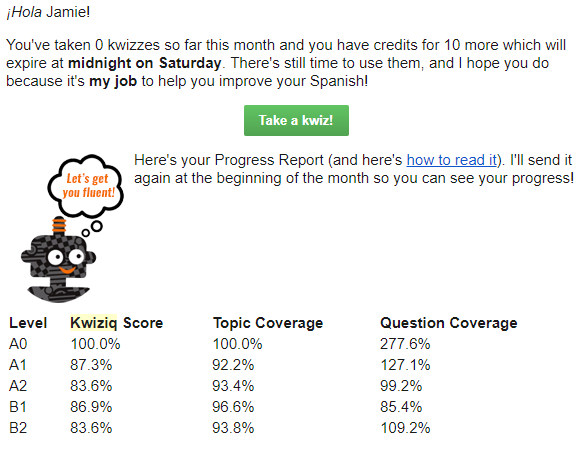
Kwiziq offers 10 free Kwizzes per month to everyone. I love this because the free content never expires! You can take free kwizzes as long as you want, they’re just limited. At the start of the new month, these 10 kwizzes are recharged.

This also means that you get your free kwizzes even if you were a member in the past but have since canceled, which is a thing that a lot of companies punish you for. If you cancel, you’ll still get an email once a month reminding you of free kwizzes that you have left, and when they’ll expire. Even if I’m not paying anymore, I still really like to be informed of free content that’s waiting for me.

Kwiziq review

Con: You can get a lot more for free elsewhere

Kwiziq isn’t the only guy out there with free quizzes to test your grammar fluency, but they’re the only one I know about that limits their quizzes. They are in competition with a couple of other resources that offer very similar products, with very similar information, all for free.

For example, Spanishdict is a great website with a free online Spanish-English dictionary, forum, and similar quizzes. These quizzes aren’t led by artificial intelligence, but they do a great job of providing you with the practice for some of these more difficult concepts.

Another popular free resource for grammar quizzes is StudySpanish. This website also has significant amounts of information available to help you understand your grammar, with some more hidden behind a paywall.

Note that both of these options are Spanish only. I’m not aware of similar resources for French as of this Kwiziq review.

Con: Kwiziq might be out of your budget

While Kwiziq is far from the only monthly membership platform to learn a language, it is on the pricey side. I do think the value is absolutely worth the price if you can swing it, and you specifically need to improve your grammar.

You can click here for Spanish pricing, and here for French pricing.

But don’t leave this Kwiziq review yet, there are still important features to talk about!

Pro: Kwiziq is more than just grammar

Primarily, Kwiziq is perfect for improving your Spanish and French grammar, but the other exercises in the “library” are excellent as well.

Just like Kwiziq’s grammar content, the exercises are also organized by A1-C2, so you get a really solid, in-depth understanding of your skill levels across the board, considering all 4 are rarely in the same place at any given time. And, honestly, I highly recommend Kwiziq for all language learners, if even just for these exercises.

In those practices (especially the last one), I love that it has you grade yourself. This is more flexible than the normal kwizzes, so you don’t have to mark yourself wrong for not seeing a word if you don’t find that necessary.

Then, of course, Kwiziq then links you to the individual lessons used in the statement, so you can figure out what you did wrong. If you’re not up to doing that research just yet, the icons to the right of the lesson links let you save them for later.

Still not quite getting it? All users are able to comment on the lessons and ask their questions, and Kwiziq’s Spanish teachers are actually incredibly responsive; if you’ve found something ambiguous and your question helps them see that something is confusing, they also have the power to make changes.

Plus, you can’t forget about the Weekend Workout! Every weekend, members get brand-new writing and listening challenges appropriate for every level sent directly to their email. It’s honestly a really nice reminder to keep up your practice, even if it’s only a little bit.

Kwiziq review: how to know if it’s the language app for you

At the end of the day, this Kwiziq review shows us a really great resource for French and Spanish learners. It has every grammar concept under the sun, and more are being added regularly.

Its gamification and easy-to-swallow kwizzes are addictive, which means that you’ll learn more grammar than you ever would anyways (let’s be real, most of us hate learning grammar). The exercises that are updated regularly are also a major win, I think.

If you’re not looking for grammar help, Kwiziq’s price point may not be worth it for you, depending on how much you use the other exercises. If you’re looking for something similar at a lower price point, I would recommend Yabla instead – not as pretty or user-friendly, but has similar types of exercises.

After reading this Kwiziq review, I would recommend all Spanish and French language learners, no matter the level, at least go through a few free kwizzes (click here for Spanish, or click here for French) and have the AI assess your level.

Filed Under: $101-200, $16-20, Advanced, Annual subscription, Audiobooks & video, Beginner, Communication, Daily streaks, Device, Explicit, Free, French, Gamification, Grammar, Implicit, Intermediate, Language app reviews, Language Skill, Level, Listening, Monthly subscription, Other Features, Pricing type, Reading, Spanish, Spelling, Stories, Target Language, Website, Words/phrases, Writing

Rosetta Stone review: for beginner language learners only

March 21, 2022 by Jamie Leave a Comment

Rosetta Stone has been a major name in the language learning world longer than most. This Rosetta Stone review will help you decide if it’s the language app for you.

Can you really get fluent using Rosetta Stone? Is it worth the money? Should you be considering it? In this Rosetta Stone review, I’ll touch base on all these questions, so you can make an educated decision on whether to take the plunge.

First things first, though, is to make sure Rosetta Stone actually teaches the language you’re interested in learning. Rosetta Stone offers the following languages:

  • Arabic
  • Chinese (Mandarin)
  • Dutch
  • English (American)
  • English (British)
  • Farsi (Persian)
  • French
  • German
  • Greek
  • Hebrew
  • Hindi
  • Irish
  • Italian
  • Japanese
  • Korean
  • Latin
  • Polish
  • Portuguese (Brazil)
  • Russian
  • Spanish (Latin America)
  • Spanish (Spain)
  • Swedish
  • Tagalog
  • Turkish
  • Vietnamese

Rosetta Stone review: what works

First off, let’s talk about how exactly Rosetta Stone accomplishes what it says it will accomplish. I’m very particular about making sure I’m practicing all of my language skills and knowing exactly what my goal is with any language.

That being said, how does Rosetta Stone work, and what does it teach you?

The closest thing to immersion

Rosetta Stone’s claim to fame is that it teaches you the language by immersion, which is great! And it’s true – you will never see or hear a single English word using this program. Using Rosetta Stone as an ultimate beginner is great because you’re learning to think using the language right off the bat; compared to other programs, where you’re translating between languages in order to learn, this is undoubtedly the best way to take in a language.

And Rosetta Stone is great for this very reason: it makes you think. With every round of questions, the way it’s designed forces you to actually think in the language. This is the first step in learning a new language authentically and efficiently.

So, if you’re starting out with the language fresh and new, the Rosetta Stone method is incredibly challenging, but in the best way.

The lessons may not go by as quickly and painlessly as Duolingo’s 5-minute lessons – you’ll spend a significant amount of time really using your brain, just like you would in real-life immersion. In fact, I had to take a break after the first 2 lessons because my brain hurt like it does when I’m in actual language exchanges!

Multiple-choice questions that you can’t fake

Another thing about Rosetta Stone that I really love is that you can’t really BS it. The program depends heavily on multiple-choice questions, but they switch it up. For example, you’re given a phrase, and then you’re given 4 pictures – your job is to match the phrase to the correct picture.

Once you’ve done that, not only is the text taken off the picture (so you still have four images to choose from for the next phrase), but the order of the pictures is flipped around. It’s just another level at which you actually have to think, as opposed to “well I’ve already matched up 3 pictures, so I don’t even have to look at the last phrase to know which picture it belongs to”.

It’s a simple thing, but it really makes a world of difference when it comes to making you actually think in the language, which, again, is one of the most important parts of effectively learning a new language.

Speaking from the beginning

Another thing that Rosetta Stone does really well is making you speak from day one. At the beginning levels, this is really helpful, as a lot of newbie language learners don’t realize that getting used to forming the words correctly is a skill in itself.

Foreign languages use different sounds, and just recognizing them by ear isn’t enough – you need to build muscle memory, and Rosetta Stone helps with that.

Rosetta Stone makes very large claims about speech recognition. I personally tend to take this with a grain of salt, because this isn’t the first time I’ve heard that, and it’s usually pretty useless. Most of the time, speech recognition is either easy to fake or says you’re wrong even when you’re right.

In my experience…Rosetta Stone’s speech recognition is about 50/50, as well. In some ways it has alerted me to how I’m pronouncing incorrectly, but whether or not it’s been a convenient fluke…who knows. I say that because after saying the same word with the same exact pronunciation four times and being told it was wrong the first three and right the fourth…it’s still not 100%.

So, take what it tells you with a grain of salt. Listen carefully, and absolutely practice your speaking, but I feel like there are better ways to go about that one.

…and all the other language skills

Yes, speaking is the big thing that most newbie language learners might avoid. Besides speaking, Rosetta Stone is surprisingly good at hitting the other language skills: reading, writing, and listening. Once you get through your core lesson, where you’ll learn all the things you need to learn about that unit, you’re also taken through lessons for each individual skill, which is amazing.

You get all of your language skills, appropriate to your level of learning, right in one go. Honestly, no other independent language learning resource does that, so in this way, Rosetta Stone is way ahead of the game (and has been for more than 20 years now).

That being said, this is a big deal. From the very very beginning, you get in the habit of practicing the language in every way necessary. Pretty good for beginners!

Rosetta Stone review: what doesn’t work

Now that I’m done raving on and on about how wonderful Rosetta Stone is, let’s talk about its failings. Now, keep in mind that it’s not that this program does things wrong necessarily – Rosetta Stone knows who its target audience is, and if these faults are a big deal, it’s not meant for you anyway.

I say this because I’ve seen plenty of reviews talking about how Rosetta Stone is heavily flawed, but so is every other language learning resource. Nothing is one-size-fits-all; if it were, there wouldn’t be a reason for all of these products. Know what you’re looking for in your language learning journey, and that will help you to make the right choice.

It’s repetitive

Right off the bat, Rosetta Stone can get infuriatingly repetitive. If you’re used to learning languages, and it’s easy for you to grasp linguistic patterns, Rosetta Stone is horribly boring and slow. The most basic words and grammatical patterns don’t need to be drilled so incessantly for learners who have already learned these same exact patterns in other languages.

If you’re an ultra-newbie this is great, because you’ll learn the basics and you’ll learn them well. However, if you’ve already done the legwork to recognize and be familiar with these basic patterns, you’re gonna get real bored real quick, which means you’ll give up.

Even with more advanced-level content, this was too slow. I tried to go into the settings real quick to speed it up, but no-go.

Rosetta Stone will provide you with a great base level to build on, which is great if you need it. If you don’t need it, don’t bother with it.

It’s basic

Rosetta Stone has 5 units of lessons for languages that are related to English, but only 3 or 4 for other unrelated languages. There is a lot of content, and the content is very thoroughly broken down into all of the language skills. It involves a lot of drilling and a lot of basic hand-holding.

However, the amount of drilling and hand-holding involved means that the content doesn’t get you very far. If you’re planning a trip abroad and want to feel comfortable understanding and communicating at a basic level, it’s very thorough and efficient. However, you won’t get much farther than that. And if you’re a seasoned language learner, you’re gonna get bored real quick, even if you’re still learning things.

You will not be learning intermediate or advanced words or concepts with Rosetta Stone. If you’re just starting out with the language, you’ll be fine, but there is no real building on the basics using this program. You’ll get a very solid root to the language, and you’ll be at a good place to push onward, but you can’t get onward depending solely on this program.

It’s expensive

This has been a major sore spot for Rosetta Stone since the beginning. Especially since the internet became a thing, and a variety of cheap or even free resources have become available, the steep price tag (think $200 for a single-level CD-set!) has turned a lot of people off.

As time has gone on, Rosetta Stone’s prices have become a bit more palatable by switching to a monthly model like a majority of the industry. The caveat is that you cannot invest month-by-month. You can see current prices here.

Fortunately, they do offer a 30-day guarantee.

Rosetta Stone review: stories

With stories, you get 3 different options for practice: read the story, read and listen, or read and read aloud. These stories are very on-level, and offer you another resource to practice both input and output.

I’m a big fan of listening to text while you read it, plus highlighting each individual word as it’s read? Two thumbs up!

When reading aloud with the story, the concept is exactly the same – the highlight tries to follow along with you word-by-word. It’s not exactly 100%, but it does the job enough.

Use this tool to listen to how you’re pronouncing the words, and then switch back to listening to compare.

My only complaint here is that I wish you had the option to download your recording. That way you could send it to a tutor or language exchange partner for feedback, or even just keep track of your progress for yourself.

Rosetta Stone’s audio companion

Then we have the audio companion. With each lesson, Rosetta Stone offers audio tracks of vocab pronounced correctly and slowly, with a beat after each word for you to repeat.

On mobile, you have the option to rewind, pause, and fast-forward; on desktop (as pictured), you just get the audio tracks downloaded straight to your device. In this case, it’s up to you to have a program that offers these options.

This first lesson had 18 audio clips (including the intro), by the way, not just the 3 shown here.

Rosetta Stone review: is it for you?

Rosetta Stone is a great language learning program that satisfies every language skill (that in itself is hard to come by), meaning you don’t have to look elsewhere for practice. If you’re a total beginner looking for a very confident base in the language, click here to get started with Rosetta Stone.

However, if you’re not a beginner or find the pace to be much too slow, I’d skip it. Instead, I’d recommend these comparisons if you’re interested in something similar:

  • Babbel vs Rosetta Stone
  • Duolingo vs Rosetta Stone
  • Pimsleur vs Rosetta Stone
  • Babbel vs Rosetta Stone vs Duolingo

Filed Under: $10-15, Android app, Arabic, Audiobooks & video, Beginner, Chinese (Mandarin), Device, Dutch, English, Farsi, French, German, Grammar, Greek, Hebrew, Hindi, Implicit, Intermediate, iOS app, Irish, Italian, Japanese, Korean, Language app reviews, Language Skill, Latin, Level, Lifetime access available, Listening, Monthly subscription, Polish, Portuguese, Pricing type, Reading, Russian, Spanish, Speaking, Speech recognition, Stories, Swedish, Tagalog, Target Language, Turkish, Vietnamese, Website, Words/phrases, Words/phrases

  • « Go to Previous Page
  • Page 1
  • Page 2
  • Page 3
  • Page 4
  • Interim pages omitted …
  • Page 10
  • Go to Next Page »

Primary Sidebar

Meet your language coach

Hi! I'm Jamie (she/her), and I help you learn exactly what you need to do to learn a foreign language. Click my face above to learn more about me and how I can help.


We strive to offer equitable access to language learning for all, regardless of ethnicity, gender identity, ability, or sexual orientation.
Copyright © 2025 · Multilingual Mastery · Privacy Policy

  • About
  • Get 1:1 support
  • App search